Summary
Editor's rating
Is it worth the money compared to other options?
Looks gamer‑ish, but mostly practical
Build quality and long‑term concerns
Cooling and noise: the real weak spot
What this stand actually does day to day
Charging, ports and daily usability
Pros
- Charges two DualSense controllers reliably with overcharge protection around 80%
- Cleans up the setup by combining stand, charger, USB hub, RGB and headset hook in one unit
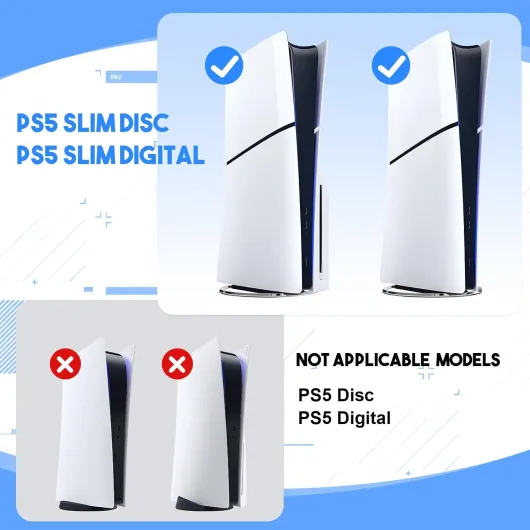
- Stable vertical mount with screw and anti‑skid pads, compatible with PS5, Slim and Pro
Cons
- Cooling fan is modest and can be noisy or squeal on some units
- RGB lighting requires cycling through up to 9 modes just to turn it off
- Build feels budget and the 180‑day warranty is short, especially for the fan

Specifications
View full product page →| Brand | Mcbazel |
A cheap way to tidy up the PS5… on paper
I picked up this Mcbazel PS5/Slim/Pro cooling stand mainly because my TV unit was starting to look like a cable scrapyard. PS5 lying on its side, controllers charging with random USB‑C cables, headset dropped wherever there was space. I wanted one thing that would hold the console, charge two DualSense pads, and give the headset a fixed spot. The RGB lights were a bonus, not the main reason.
I’ve been using it for a bit now with a standard PS5 Disc Edition, and I’ve tested the fan speeds, the charging dock, and the extra USB ports. I also paid attention to noise, because my console already makes a bit of a whoosh and I don’t need a mini jet engine on top of that. Some Amazon reviews mentioned a squealing fan, so I was curious if I’d get the same problem.
In daily use, the stand does what it says: it holds the console upright, charges two controllers, and gives you a semi‑clean setup. But it’s not perfect. The fan is clearly the weak point, and the RGB controls are a bit annoying when you just want the lights off. Still, for the price, it’s not complete trash either. It kind of sits in that middle ground: not a disaster, not a miracle, just okay with a few rough edges.
If you’re expecting industrial‑grade cooling or a super quiet accessory, you’ll probably be disappointed. If you mainly want a cheap way to save space and keep controllers docked, you’ll probably be fine with it as long as you accept its limits. I’ll break down what worked for me and what I’d watch out for before buying.
Is it worth the money compared to other options?
Given its ranking on Amazon (high in PS5 chargers) and the 4.2/5 average rating, this stand clearly sells a lot. The price usually sits in that low‑to‑mid range for PS5 stands with fans and RGB. You can definitely find cheaper basic stands without cooling or lights, and you can find more expensive brands that claim better fans and quieter operation. So this Mcbazel model sits in the “affordable all‑in‑one” category.
For what you pay, you get: vertical stand compatible with PS5/PS5 Slim/PS5 Pro, dual controller dock with overcharge protection, RGB lighting, headset hook, and extra USB ports. That’s quite a lot of functions in one piece of kit. If you were to buy a separate vertical stand, a separate dual charging dock, and a separate headset holder, you’d probably end up spending more overall and cluttering your setup again. So from a pure feature‑per‑euro perspective, it’s good value.
The downside is the compromises: the fan is not very strong and can be noisy depending on the unit, the RGB controls are a bit clunky, and the plastic look is clearly budget. If you’re picky about noise or you absolutely want strong, reliable cooling, you might be better off spending more on a dedicated cooling solution or just relying on Sony’s own stand plus a simple charger. On the other hand, if your main goal is to tidy up your PS5 area and keep two controllers always charged, this gives you a lot for the money, as long as you treat the fan as a secondary perk.
Overall, I’d call the value pretty solid but not mind‑blowing. You get a lot of features, some rough edges, and a few risks (fan quality). If you catch it at a good price and you’re realistic about what it can and can’t do, it’s a sensible buy. If it’s close in price to better‑rated stands with quieter fans, I’d compare carefully before pulling the trigger.
Looks gamer‑ish, but mostly practical
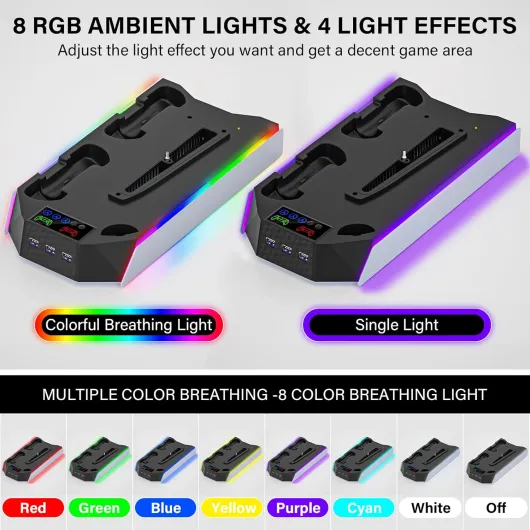
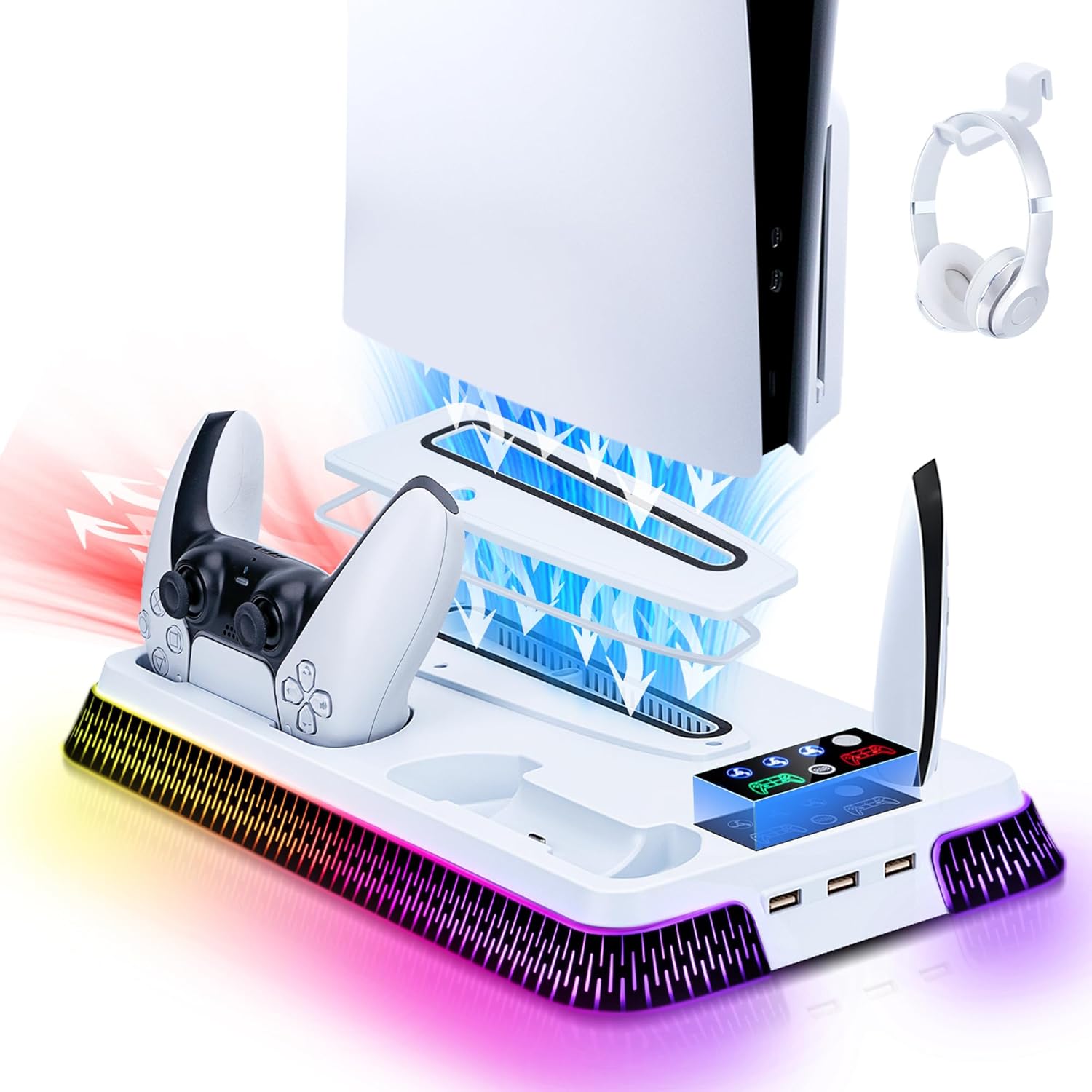
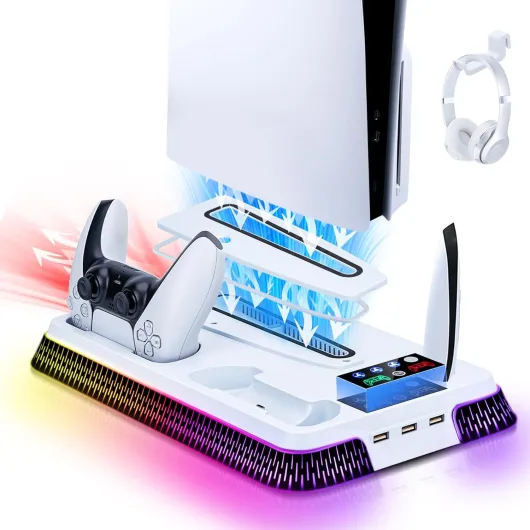
Design‑wise, it’s very clearly aimed at the typical “gamer setup” crowd. Black plastic base, RGB strip around the sides, and a shape that hugs the PS5 footprint. Once the console is mounted vertically, it actually looks fairly clean. The stand lines up well with the PS5’s curves, so it doesn’t look like some random cheap dock jammed underneath. If you’ve got other RGB stuff on your desk or TV unit, it blends in pretty well.
The RGB implementation is okay visually but a bit annoying to control. You have 10 modes: 7 static colors plus some flashing/breathing modes, then “off” is technically the 10th state. The problem is there’s only one button and no memory for the “off” position. So sometimes I’d turn the console on at night, the lights would start cycling like a Christmas tree, and I’d be jabbing the button multiple times to get back to off. The lights themselves are bright but not blinding; they reflect a bit on glossy TV stands but nothing crazy.
In terms of layout, the front charging bays for the controllers are easy to access. You don’t have to aim perfectly; after a couple of days you get used to the angle and they drop into place pretty smoothly. The headset hook clips on the side and is fine. It’s plastic, doesn’t feel premium, but it holds a standard gaming headset without bending or looking like it’s going to snap. I ended up appreciating that little hook more than I expected, because my headset finally had a fixed home.
Visually, it’s not some design masterpiece, but it’s not ugly either. It looks like what it is: a practical plastic stand with some RGB to make it look a bit more fun. If you like clean, minimal setups with no lights, you’ll probably turn the LEDs off and just see it as a black base. If you’re into colorful setups, you’ll probably leave a static color on and forget about it. Either way, it doesn’t ruin the look of the PS5, which is what matters to me.
Build quality and long‑term concerns
The stand is made from ABS plastic, which is pretty standard for this kind of accessory. It doesn’t feel premium, but it doesn’t feel flimsy either. The base has a bit of flex if you twist it, but once the PS5 is screwed in and the anti‑skid pads are in contact with a flat surface, it feels stable. I never felt like the console was going to tip over, even when I bumped the TV unit slightly or plugged in a cable a bit roughly.
The headset hook is also plastic and clips into the side. I was a bit worried it would be wobbly, but it held my fairly heavy over‑ear gaming headset without bending. I wouldn’t hang something crazy heavy off it, but for a normal headset it’s fine. After repeated use, clipping the headset on and off, nothing loosened or felt like it was about to snap.
The main durability concern is clearly the fan. Some users report squealing or loud noise after very little use, which sounds like cheap bearings or poor assembly. My unit was okay, just a bit noisy on high, but those reviews are a red flag. If the fan starts making a high‑pitched noise, you either live with it, turn it off forever, or go through the hassle of a return. At least the stand still works as a charger and organizer even if you never use the fan, but it still feels like wasted potential.
Mcbazel offers a 180‑day warranty, which is better than nothing but not exactly long, especially for a moving part like a fan. For the price, I didn’t expect a tank, but I would have liked to feel a bit more confidence in the electronics. Overall, I’d say the structural durability (plastic, screw mount, pads) is decent, but the long‑term reliability of the fan is questionable. If you go in thinking “this is mainly a stand and charger, and the fan is a bonus”, you’ll probably be less annoyed if the fan isn’t perfect.
Cooling and noise: the real weak spot
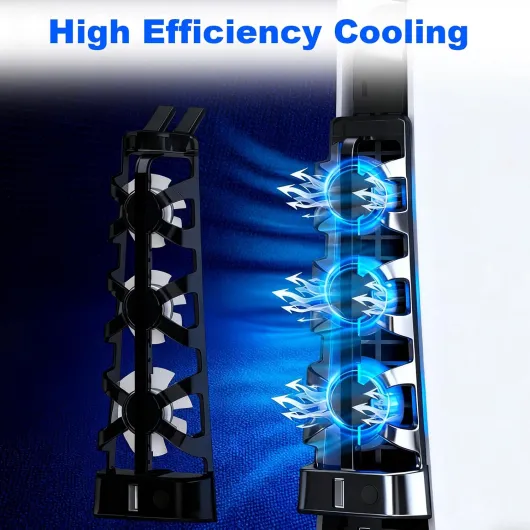
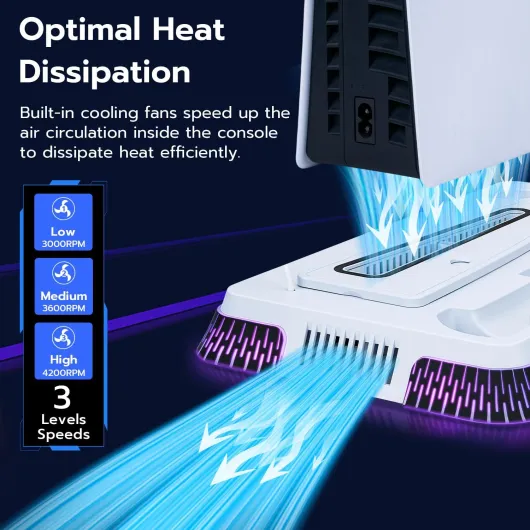
This is where things get a bit mixed. The stand has a 3‑speed fan (low/medium/high) with RPMs listed at 3000/3600/4200. On paper, that sounds decent. In reality, the airflow is just okay and the noise level depends a lot on your unit. On low speed, I could hear a soft hum if the room was quiet, but during gameplay with the TV on, it basically faded into the background. On medium and high, the tone gets sharper and more noticeable. It’s not unbearable on my unit, but it’s definitely there.
Some Amazon reviews mention a loud squealing sound and almost no airflow. That tells me the quality control is a bit hit or miss. On my stand, if I put my hand behind the vents, I can feel some air moving, but it’s not crazy strong. It’s more like a gentle assist to the PS5’s own cooling rather than something that drastically drops temperatures. I didn’t see any thermal throttling or shutdowns with or without the stand, so I can’t say it “saved” the console. It’s more of a small safety net during long sessions in a warm room.
Practically speaking, after a few evenings of long gaming sessions (3–4 hours of heavy games), the console casing felt slightly cooler with the fan on low compared to having the fan off. Not a scientific test, but enough to say it does something, just not a massive amount. If you’re buying this purely for cooling, I’d say that’s a bit optimistic. It’s more of an organizer that adds a little airflow. The PS5 is already designed to run fine on its own as long as it’s not crammed in a closed cabinet.
Because of the noise trade‑off, I ended up leaving the fan on the lowest setting most of the time, or even off during quieter single‑player games where I really didn’t want extra noise. The fan is basically “nice to have” rather than essential. And with those user reports of squealing fans, you have to accept there’s a chance you get a noisy unit and may need to return it. For me, the performance is decent but nothing more.
What this stand actually does day to day
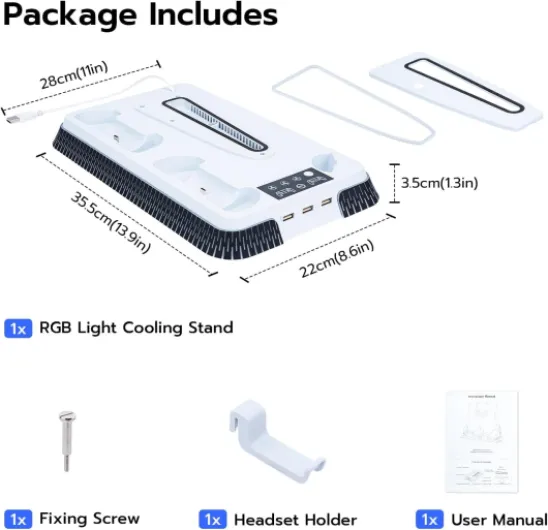
Functionally, this Mcbazel base is a combo of three things: vertical stand for PS5/PS5 Slim/PS5 Pro, dual controller charging dock, and cooling station with RGB lighting. You drop your PS5 into the slot, screw it in with the included screw, and then you’ve got two charging cradles at the front for DualSense controllers. On the side, there’s a hook for your headset, and on the back/side you’ve got extra USB ports to plug in stuff like a headset dongle or a charging cable.
The charging dock uses the little pins that connect to the bottom of the DualSense, so you don’t need to mess with USB‑C cables. You just place the controller in the groove and it starts charging. Mcbazel claims it cuts charging at around 80% to avoid overcharge, which is both good and a bit annoying. Good because it protects the battery, annoying if you’re the type who wants to see 100% all the time. In practice, my controllers were always ready to go, so I didn’t really feel limited by that.
On the cooling side, there’s a 3‑speed fan built into the base: 3000, 3600, and 4200 RPM according to the specs. You control it with a button on the front. It pulls air around the bottom of the console to help with temps. I’m not going to pretend it turns the PS5 into a fridge, but it does move some air. The RGB button next to it cycles through 9 lighting modes (7 colors plus effects), and the 10th press turns the lights off. That means if you’re in the wrong mode, you might have to hammer the button up to 9 times just to get darkness, which gets old fast.
Overall, in daily use it’s a space‑saving organizer more than some high‑end cooling solution. The best part is honestly having everything in one place: console locked in, two controllers always docked, headset hanging on the side. The rest (fan, RGB) is a bonus that you either tolerate or mostly ignore.
Charging, ports and daily usability
On the charging side, the stand is actually pretty solid. You can dock two DualSense controllers at once, and from empty to charged it took me around 3 hours to hit what the dock considers “full” (it cuts at roughly 80% to protect the battery, according to the description). In practice, that 80% limit didn’t bother me. Every time I grabbed a controller after leaving it on the dock for a while, I had plenty of battery for a long session. The LED indicators are straightforward: you can see at a glance if the controller is still charging or basically done.
The built‑in overcharge protection is a nice touch. With some cheap docks, the controllers sit at 100% on charge all the time and you don’t really know what that does to the battery long term. Here, it charges, then stops. If you’re the type who always leaves controllers docked when not in use, this is actually more reassuring. It’s not something you feel day one, but it’s the kind of thing that should help the DualSense hold up better after a year or two.
The extra USB ports are handy but limited. They’re fine for low‑power stuff like a headset dongle, charging a wireless headset, or plugging in a small accessory. Don’t expect to run power‑hungry devices from them. I liked being able to keep my headset receiver plugged into the stand instead of the front port of the PS5, which kept the look cleaner. Just remember that everything hangs off one main USB connection, so it’s more for convenience than performance devices.
In everyday use, the biggest win is simply organization. After a few days, I got into the habit of dropping the controller on the dock and hanging the headset on the hook. The area around the console stopped looking like a pile of random tech. That’s the real effectiveness of this product: less cable mess, controllers always topped up, and a fixed place for everything. It doesn’t magically improve your gaming, but it makes the setup easier to live with.
Pros
- Charges two DualSense controllers reliably with overcharge protection around 80%
- Cleans up the setup by combining stand, charger, USB hub, RGB and headset hook in one unit
- Stable vertical mount with screw and anti‑skid pads, compatible with PS5, Slim and Pro
Cons
- Cooling fan is modest and can be noisy or squeal on some units
- RGB lighting requires cycling through up to 9 modes just to turn it off
- Build feels budget and the 180‑day warranty is short, especially for the fan
Conclusion
Editor's rating
This Mcbazel PS5/Slim/Pro cooling stand is basically a space‑saving organizer with bonus features. It holds the console securely, charges two DualSense controllers reliably, and gives your headset a proper place to live. The extra USB ports and RGB lighting are nice extras, even if the light controls are a bit annoying. In daily use, the biggest benefit is just having everything in one neat block instead of cables and controllers scattered everywhere.
Where it falls short is the cooling fan. The airflow is modest, and there are enough reports of squealing or loud fans to say quality control is not perfect. On my side it was usable, but I ended up mostly leaving it on the lowest speed or turning it off when I wanted quiet. If you buy this expecting a big drop in PS5 temperatures or whisper‑quiet operation, you’re going to be disappointed. Think of the fan as a small extra rather than the main reason to buy it.
I’d recommend this stand to PS5 owners who mainly want organization and convenient charging at a reasonable price, and who are okay with the fan being average or even potentially unused. If you’re very sensitive to noise, or if cooling performance is your top priority, I’d look at other options or just stick to a simple dock without a fan. Overall, it’s a decent, practical accessory with clear trade‑offs that you should understand before adding it to your setup.