Summary
Editor's rating
Value: great to use, hard to justify for everyone
Design: premium feel, a bit dated in some spots
Battery life: strong, but not user‑replaceable
Comfort: heavier, but in a good way (most of the time)
Durability: feels solid, but long‑term doubts
Performance: paddles and sticks actually change how you play
What you actually get in the box
Pros
- Very comfortable with nice weight and wrap‑around rubber grip once warmed up
- Back paddles and adjustable triggers actually improve gameplay in shooters and action games
- Strong battery life with handy charging dock and good wireless/wired options
Cons
- High price compared to a standard Xbox controller
- No Hall Effect sticks and non‑replaceable battery raise long‑term durability concerns
- Missing dedicated Share button and some more modern touches from the newer cheap controller

Specifications
View full product page →| Brand | Xbox |
A pricey controller I actually wanted to hate
I’ve been using the standard Xbox controllers for years, both on Xbox and on PC, and I always told myself these “pro” controllers were just expensive toys for streamers. Then my regular pad started getting stick drift again, and I finally gave in and grabbed the Xbox Elite Wireless Controller Series 2 to see if it was actually better or just marketing. I’ve been using it pretty much every day for a few weeks now on Xbox Series X and Windows.
First thing: the price hurts. You really feel it when you hit checkout. So I went into this kind of hoping it would disappoint me so I could send it back and feel smart. Instead, after a couple of long evenings on shooters and some casual games, I realised I was reaching for the Elite by default and my old pad was just sitting there collecting dust.
It’s not perfect though. For this price, I was expecting something that feels bulletproof and future‑proof, and that’s not exactly what you get. Some design decisions are great, others feel a bit stuck in 2019. There are also a few small annoyances that you only notice after using it for a while, like the missing dedicated share button and the fact that cleaning the rubber grip is a pain.
Overall, my first impression is: very good controller, expensive, and not immortal. If you’re a casual player who just hops on at weekends, it’s probably overkill. If you play a lot, especially shooters or competitive games, it starts to make more sense. I’ll break down what actually feels better than a standard controller, and what’s just hype or half-baked.
Value: great to use, hard to justify for everyone
Let’s be honest: the price is high for a controller. You can buy two or even three standard Xbox controllers for the cost of one Elite Series 2 if you catch them on sale. So the real question is whether the extra features actually matter to you. For me, after a few weeks, the answer is “yes, but with limits”. I really like the paddles, the adjustable triggers, and the rechargeable battery with the dock. These are things I actually use every day, not just gimmicks.
Where it gets tricky is long‑term value. You’re paying premium money for a product that still has some compromises: no Hall Effect sticks, no easily swappable battery, and a design that’s missing the built‑in share button from the newer cheap controller. It’s a bit weird when the cheaper model has some modern touches that the expensive one doesn’t. That makes it feel like this controller is due for an update, but it’s still being sold at full price.
If you’re a heavy gamer (several hours a day, competitive shooters, racing, etc.), I think the value is decent. The paddles alone can change how you play, and the build and comfort do feel better than the standard pad. If you only play casually on weekends, I’d say save your money: a regular Series X|S controller is already very good and much cheaper.
So overall, I’d call the value good but not amazing. You’re paying a lot, you do get a lot, but it’s not the unbeatable deal it could be if they had updated the internals and fixed the long‑term concerns. It’s one of those purchases where you’re happy every time you use it, but you still know you paid a premium for it.

Design: premium feel, a bit dated in some spots
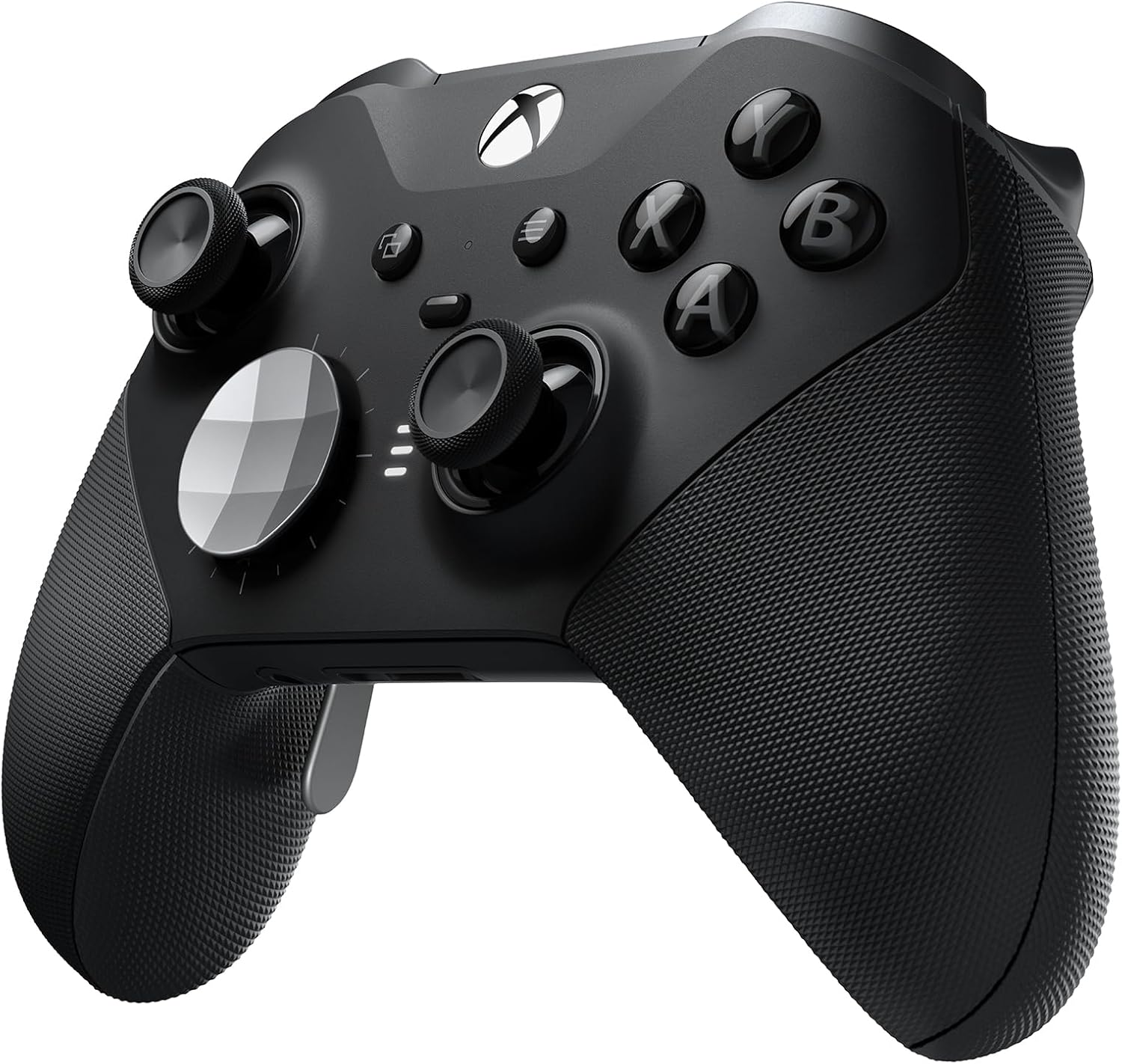
The overall design is clearly based on the classic Xbox controller shape, so there’s nothing shocking here. If you’ve used an Xbox One or Series X|S pad, you’ll feel at home immediately. The difference is in the details: metal triggers, metal paddles, a darker, more serious look, and a rubberised grip that wraps around more of the body. It looks and feels more “serious” than the basic one, but still familiar.
The front layout is standard: same ABXY buttons, same menu buttons, and the Xbox logo in the middle. There’s a profile button and the LED indicator for which profile you’re on. What’s missing, and it’s pretty obvious if you’re used to the newer Series X|S controller, is the dedicated Share button. You can work around it by mapping one of the paddles to capture, but you do lose a paddle for that, which is a bit annoying for a product at this level.
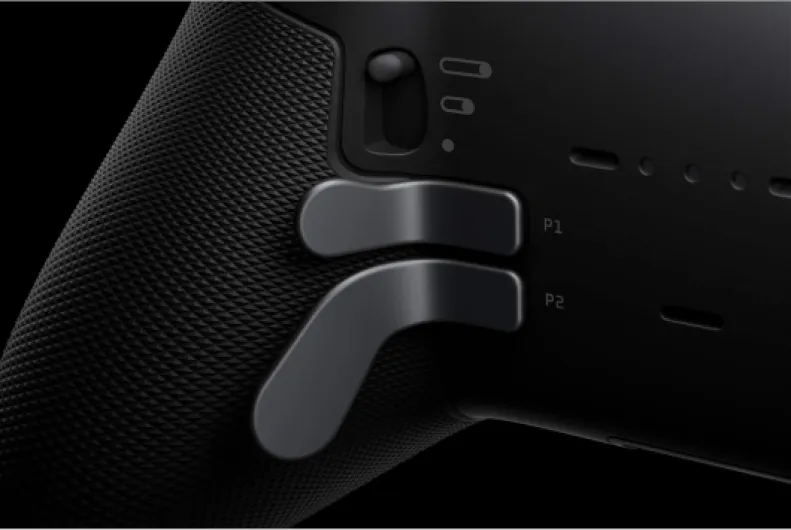
On the back, you get the main reasons to buy this thing: four removable paddles and the three‑position trigger stops. The paddles sit exactly where your middle and ring fingers naturally rest. At first it feels like too much going on back there, but after a few hours you start to use them without thinking. I ended up taking off the top two paddles and just keeping the lower two, which felt way more natural for my grip.
Visually, it’s pretty understated: all black, small green accent around the Xbox button, and that’s it. No RGB, no crazy patterns. Personally, I like that it doesn’t scream “gamer hardware”. The only downside on the design side for me is that, because it launched before the Series X|S pad, it’s missing some of the small quality-of-life touches like the built‑in share button and the newer-style D‑pad dish. So the design is solid, but you can tell it’s a 2019 product still being sold at a 2026 price.
Battery life: strong, but not user‑replaceable
The built‑in rechargeable battery is one of the good points of this controller. In real life use, with vibration on and using it wirelessly on Xbox, I’ve been getting roughly 25–35 hours per charge, depending on how much I play and whether I leave it idle on the dashboard. Xbox advertises up to 40 hours; maybe you can hit that if you turn vibration down or off, but I’d say 30 hours is a fair realistic average for normal use.
Charging is simple thanks to the included dock. I keep the dock plugged into the console’s USB port and just drop the controller on it when I’m done. It clicks into place with magnets, and the little LED tells you when it’s charging or full. If you’re lazy about cables, this is very convenient. The included USB‑C cable is also long and feels decent quality, so you can still play wired if the battery is empty and you don’t want to wait.
The downside is that the battery is not easily replaceable. On a normal Xbox controller, you just swap AA batteries or drop in a new rechargeable pack when the old one dies. Here, the battery is built in, so if it degrades badly in a few years, you either open it up yourself (not ideal) or you’re basically stuck. For a controller this expensive, that’s a bit annoying. I would have liked at least an official, easy swap option.
In daily use though, you don’t think about battery life much, and that’s the good part. I charge it maybe once a week with regular use, and I’ve never had it die mid‑session. If you’re coming from a controller that eats AA batteries, this feels like a big quality‑of‑life upgrade. Just keep in mind that long‑term, when the battery eventually gets weaker, you don’t have a clean, official way to replace it.

Comfort: heavier, but in a good way (most of the time)
In the hand, the Elite Series 2 feels heavier and denser than the regular controller. At first I was worried it would be tiring during long sessions, but after a few evenings on Warzone and Rocket League, I actually prefer the extra weight. It makes the controller feel more stable in your hands, especially when you’re pressing the paddles and triggers a lot. It doesn’t feel like cheap plastic at all.
The rubber grips are a bit weird at first. When the controller is cold, they can feel almost slippery, which is the opposite of what you expect from a grip. After 5–10 minutes of use, once your hands warm it up, it becomes properly grippy and actually quite nice. The problem is that if you put it down for a while and come back, you get that slippery sensation again for the first few minutes. It’s not a dealbreaker, but it’s a quirk you notice.
As for hand position, the paddles take some getting used to. With four paddles installed, I found myself gripping the controller awkwardly, almost only with my pinkies, which gets tiring and feels unstable. After a couple of days, I removed the top two paddles and kept only the bottom ones. That instantly felt more natural: my middle fingers rest on the lower paddles, and I can still grip the controller firmly. So for me, two paddles is the sweet spot, not four.
Long sessions (2–3 hours) are totally fine. The weight never really bothered me, and I didn’t get any hand cramps. Compared to the standard pad, the Elite feels more planted and more comfortable, especially because you don’t have to move your thumbs off the sticks as often thanks to the paddles. If you already find the standard Xbox controller too big or too heavy, this won’t magically fix that, but if you’re okay with the regular one, this is basically the more comfortable, more solid version.
Durability: feels solid, but long‑term doubts
Physically, the build quality feels solid. The controller has some heft, the triggers and paddles are metal, and nothing rattles. The magnetic thumbsticks and D‑pads snap in firmly and I never felt like they were going to fall off, even when I got a bit rough during tense matches. The rubber grips wrap around more of the body than on the basic controller and feel more premium, even if they’re a bit weird when cold like I mentioned earlier.
I’ve thrown it into a backpack in the hard case a few times and taken it to a friend’s place, and it handled that just fine. The case itself is sturdy enough that I don’t worry about it. The only cosmetic issue I noticed is the central section of the controller tends to pick up finger grease marks easily. It still looks fine, but you do see smudges, especially under strong light. Also, the textured rubber grips trap dirt and sweat in the little pattern, and cleaning that properly takes more effort than with a smooth plastic controller.
Now, the bigger question is internal durability. The Elite line has a bit of a reputation for quality control issues on older models (stick drift, peeling grips, sticky buttons). I personally haven’t hit any of that yet on this unit, but I’ve only had it for a few weeks, which is not enough to judge long‑term. The fact that it still uses the same stick tech as normal controllers means that, with enough hours, drift is still a possibility. At this price, I would have liked more durable sticks.
So, my honest take on durability: it feels built to last, but I don’t fully trust it to outlive multiple cheap controllers. If you’re a heavy player putting in several hours a day, I’d keep the receipt and maybe consider extra warranty just in case. It’s definitely stronger and nicer than a stock pad, but I wouldn’t call it indestructible, especially given the non‑replaceable battery and traditional stick modules.
Performance: paddles and sticks actually change how you play
In terms of pure performance, this is where the Elite Series 2 starts to justify its price. The paddles on the back are genuinely useful. I mapped them to A, B, X, and Y in shooters so I could jump, crouch, and reload without taking my thumbs off the sticks. After a couple of sessions, going back to a normal controller felt clumsy. For action games and platformers, I mainly use two paddles for jump and dodge, and it just feels more efficient.
The thumbsticks are also a level above the regular ones. The movement feels smoother, and you can adjust the tension with the little included tool. I tried all three levels: light feels close to a standard controller, medium feels more precise for shooters, and heavy is probably more for people who like a very stiff stick. I settled on medium for both sticks, and aiming definitely feels more consistent, especially when doing small corrections while sniping.
The short hair trigger locks are another big plus. There are three positions for each trigger. In shooters and racing games, setting them to the shortest pull makes a noticeable difference; you fire or accelerate with way less travel. For games that need full trigger range (like some driving sims), you just flick them back to the long position. Switching on the fly is easy and becomes part of your routine pretty quickly.
On the software side, the Xbox Accessories app lets you go pretty deep: you can change dead zones, set custom response curves for the sticks, and even give the paddles a “shift” function. It’s a bit nerdy, but if you’re picky about your controls, it’s handy. The only real concern is long‑term: the sticks are still the usual tech (no Hall Effect), so stick drift is still a risk over time. So far, after a few weeks, mine are fine, but given the price, I would have liked more modern internals here.
What you actually get in the box
Out of the box, it feels like you’re buying a whole kit, not just a controller. You get the Elite Series 2 pad, a hard carrying case, the little charging dock, a long USB‑C cable, four rear paddles, extra thumbsticks, two D‑pads, and the tiny tool to adjust stick tension. Compared to a normal Xbox controller that comes with nothing, you can at least see where part of the money goes.
The carry case is actually useful. The charging dock can sit inside the case, and there’s a hole at the back so you can plug the USB‑C cable in and charge it while it’s stored. In practice, I just leave the dock on my desk and drop the controller on it between sessions. It’s simple and I barely touch the cable anymore unless I’m on PC and want a wired connection.
Setup is straightforward: it connects like any other Xbox controller, either over Xbox Wireless on console, Bluetooth on PC, or with the USB‑C cable. The real difference shows up once you install the Xbox Accessories app. That’s where you map the paddles, change sensitivity curves, adjust dead zones, and save up to three profiles directly on the controller. Switching between those profiles is done with the small button under the Xbox logo, and it works instantly.
On paper, it’s clearly built for people who like to tweak things. If you’re the type who just plugs in and never goes into settings, a lot of what you’re paying for here will be wasted. But if you like the idea of having one profile for shooters, one for racing, and one for slow single‑player games, the way this package is put together actually makes sense. It feels like a complete setup, not just a slightly nicer pad.
Pros
- Very comfortable with nice weight and wrap‑around rubber grip once warmed up
- Back paddles and adjustable triggers actually improve gameplay in shooters and action games
- Strong battery life with handy charging dock and good wireless/wired options
Cons
- High price compared to a standard Xbox controller
- No Hall Effect sticks and non‑replaceable battery raise long‑term durability concerns
- Missing dedicated Share button and some more modern touches from the newer cheap controller
Conclusion
Editor's rating
After using the Xbox Elite Wireless Controller Series 2 daily for a few weeks, my feeling is pretty clear: it’s a very good controller that’s held back a bit by its age and price. The paddles, adjustable triggers, and custom profiles genuinely improve how you play, especially in shooters and fast‑paced games. The build feels solid, the extra weight is comfortable, and the battery life with the charging dock is very convenient in everyday use.
On the other hand, for the money, you don’t get modern stick tech, the battery isn’t easily replaceable, and it’s missing small things like the built‑in share button from the cheaper Series X|S controller. Long‑term durability is still a question mark, even if my unit has been fine so far. So it’s not the perfect “buy it and forget about it for 10 years” device some people might expect at this price.
If you play a lot, tweak your settings, and like the idea of using paddles to avoid moving your thumbs off the sticks, you’ll probably really like it and use most of what you’re paying for. If you’re more of a casual player who just wants a decent pad for a few hours on the weekend, a standard controller will do the job for much less money. For me, it’s a controller I enjoy using every day, but I also think Microsoft could and should do a Series 3 that fixes the obvious weaknesses.