Summary
Editor's rating
Is it worth the money?
Looks fine, sits quietly next to the console
Real battery life with the 850mAh packs
Build quality and how sturdy it feels
Charging speed and day-to-day use
What you actually get in the box
Pros
- Two controllers charge at once with clear red/green LED indicators
- Includes two 850mAh battery packs and interchangeable covers for Xbox One and Series X|S
- Reduces cable clutter and makes it easy to keep controllers always charged
Cons
- Initial battery and cover installation is a bit fiddly and requires proper alignment
- Designed mainly for official controllers; some third‑party pads may not fit well

Specifications
View full product page →| Brand | Venom |
Ditching AA batteries (finally)
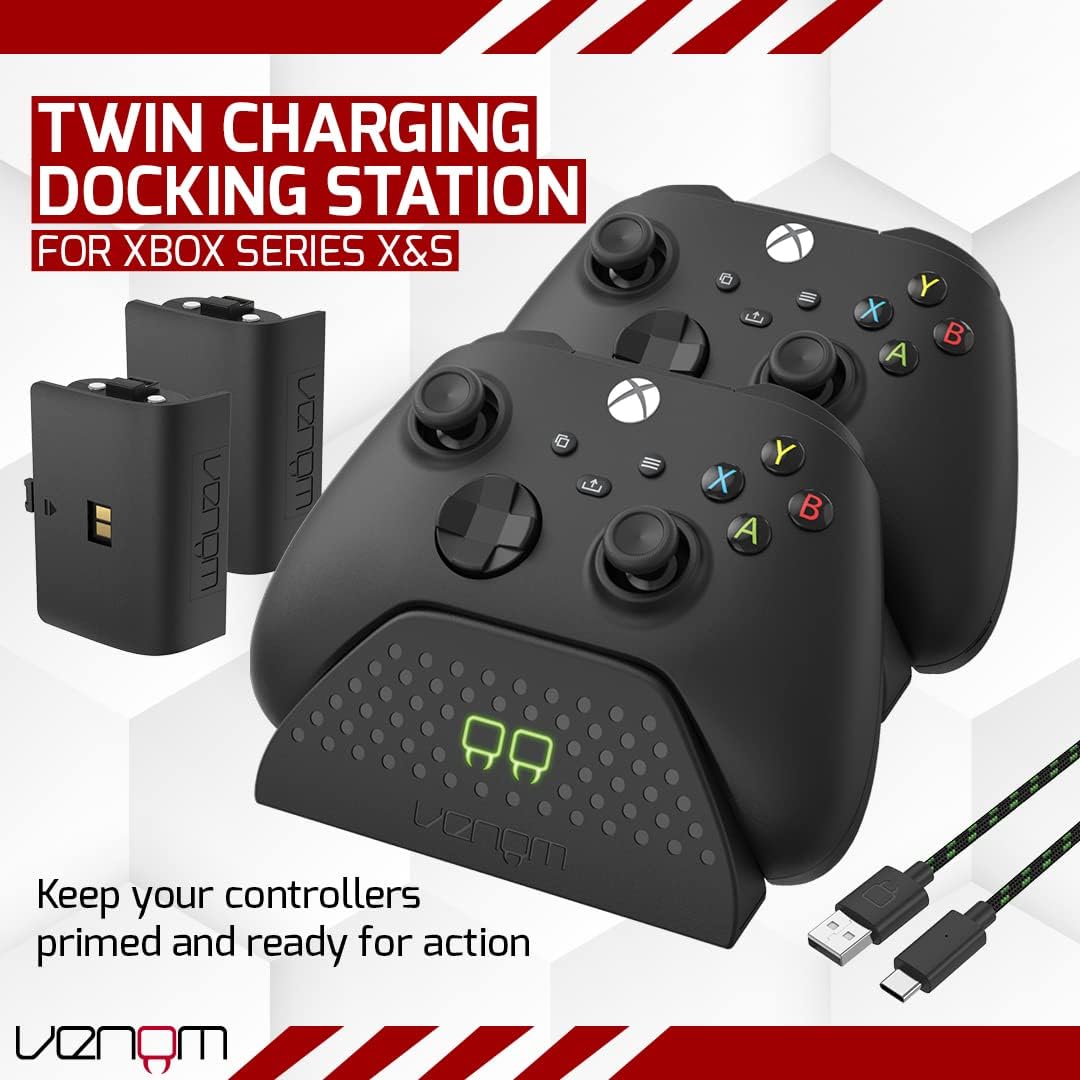
I’ve been using the Venom Twin Charging Dock with the two rechargeable battery packs for a few weeks on an Xbox Series X. Before this, I was swapping AA batteries or using random rechargeable AAs that never seemed to last the same amount of time. I wanted something that I could just drop the controllers on at the end of the night and not think about it. This dock basically aims to do that: two pads, two batteries, one spot on the TV unit, and you’re done.
In day-to-day use, the main thing I noticed is how much less I’m hunting around for batteries. Before, every long gaming weekend meant digging in drawers for half-charged AAs. With this, the controllers pretty much live on the dock when I’m not playing. It sounds minor, but it actually changes the habit: you put the controller down to charge, the same way you plug in your phone at night.
It’s not perfect though. The fit of the batteries and covers is a bit fiddly the first time, and if you have third‑party controllers, it’s not guaranteed they’ll sit nicely. Also, the 850mAh packs do the job, but they’re not endless; this isn’t some magic unlimited power source. You still need to be a bit disciplined about docking them when you’re done, otherwise you can drain them in a long session and be stuck waiting.
Overall, my first impression is that it’s a pretty solid, no-nonsense bit of kit. Nothing flashy, just a dock that charges two Xbox controllers and cuts down on battery waste and cable mess. If you’re sick of buying AA batteries for your Xbox pads, this kind of setup makes sense. The rest of this review is just breaking down how it actually behaves in real use: design, performance, battery life, durability and whether I think it’s good value for money.
Is it worth the money?
In terms of value, the Venom Twin Charging Dock sits in that "not expensive, not super cheap" middle ground. You’re basically paying for two rechargeable battery packs plus a dock that keeps them topped up and your setup tidy. If you think about how much you’d spend on decent rechargeable AAs or on constantly buying disposable batteries, this starts to make sense quite quickly, especially if you game regularly. Over a year or two, the cost of AAs alone would easily overtake the price of this kit.
Compared to some other brands, you can definitely find cheaper no-name charging docks online, but those usually cut corners on build quality or battery performance. Venom is one of those mid-tier accessory brands: not premium, but also not complete junk. The 4.5/5 average rating on Amazon kind of matches my feeling. It’s not perfect, but for what you pay, you get a fairly complete package: dock, two batteries, multiple covers, and a decent cable.
Where the value could be questioned is if you already own a bunch of rechargeable AAs and a charger. In that case, this is more about convenience and tidiness than saving money. You’re paying to have a dedicated place to drop controllers and to stop dealing with battery doors and separate chargers. If that doesn’t bother you, then you might not need this. But if you’re like me and you’re lazy about swapping batteries and hate cable mess, the price for the added convenience feels justified.
So overall, I’d call the value for money good, especially for someone with two controllers in regular use. You get rid of most battery-related annoyances, you cut down on waste, and your controllers have a home rather than living on the sofa. There are fancier solutions out there and there are cheaper, more basic ones, but this hits a nice balance of price, features, and reliability for an everyday Xbox setup.
Looks fine, sits quietly next to the console
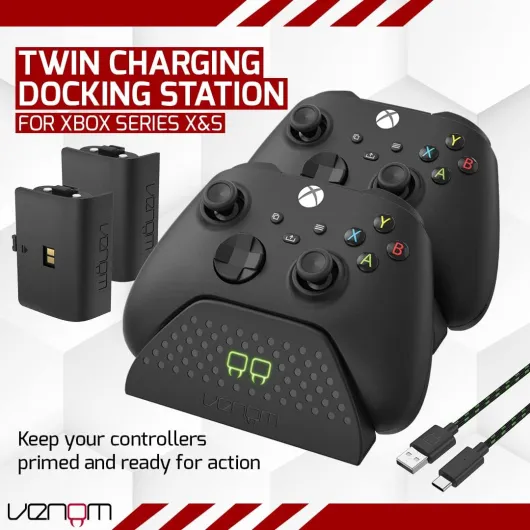
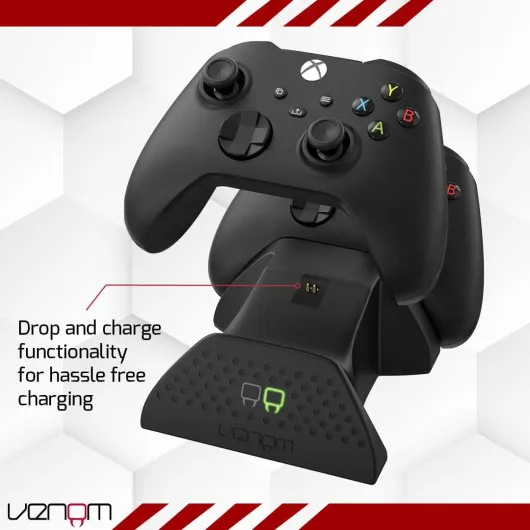
Design-wise, the dock is pretty low-key. It’s black plastic and clearly styled to match the Xbox Series X|S look, but it’s not something you’re going to stare at. It sits in front of or beside the console, holds two controllers at a slight angle, and that’s it. The footprint is reasonable: it doesn’t take up a huge amount of space on a TV stand, and the two controllers actually act like a sort of stand-in display when they’re docked. If you like things looking tidy, it helps a lot compared to controllers dumped everywhere.
The LED indicators on the front are actually the bit of the design I noticed the most. They’re simple red/green lights, but they’re bright enough to see from the sofa without lighting up the whole room. Red for charging, green for done. No weird color codes, no blinking patterns to decode. For a very functional product, that’s all I need. When I sit down to play, I can see at a glance which controller is ready, which is still charging.
One design detail I did like is the rear USB output port. It’s not huge, but it means you can still charge something else (like a headset or a phone) from the same dock, as long as you have another cable. It’s a small bonus that makes the dock more useful than just a single-purpose brick. That said, it’s still limited by whatever power source you’re using, so don’t expect to charge a tablet, two controllers, and a phone all at once super quickly from a console USB port.
The downside in terms of design is that it’s clearly made for official controllers. If you’ve got any third‑party or slightly chunky pads, they may not sit perfectly or you might have to remove their own battery covers, like one of the Amazon reviewers mentioned. With standard Xbox controllers, once the batteries and covers are installed properly, they drop into place easily enough, but you do have to learn the angle and feel the first few times. Overall, I’d call the design practical and unobtrusive: not pretty, not ugly, just something that blends into the rest of the setup and keeps the controllers in one place.
Real battery life with the 850mAh packs
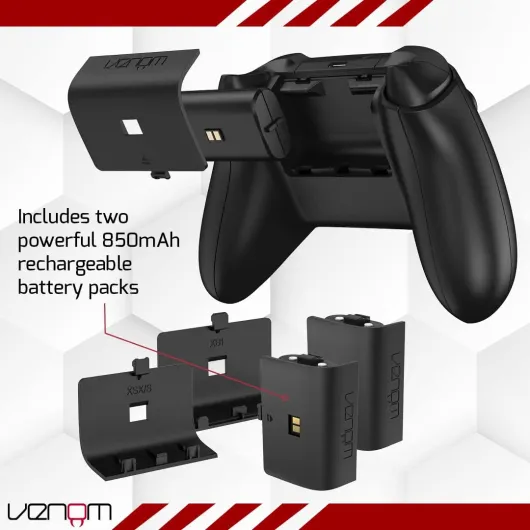
The dock comes with two 850mAh rechargeable battery packs, and that’s really the heart of the product. Without decent battery life, the dock would just be a fancy stand. In actual use, I was getting roughly 8–10 hours of play per fully charged battery, depending on what I was playing and whether I had headset audio going through the controller. That lines up with what one of the Amazon reviewers mentioned: easily more than 8 hours in one sitting. For most people, that’s more than enough for a day or a couple of evenings of gaming.
Compared to regular AA batteries, the main difference isn’t so much the total runtime, but the convenience. With AAs, I’d eventually get caught with a dying controller mid-session and have to scramble around to find spare batteries. With these packs, I just swap to the second controller that’s sitting fully charged on the dock. As long as you keep the habit of dropping the used controller back on its slot, you almost never think about battery levels again. It just becomes part of the routine.
The batteries themselves feel secure in the controller. Once clipped in with the right back cover, there’s no rattle or looseness. I did have a moment at the start where I thought the pack didn’t fit, but it was just me not pushing it all the way in. After that, it’s been fine. They connect solidly with the dock contacts, and I haven’t seen any weird behavior like controllers randomly shutting off or dropping connection. For a third-party battery, that’s reassuring.
Of course, these are not the biggest capacity packs on the market. If you’re the type who plays 12+ hours straight or you constantly forget to charge, you might want something with a bit more capacity. But for normal use—say 2–4 hours a night—they hold up well. Over time, like any rechargeable battery, they’ll probably lose a bit of capacity, but that’s the tradeoff versus buying disposable batteries forever. For the price of the kit, getting two packs that give you solid, repeatable battery life is decent value in my opinion.
Build quality and how sturdy it feels
On the durability side, this is not some heavy metal dock, but it doesn’t feel flimsy either. The plastic is fairly standard accessory plastic: light, slightly glossy, and not something you want to drop off a high shelf every day. On a stable TV unit or desk, it feels fine. I moved it around a few times, plugged and unplugged the USB‑C cable regularly, and the port still feels tight and not wobbly. The controllers slot in and out multiple times a day, and the contact pins haven’t bent or misaligned so far.
The part that worried me slightly at first was the battery covers. Because they’re removable and you get different ones for Xbox One and Series X|S, they’re thin plastic and feel like they could crack if you forced them too hard. Once installed, though, you don’t touch them again, so it’s mostly a one-time concern. As long as you don’t go full gorilla on them during installation, they seem fine. The batteries themselves are in a solid casing and don’t show any obvious weak points.
I’ve also tugged on the controllers while they were in the dock by accident a few times—classic cable snag situation—and the dock didn’t tip over easily. It will slide a bit if you yank hard, but it hasn’t fallen with controllers in it yet. That’s partly down to the low center of gravity and the way the controllers lean back against the support. If you’ve got kids or pets running around, I’d still keep it somewhere they’re not going to knock into constantly, but for normal living-room chaos, it seems to handle it.
Long term, the only real question mark is how many charge cycles the batteries will survive before they noticeably degrade. That’s the same for any rechargeable pack, though, and after a few weeks I obviously can’t comment on years of use. Based on the feel of the hardware and the fact that everything still works exactly the same as day one, I’d say the durability is decent for the price. It’s not built like a tank, but it doesn’t feel like a cheap throwaway either.
Charging speed and day-to-day use
In practice, the dock does what it says: it charges two controllers at the same time without any drama. From empty, I was seeing roughly 3–4 hours to go from completely drained to full, using the console’s USB port as the power source. I didn’t sit there with a stopwatch, but I did plug in dead controllers after a long session and they were fully green by the time I came back in the evening. For an 850mAh pack, that’s pretty much what I expected. It’s not lightning fast, but it’s consistent.
During normal use, I almost never fully drain the batteries in one go. My usual pattern is a couple of hours of gaming, then the controller goes back on the dock. With that routine, I basically always have a full controller ready. The LED indicators help: if I see red, I’ll just grab the other pad. For people who share a console or swap between two controllers, this setup works nicely. One is always charging while the other is being used, so you rarely hit 0% unless you forget to dock them.
One thing to be aware of: the contact alignment matters. If you just drop the controller on the dock without looking, sometimes it doesn’t sit properly and doesn’t start charging. You can tell because the light doesn’t switch to red. After a few days, I got used to lining it up and giving it a tiny wiggle to make sure it’s seated. Once you’ve got the hang of it, it’s quick, but it’s not quite as brainless as literally just throwing the controller on any which way.
Overall, the performance is solid for a mid-priced accessory. It doesn’t overheat, it doesn’t buzz or make noise, and I haven’t had any random disconnects or weird behavior. The controllers are always charged when I remember to use the dock properly. If you’re expecting ultra-fast charging or some kind of smart battery management with an app, this is not that. It’s a simple, reliable charging dock that keeps two Xbox controllers ready to go, and in that sense, it gets the job done.
What you actually get in the box
Out of the box, the Venom Twin Charging Dock setup is pretty straightforward. You get the dock itself, two 850mAh rechargeable battery packs, a 2m USB‑C cable, and a bunch of different rear battery covers to match Xbox One and Xbox Series X|S controllers. No power brick included, so you either plug it into your console’s USB port or use your own USB plug. That’s pretty standard these days, but worth knowing if all your USB chargers are already in use.
The dock is light but not toy‑like. It’s around 350g according to the specs, and that feels about right. Once you put it on a flat surface, it doesn’t slide around much, but it’s not heavy enough to feel premium or anything. It’s just a plastic base that holds two controllers at an angle, with contacts at the bottom for the batteries. The front has the LED indicators: red while charging, green when full. Simple and obvious, which I prefer over fancy lighting that doesn’t tell you anything useful.
Installing the batteries is the only slightly annoying step. You have to pick the right back cover for your controller model (they include ones for Xbox One and for Series X|S), clip the battery into the controller, then put the cover on. It’s not hard, but the first time I tried I didn’t line up the contacts properly, and the controller didn’t charge on the dock. Once you’ve done it right once, you don’t really think about it again, but there is a bit of trial and error the first time.
In terms of first impression, it’s very much a "plug it in and forget it" product. No software, no pairing, nothing fancy. You connect the USB‑C cable, drop the controllers on, and the lights tell you what’s happening. For someone who just wants a practical charging station and doesn’t care about bells and whistles, this presentation is totally fine. It feels like a functional accessory rather than some tech showpiece, and that matches the price point and what it’s trying to do.
Pros
- Two controllers charge at once with clear red/green LED indicators
- Includes two 850mAh battery packs and interchangeable covers for Xbox One and Series X|S
- Reduces cable clutter and makes it easy to keep controllers always charged
Cons
- Initial battery and cover installation is a bit fiddly and requires proper alignment
- Designed mainly for official controllers; some third‑party pads may not fit well
Conclusion
Editor's rating
After using the Venom Twin Charging Dock with the included 850mAh batteries, my overall take is pretty straightforward: it’s a practical accessory that makes living with Xbox controllers less annoying. It doesn’t try to impress with fancy design or features; it just charges two pads at once, shows you red or green lights, and keeps everything in one spot. If you’re tired of hunting for AA batteries or juggling loose charging cables, this solves that problem in a simple way.
It’s not without small quirks. The initial battery and cover setup can be fiddly, you need to seat the controllers properly on the dock, and it’s clearly meant for official Xbox controllers, so third‑party ones might be hit or miss. The battery capacity is decent but not huge, so if you run marathon sessions and never dock the controller, you can still drain it. But for typical use—few hours here and there, dropping the controller back on the dock when you’re done—it works smoothly.
I’d recommend this to Xbox Series X|S or Xbox One owners who use two controllers regularly and want a clean, low-effort charging setup. It’s also a good fit for families or shared consoles, where having one controller always on charge is handy. If you already have a solid rechargeable AA system and don’t care about having a dock, you can probably skip it. For everyone else, it’s a pretty solid, no-fuss way to stop wasting money on disposable batteries and keep the gaming area a bit more organised.