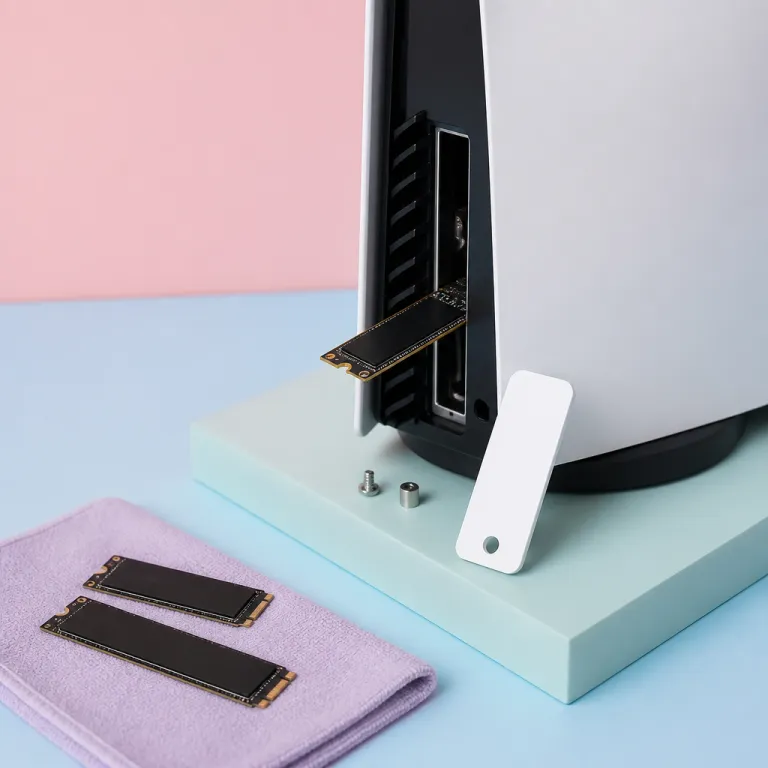
Why PS5 SSD expansion finally makes sense for competitive players
On a modern PlayStation console, internal storage fills up fast once you install a few 100 GB games. The native solid state drive is quick, but its limited capacity will push any competitive player toward a serious PS5 SSD expansion 2026 strategy. Treat storage as part of your performance budget, not an afterthought.
Sony’s design expects you to use an internal SSD in the dedicated expansion slot, and that slot only accepts a PCIe Gen 4 NVMe SSD with a compact heatsink. The right internal drive will match or exceed the speed of the built in solid state storage, while the wrong one will throttle under heat and quietly hurt performance during long sessions. That is why the best ssds for this console are not just about raw sequential read numbers, but also about stable thermals and a suitable form factor.
Prices for high quality NVMe ssds have crashed, which changes the entire value equation for a PS5 SSD expansion 2026 upgrade. Two terabyte internal ssds now sit in the sweet spot where you can install dozens of games without juggling saves, while four terabyte drives finally make sense for players who rotate between multiple competitive titles. When you pick the best ssd for your own habits, you are really choosing how often you want to delete games and how much friction you accept before you can just sit down and play.
2 TB vs 4 TB: how much PS5 storage you actually need
Think about your current library of PlayStation games before you buy any drive. A typical big budget title now eats between 80 and 120 GB of ssd storage, and some online shooters push even higher once texture packs and seasonal updates land. That is why a serious PS5 SSD expansion 2026 plan starts with counting the games you actually play, not the ones you only intend to try.
On a two terabyte internal ssd, you can comfortably keep around fifteen to twenty large games plus a stack of smaller indies, which already dwarfs the space on many older hard drives. A four terabyte nvme ssd roughly doubles that, but the extra capacity only pays off if you hate uninstalling anything and treat your console like a long term archive. For a lot of players, two terabytes in the expansion slot hits the best balance between cost, performance and the psychological comfort of not micromanaging downloads every weekend.
If you mainly rotate through three or four competitive games, a two terabyte game drive will feel generous for years. Players who hoard their entire PlayStation 4 back catalogue might prefer a cheaper external ssd or even large external hard drives for cold storage, keeping only current favourites on the faster internal drive. For a deeper look at why cramped storage kills the fun, this analysis of why small capacities frustrate console owners shows how quickly modern titles overwhelm limited space.
The specific PS5 SSD models worth buying and what to avoid
When you shop for a PS5 SSD expansion 2026 upgrade, focus on PCIe Gen 4 drives with at least 5 500 MB/s sequential read speed. Models like the Samsung 990 Pro, WD Black SN850X and Seagate FireCuda 530 have proven performance as internal ssds in this console, provided you pair each drive with a proper ssd heatsink. These ssds hit the required read speed on paper, but more importantly they sustain that speed under load without throttling during long gaming sessions.
Look for versions that either include a low profile heatsink or leave room to add a dedicated ssd heatsink designed for the PS5 expansion slot form factor. Some flashy drives ship with oversized heatsinks that technically fit in a PC but will not slide into the console bay, so always read the fine print before you buy. In many cases, the best ssds for this system are the plain versions plus a slim third party heatsink, rather than the so called ssd best gaming editions with bulky metal shrouds.
Be wary of cheaper PCIe Gen 4 drives that advertise high sequential read numbers but use aggressive thermal throttling or weaker controllers. These drives may pass synthetic benchmarks yet drop speed once the internal temperature climbs, which can slightly extend loading times and increase wear over the long durée. If you want extra flexibility for moving games between devices, pairing a fast external ssd with a quality USB adapter, as explained in this guide to choosing a USB C to USB 3 adapter for consoles, can complement your internal expansion rather than replace it.
Installation walkthrough: from side panel to heatsink without stress
Upgrading your PS5 SSD expansion 2026 setup looks intimidating, but the process is surprisingly simple once you know the steps. You need a small Phillips screwdriver, a clean table and a bit of patience to avoid scratching the console shell while you remove the side panel. Take a moment to read the official Sony instructions or watch a short video, then you will see that the hardest part is usually just unclipping the plastic without forcing it.
After you slide off the panel, you will see the metal cover for the expansion slot held by a single screw, which you remove to access the nvme ssd bay. Inside, a small spacer lets you adjust for different form factor lengths, from compact 2230 drives to longer 22110 models, and you simply align your chosen drive with the PCIe connector and press it down gently. Once the internal ssd is seated, you secure it with the screw, attach the ssd heatsink if it is not preinstalled, then replace the metal cover and snap the console shell back into place.
On first boot, the PlayStation system will prompt you to format the new game drive and will run a quick test of its read speed to confirm it meets requirements. You can then move games between the original solid state storage and the new expansion, choosing where each title lives based on how often you play it. If you want a quieter setup, consider a low profile heatsink that spreads heat without adding extra fan noise, because a well cooled internal drive will maintain peak performance for a longer durée.
Performance reality: internal vs external drives and when to use each
Once your PS5 SSD expansion 2026 upgrade is installed, the obvious question is whether games actually load faster than from the original internal drive. In practice, a high quality PCIe Gen 4 nvme ssd with strong sequential read performance will match the built in storage almost exactly, with differences measured in fractions of a second. What matters more is avoiding weak drives that throttle, because inconsistent speed feels worse than being a tiny bit slower on paper.
External drives play a different rôle in a modern console setup, especially for players with large libraries of older titles. A fast external ssd connected over USB makes an excellent archive for PlayStation 4 games and smaller indie releases, while big cinematic blockbusters and competitive shooters stay on the internal expansion slot for maximum performance. Traditional external hard drives still work for cold storage, but their slower read speed and higher latency make them a poor choice for anything you launch every day.
For competitive players chasing every millisecond, the best ssd configuration is usually a strong internal nvme drive for current games plus a secondary external ssd for overflow. This layered approach keeps your main game drive lean and fast, while giving you room to park seasonal content or co op titles you only touch occasionally. If you care about audio as much as loading times, pairing this storage setup with one of the best console headsets under 100 will round out a pro grade yet affordable living room rig.
How to read spec sheets and marketing claims without getting misled
Spec sheets for PS5 SSD expansion 2026 products throw a lot of numbers at you, but only a few really matter. Focus on the quoted sequential read speed, the PCIe Gen version, the presence of a compatible heatsink and the warranty length, then ignore most of the vague gaming labels. When a manufacturer calls its product the best ssd for consoles without clear data, treat that as marketing, not a meaningful benchmark.
Sequential read ratings above 5 500 MB/s are the baseline for this console, yet real world performance depends on how the controller and cache behave once the drive fills up. Some ssds maintain their advertised read speed even when nearly full, while others slow down sharply past the eighty percent mark, which is why long term testing beats a quick read full benchmark. Pay attention to reviews that mention thermal behaviour, because a good ssd heatsink can only do so much if the underlying design runs too hot.
Brand reputation still counts, especially for models like the Samsung 990 Pro and other samsung pro lines that have seen multiple firmware updates to fix early quirks. When you compare drives, think about your own usage pattern rather than chasing the absolute ssd best score in a chart, because a stable, cool running solid state drive will feel faster over its whole durée of use. In the end, the right PS5 SSD expansion is the one that quietly disappears into your console and lets you focus on the tenth Christmas morning, not the spec sheet.
FAQ
Does a PS5 SSD expansion load games faster than the original drive ?
A high quality PCIe Gen 4 nvme ssd in the PS5 expansion slot usually matches the internal solid state drive rather than beating it by a huge margin. You might see slightly shorter loading screens in some games, but the main benefit is having more storage without sacrificing performance. The key is choosing a drive with strong sequential read speed and a proper heatsink so it does not throttle.
Can I use any NVMe SSD as a PS5 internal upgrade ?
No, the console requires a PCIe Gen 4 nvme ssd with at least 5 500 MB/s sequential read performance and a compatible form factor that fits under the expansion slot cover. The drive also needs a low profile ssd heatsink to manage temperature inside the tight bay. Always check the manufacturer’s compatibility notes and avoid models with oversized cooling plates designed only for desktop PCs.
Is a 4 TB SSD overkill for most PS5 players ?
For many players, a two terabyte internal ssd already feels generous, holding well over a dozen large games plus smaller titles. A four terabyte game drive makes sense if you install almost everything you buy and rarely delete anything, or if multiple people share the same console. If you mostly rotate through a few competitive games, the extra capacity may sit half empty and represent poor value.
Should I use an external SSD or hard drive with my PS5 ?
An external ssd is ideal for storing and running PlayStation 4 games, as well as parking PS5 titles you are not actively playing, while keeping the fastest internal storage free. Traditional external hard drives are cheaper per terabyte but much slower, so they work best as cold storage for games you rarely touch. For everyday competitive play, keep your main titles on the internal nvme ssd in the expansion slot.
What happens if my PS5 SSD runs too hot during long sessions ?
If the internal ssd or expansion drive overheats, the controller will throttle performance to protect the hardware, which can slightly increase loading times and reduce responsiveness. In extreme cases, the console may warn you about temperature and ask you to shut down until it cools. Using a quality ssd heatsink and keeping the console in a well ventilated space greatly reduces this risk.