Summary
Editor's rating
Value: strong specs, messy charger story, not cheap
Ergonomics: closer to an Xbox pad than a brick
Battery life: better than older Allys, still not “all day”
Comfort and controls: good grip, but weight fatigue is real
Build quality and reliability: feels solid, but support is a concern
Performance: strong for 1080p, but still a PC you have to tweak
What you actually get (and what you don’t)
Pros
- Strong performance for a handheld thanks to Ryzen AI Z2 Extreme, 24GB RAM and 1TB SSD
- Comfortable Xbox-style grips and full-size sticks that feel familiar
- Bright 7" 1080p 120Hz screen with decent anti-glare and FreeSync support
Cons
- No charger in the box despite the high price and confusing listing info
- Battery life still limited for heavy games, around 2–3 hours in real use
- Windows 11 brings complexity and occasional bugs compared to more console-like competitors

Specifications
View full product page →| Brand | ASUS |
Powerful handheld, awkward buying experience
I’ve been using the ROG Xbox Ally X 2025 for a bit now, mainly on the sofa and in bed, and my first reaction was basically: this thing is a small gaming laptop in your hands. It boots into that Xbox-style full-screen interface, and if you’re used to Xbox dashboards and Game Pass, you feel at home in about two minutes. You still have full Windows 11 underneath, but day to day you mostly live in the Xbox layer, which is good because Windows with a thumbstick is still a pain.
Where it gets messy is the whole charger story. The listing and box info are confusing, and in practice you get no charger in the box. For a device at this price, that’s pretty annoying. You can argue legislation or whatever, but when you unbox a handheld console/PC and realise you can’t even power it up until you find a 100W USB‑C charger, it kills the excitement a bit. I had a compatible laptop charger at home, but if you don’t, that’s an extra cost straight away.
Once I got past that and actually played on it, the overall experience is pretty solid. Performance is strong enough for modern games at 1080p with some settings tweaks, the 120Hz screen looks clean, and the controls feel more like an Xbox pad than a typical PC handheld. It definitely runs hotter and louder than a Switch or a basic Steam Deck, but that’s the trade‑off for the power you’re getting and the fact it’s basically running full Windows instead of a stripped-down OS.
So my first impression is: good hardware, decent software idea, but the whole charging and support angle feels messy. If you’re not comfortable dealing with drivers, Windows updates, and maybe some bugs like sleep/resume issues, this might frustrate you. If you just want raw PC power in your hands and you’re ready to tinker a bit, it’s pretty tempting despite the rough edges.
Value: strong specs, messy charger story, not cheap
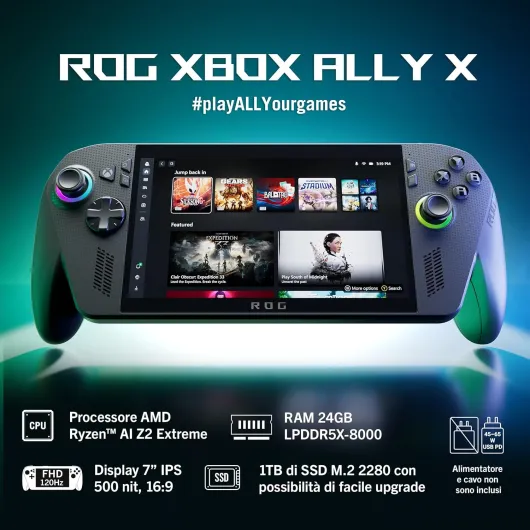
On paper, the ROG Xbox Ally X 2025 offers a lot: Ryzen AI Z2 Extreme, 24GB RAM, 1TB SSD, 120Hz 1080p screen, and a decent controller layout. Compared to a similarly specced gaming laptop, it’s relatively compact and more portable. But you pay a premium for that portability. When you factor in the missing charger, maybe a case, and possibly a high‑wattage power bank if you want to travel with it, the total cost creeps up even more. You really need to want a Windows handheld specifically to justify that spend.
Compared to a Steam Deck (especially if you catch it on sale), the Ally X is more powerful and has a sharper, faster screen, but the Deck offers a smoother, more console‑like experience and usually includes the basics like a charger. If you mostly play Steam games and don’t care about Windows or the Xbox layer, the Deck is still hard to beat for value. Against something like a Switch, this isn’t even the same category: the Ally X crushes it in performance, but the Switch is cheaper, lighter, and simpler.
The Amazon reviews reflect this mixed value feeling. Some people are happy and even say the seller refunded them enough to buy a charger, which softens the blow. Others are rightly annoyed that the listing mentions a charger in the box when there isn’t one, or that they had to run out on Christmas Eve to find a charger just to use the thing. That kind of experience really drags down the perceived value, because at this price most people expect a ready‑to‑use product.
Overall, I’d say the value is decent but not fantastic. If you’re a tech‑savvy user who wants full Windows, Xbox integration, and strong performance in a handheld, you’ll probably feel you got your money’s worth, especially if you already own a suitable charger. If you’re more casual, just want to play games with minimal fuss, or are sensitive to price, there are cheaper and simpler options that make more sense. This is more for enthusiasts who know what they’re getting into and are okay with the rough edges.
Ergonomics: closer to an Xbox pad than a brick
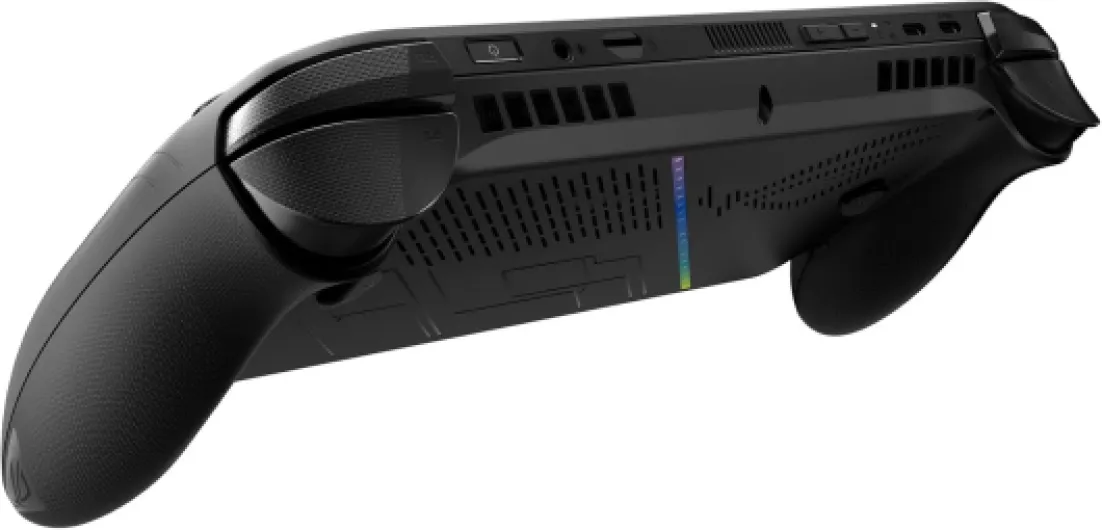
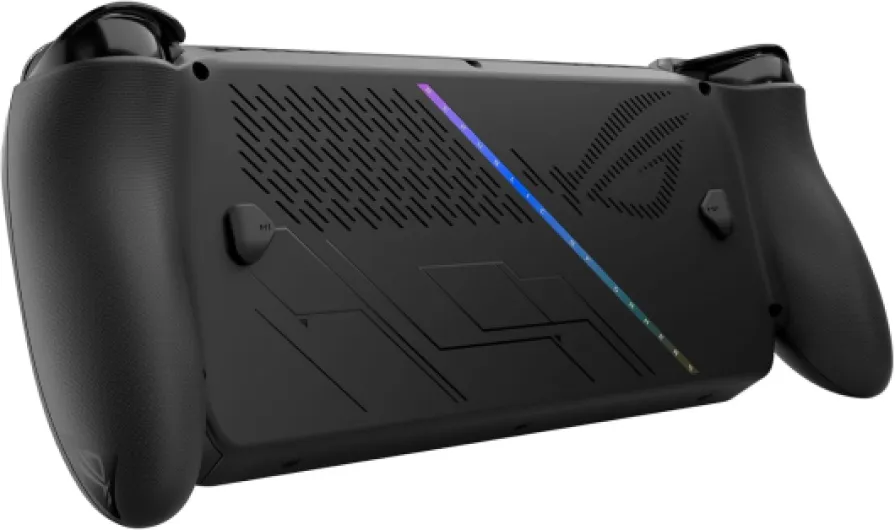
Design‑wise, the ROG Xbox Ally X leans heavily into the Xbox partnership. The handles are shaped a lot like an Xbox Wireless Controller, just stretched to fit a 7" screen in the middle. In the hand, it feels more natural than some other handheld PCs I’ve tried, which can feel like you’re gripping a flat tablet with buttons slapped on. The weight is noticeable, though. At around 689 g, it’s heavier than a Switch and also heavier than a basic Steam Deck, so after an hour lying on the couch, your wrists feel it a bit.
The layout is familiar: ABXY on the right, D‑pad on the left, two full‑size analog sticks, bumpers and triggers on the shoulders, plus two extra assignable rear buttons. On top of that, there are a bunch of small function buttons: Xbox, Menu, View/Display, Control Center, Library, etc. It looks busy at first, but after a few days I got used to where everything was. The rear buttons are handy for stuff like jump or reload, but you have to be careful not to press them accidentally if you grip the console too tightly.
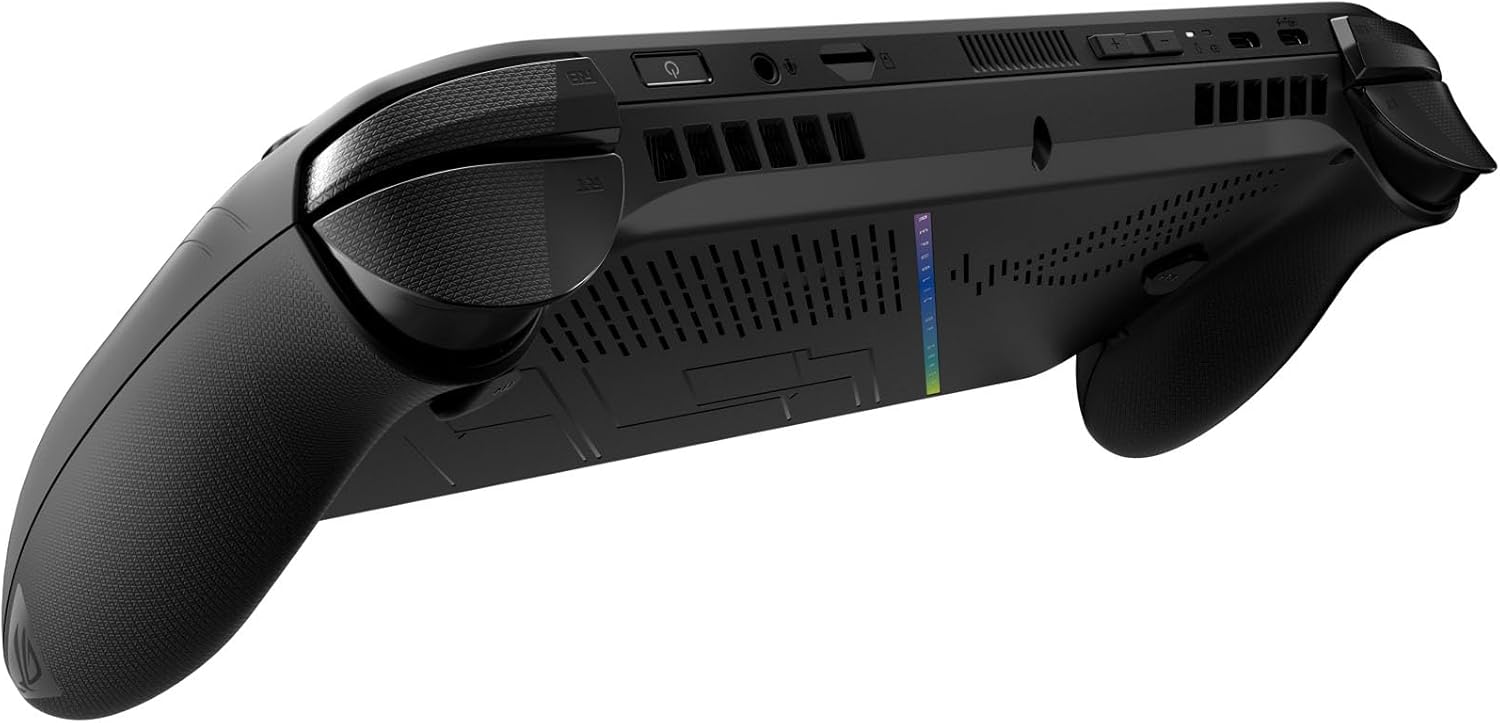
The ventilation design has also been reworked compared to older Ally models. You have clearly visible vents on the top and back, and you can feel warm air being pushed out when the fans ramp up. It never got so hot that I couldn’t hold it, but the middle back area does get toasty in performance mode. On the plus side, the airflow seems decent; I didn’t get any obvious thermal throttling in the short term, but the fan noise is there, especially in quieter games or menus.
In terms of looks, it’s clearly a gaming device: sharp lines, ROG branding, and a more aggressive design than a Switch or something like a simple tablet. Personally, I don’t mind it, but if you like minimalist gear, this isn’t it. Overall, the design is practical and comfortable
Battery life: better than older Allys, still not “all day”
The big promise on this model is the doubled battery for longer sessions. In practice, it’s an improvement, but don’t expect miracles. This is still a small PC with a 1080p 120Hz screen and a hungry APU. In performance mode with a big AAA game (think something like Cyberpunk on medium/low with FSR), I was seeing around 1.5 to 2 hours before I started getting nervous and dialed things back. If I switched to a more balanced profile and lowered the frame rate target, I could stretch it closer to 2.5–3 hours for heavier titles.
Where the bigger battery actually feels decent is with lighter games and streaming. Playing indie games, emulators, or streaming from Xbox Cloud/PC over Wi‑Fi, I could get around 4–5 hours if I kept brightness reasonable and didn’t push the TDP too high. For something like a long train ride, that’s okay, but again, this is not a Switch‑style device that you charge once and forget about for days. You still need to think about your charger and power bank situation when you leave the house.
The lack of included charger makes the battery story even more annoying. You need a proper USB‑C PD charger, and realistically you want around 100W to get full performance and charge speed while playing. Some lower‑wattage chargers will technically work but might charge slowly or even just hold the battery level instead of adding percentage while gaming. I tested it with a 65W charger, and it was fine for lighter games but not ideal for heavy stuff.
So, battery life is acceptable but not impressive. It’s better than older models and some other Windows handhelds, but physics are physics: powerful chips plus a bright 120Hz screen eat power. If you mostly play plugged in or near a socket, you’ll be fine. If your plan is long trips and all‑day sessions away from power, you either need to lower your performance expectations or bring a strong power bank and the right charger.
Comfort and controls: good grip, but weight fatigue is real
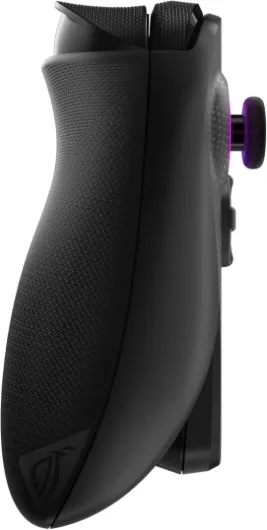
In actual use, the comfort is mostly good, with one main catch: the weight. The contoured grips really do feel like a stretched Xbox controller, which is a big plus compared to flatter handhelds. Your fingers wrap naturally around the back, and the impulse triggers feel nice and responsive for racing games or shooters. I played a couple of hours of Forza and some Halo Infinite, and the triggers felt close enough to a normal Xbox pad that I didn’t have to adjust much.
The buttons themselves are fine: ABXY have a decent click, the D‑pad is okay for menus and light 2D games, and the analog sticks are full size, which makes aiming and camera control more precise than on tiny sticks like the Switch. The HD haptics are subtle; they’re there, but it’s not something I paid much attention to after the first day. The 6‑axis IMU is more of a niche thing; I tried it in a couple of games that support gyro aiming, and it works, but I wouldn’t buy the device for that feature alone.
Where I started to feel it was with longer sessions. After about an hour and a half lying on my back holding it above my face, my wrists and forearms got tired. Sitting upright and resting the bottom on my lap or a pillow is fine, but this is not a feather‑light handheld. If you’re used to a Nintendo Switch or a smaller device, you’ll notice the difference. On the other hand, compared to a full gaming laptop on your lap, it’s still more comfortable and easier to handle.
In short, comfort is good if you support the weight somehow and don’t expect to hold it in the air for hours. The grip and button layout are well thought out, and if you like Xbox controllers you’ll adapt quickly. Just be honest with yourself: it’s a compact PC, not a tiny toy console. If you have wrist issues or want something ultra‑light for commuting, this might be too much. If you mainly play on the couch with a cushion or armrest, it’s perfectly manageable.
Build quality and reliability: feels solid, but support is a concern
In the hand, the ROG Xbox Ally X feels fairly sturdy. The plastic doesn’t creak, the buttons don’t feel mushy, and the sticks have a decent resistance. The Gorilla Glass Victus on the front gives some peace of mind for scratches, and the Corning DXC anti‑glare layer handles fingerprints okay. I tossed it in a backpack a few times (in a separate pocket, no case) and it came out without visible damage. That said, this is still a lot of money to carry around without a case, so I’d definitely recommend buying some basic protection.
Thermally, the device gets warm but not dangerously so, at least in my testing. Long sessions in performance mode heat up the back, but the vents do push air out effectively. I didn’t see any obvious throttling or crashes. However, one of the Amazon reviews mentioned a screen scrambling issue right from the first wake from sleep, which then led to an RMA and a repair rather than a full replacement. That kind of story always makes me a bit cautious about long‑term reliability and how smooth the support process is if something goes wrong.
ASUS hardware in general is usually fine for me, but their support can be hit or miss depending on your region. In that review, the user was told by ASUS that their contract is with Amazon, not ASUS, so they refused a straight swap and went for repair instead. That’s not shocking from a legal point of view, but it’s annoying when you’ve just bought one of the most expensive handhelds and it fails immediately. If you’re unlucky and get a bad unit, you might have to push Amazon for a return or replacement rather than expecting ASUS to just hand you a new one.
So, my take is: physical build feels solid enough, but I wouldn’t blindly trust first‑batch reliability. I’d keep the box, test all the features hard in the first couple of weeks (sleep/wake, SD card, Wi‑Fi, buttons, etc.), and be ready to return it quickly if something’s off. If you get a good unit, it feels like it will last a while, but support and warranty handling aren’t as straightforward as they should be for the price.
Performance: strong for 1080p, but still a PC you have to tweak
Performance is where the ROG Xbox Ally X justifies a big part of its price. The AMD Ryzen AI Z2 Extreme with integrated Radeon graphics and 24GB RAM handles modern games pretty well for a handheld. I tested a mix of titles: lighter indie stuff, some older AAA games, and a few newer ones. In general, if you’re okay running things at 1080p with medium settings and sometimes FSR or resolution scaling, you can get smooth gameplay in the 40–60 fps range. For competitive shooters, I often dropped settings further to hit higher frame rates and actually make use of the 120Hz screen.
The 120Hz panel is nice, but you won’t hit 120 fps in heavier games without serious compromises. Where it helps is in lighter games (Hades, older platformers, emulation, etc.) and in the general feel of the UI. Scrolling and camera movement look smoother than on a 60Hz handheld. The 500‑nit brightness is also useful; playing near a window or in a well‑lit room is fine, and the anti‑glare coating keeps reflections under control. Blacks are not OLED‑level, but for an IPS screen it’s decent.
On the system side, this is still Windows 11, so don’t expect console simplicity. You get the Xbox‑style interface on boot, but behind that you still have to deal with Windows updates, drivers, and the occasional weird bug. One Amazon user mentioned a scrambled screen after waking from sleep, and I had a couple of minor resume issues where games didn’t like being put to sleep and resumed. It’s the usual PC stuff: sometimes you have to restart a game or tweak a setting. If you’re used to Steam Deck’s Linux‑based OS, this will feel more flexible but also more messy.
Overall, the raw performance is solid for a handheld, and the 24GB RAM plus 1TB SSD mean you don’t hit capacity walls quickly. But you’ll still spend time tweaking graphics settings and power profiles per game if you care about balancing smoothness, visuals, and battery life. If you like fiddling and optimising, that’s fine. If you want plug‑and‑play simplicity, this might feel like too much work, especially compared to a straightforward console or even a Steam Deck with its curated UI.
What you actually get (and what you don’t)
Out of the box, the ROG Xbox Ally X 2025 feels more like opening a compact laptop than a console. You get the device itself, some paperwork, and that’s basically it. No charger, no case, no screen protector. The Amazon listing even mentions a charger in the "what’s in the box" section, but in reality it’s not there, which matches what several buyers reported. Legislation or not, it just feels off when you’ve dropped this much money on a handheld and need to immediately shop for a 100W USB‑C Power Delivery charger.
On the spec sheet, though, it looks strong: AMD Ryzen AI Z2 Extreme, integrated Radeon graphics, 24GB of LPDDR5X RAM, and a 1TB M.2 2280 SSD that you can upgrade yourself later. The screen is a 7" 1080p IPS panel, 120Hz, 500 nits, with Gorilla Glass Victus and an anti‑glare coating. Connectivity is decent: USB4 Type‑C (Thunderbolt 4 compatible), another USB‑C 3.2 Gen 2 with display and power, UHS‑II microSD slot, and a 3.5mm jack. You also get Wi‑Fi 6E and Bluetooth 5.2, so wireless stuff is up to date.
The Xbox layer on top of Windows 11 is basically a full-screen dashboard meant for controller use. In practice, it means you can launch Xbox PC games, Game Pass, and other stores like Steam or Epic without touching the touchscreen too often. It’s not as clean as a pure console OS, but better than just being dumped directly into Windows. If you want, you can still alt‑tab, install random apps, and use it like a mini laptop with a keyboard and mouse plugged in.
Overall, the product "package" is a bit of a mixed bag. The hardware and connectivity are generous, and 1TB storage plus 24GB RAM is great for a handheld. On the other hand, the lack of charger and the basic bundle make it feel like ASUS cut corners on the accessories. If you’re okay hunting down your own charger and maybe buying a case, you get a strong base device. If you expect a console‑like, ready‑to‑go experience, you’ll probably be annoyed when you first open the box.
Pros
- Strong performance for a handheld thanks to Ryzen AI Z2 Extreme, 24GB RAM and 1TB SSD
- Comfortable Xbox-style grips and full-size sticks that feel familiar
- Bright 7" 1080p 120Hz screen with decent anti-glare and FreeSync support
Cons
- No charger in the box despite the high price and confusing listing info
- Battery life still limited for heavy games, around 2–3 hours in real use
- Windows 11 brings complexity and occasional bugs compared to more console-like competitors
Conclusion
Editor's rating
The ROG Xbox Ally X 2025 is a powerful handheld PC that leans heavily into the Xbox ecosystem and does a pretty good job of it. Performance is strong for a portable machine: modern games run fine at 1080p with some sensible settings, the 120Hz screen is smooth and bright, and the 24GB RAM plus 1TB SSD give you room to breathe. The ergonomics are better than a lot of flat handhelds, with grips that feel close to an Xbox controller and full‑size sticks that make aiming and camera control comfortable. As a piece of hardware for people who like to tweak and have their full PC library in their hands, it’s solid.
On the downside, this is still a Windows device, so you have to deal with updates, occasional bugs, and more tinkering than with a console or a Steam Deck. Battery life is okay but not long‑lasting, and the missing charger is frankly annoying at this price, especially when some listings still mention it in the box. Add a few worrying reports about early defects and less‑than‑ideal support experiences, and it’s clear this isn’t a stress‑free purchase.
If you’re an enthusiast who wants a Windows handheld with Xbox integration, is comfortable buying a 100W USB‑C charger, and doesn’t mind adjusting settings to get the best balance of performance and battery, you’ll likely be happy with the Ally X. If you just want something simple, cheaper, and more console‑like, a Steam Deck or even a traditional console will make more sense. Overall, good device, but very much aimed at people who know what they’re getting into.