Summary
Editor's rating
Value: good device, awkward price
Design: looks like a Switch and an Xbox pad had a kid
Battery life: finally a handheld that doesn’t die after 2 hours
Comfort: this is where it really nails it
Durability and build: solid, but all plastic and no tank
Performance: great for streaming, average for Android, depends heavily on your internet
What this thing actually is (and what it isn’t)
Pros
- Very comfortable and lightweight for long gaming sessions
- Strong battery life (often close to a full day of mixed use)
- Great for local streaming from PC/console and retro emulation
Cons
- High price for what is essentially mid-range Android hardware
- Heavily dependent on fast, stable Wi‑Fi for a good experience
- Xbox Cloud Gaming performance can be inconsistent even on good networks

Specifications
View full product page →| Brand | Logitech G |
A cloud handheld that actually makes sense… if your Wi‑Fi is good
I’ve been using the Logitech G Cloud for a few weeks now, mainly at home on Wi‑Fi and a bit while travelling. I bought it because I was tired of my Xbox hogging the TV and I wanted something more comfortable than clipping my phone to a controller. On paper, this thing is exactly that: Android handheld, proper controls, 1080p screen, and built for cloud services like Xbox Cloud Gaming and GeForce NOW.
In practice, it does what it says, but only if you give it what it needs: a solid internet connection and realistic expectations. This is not a mini-gaming PC like a Steam Deck or ROG Ally. It’s closer to an Android tablet with a built-in Xbox-style controller that’s been tuned for streaming. If you treat it like that, it makes sense. If you expect native AAA performance, you’ll be disappointed pretty fast.
Day to day, I mainly used it for Xbox Remote Play from my Series X, some Game Pass cloud stuff, Steam Link from my PC, and a bunch of retro emulation. The short version: local streaming and emulation are great, Xbox Cloud Gaming is hit and miss, and Android games are fine but limited by the older Snapdragon 720G. Battery life is genuinely strong though, and comfort is one of the best parts.
So overall, my feeling is: the hardware is pretty solid, the experience depends heavily on your network, and the price is the main thing that stings. If you already have a good gaming PC or console and good Wi‑Fi, it’s a very handy extra screen. If you don’t, it starts to look like an overpriced Android device with nice controls.
Value: good device, awkward price
This is where things get tricky. At full price (around £329), the Logitech G Cloud is hard to justify for a lot of people. You’re basically paying a premium for comfort, battery life, and the convenience of a purpose-built cloud handheld. The internal hardware is mid-range at best, and you can find Android tablets with similar or better specs for less money, then pair them with a Bluetooth controller. It won’t be as comfortable or integrated, but it’ll be cheaper.
On the other hand, when this thing goes on discount, the story changes. At a lower price point, it starts to make more sense as a dedicated cloud and retro device that doesn’t drain your phone battery and doesn’t heat up like a laptop. If you already have a PC or console and good internet, the value is in turning that existing hardware into a portable setup around the house. One buyer mentioned getting it with Game Pass months included, which softens the blow a bit.
Compared to a Steam Deck or similar, you’re trading raw power for battery life and silence. A Steam Deck can run games locally but will die faster and is heavier. The G Cloud is lighter and lasts longer but relies on streaming and older hardware. So value really depends on your use case: if you mainly want cloud and remote play, this is a nicer experience than juggling a phone and clip, but you pay for that comfort.
So my honest take: good product, price is on the high side. If you see it on a decent sale and you already have Game Pass, GeForce NOW, or a gaming PC/console, it’s worth considering. At full price, I’d think twice and really ask myself how often I’d use it compared to cheaper setups or a more capable handheld.
Design: looks like a Switch and an Xbox pad had a kid
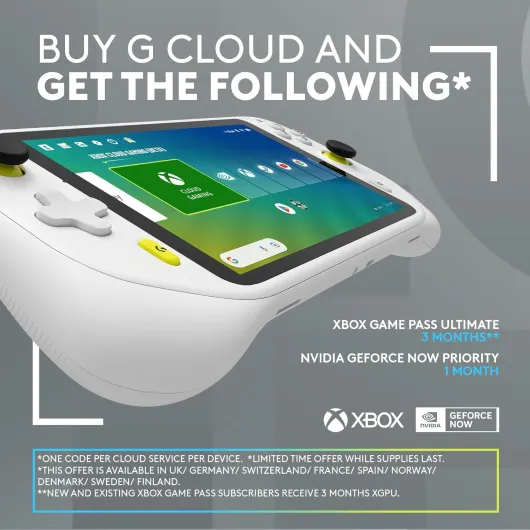
Design-wise, the Logitech G Cloud looks like a white Nintendo Switch crossed with an Xbox controller. You get a 7‑inch screen in the middle, with offset sticks, a proper D‑pad, ABXY buttons, triggers, bumpers, and a few system buttons. It’s pretty clean and simple, no RGB nonsense, no weird shapes. Just plastic, screen, and controls. Personally, I like the low-key look – it feels like a serious bit of kit, not a toy.
The screen is 1080p at 60 Hz, and for cloud gaming and retro stuff, that’s more than enough. Colours are decent, brightness is fine for indoor use, and text is sharp. I wouldn’t call it mind-blowing, but it’s good and I didn’t feel like I was staring at a cheap panel. The bezels are a bit chunky compared to modern phones, but for a handheld it’s ok – it actually gives you somewhere to rest your thumbs without touching the screen by mistake.
The layout of the controls is well thought out. The sticks are placed similarly to an Xbox controller, which I prefer over the symmetrical PlayStation style for most games. All the important buttons are easy to reach without stretching your fingers in weird angles. There are also volume buttons and a power button on top, plus a headphone jack and USB‑C port. Nothing fancy, but everything is where you’d expect it, so there’s no learning curve.
Overall, the design is practical and focused on comfort rather than trying to be flashy. It’s not small enough to throw in a jeans pocket, but it fits easily in a backpack or a small sling bag. If you’re used to bulkier handheld PCs, this feels pleasantly compact and light. If you’re used to a Switch Lite, this will feel a bit bigger but still manageable.
Battery life: finally a handheld that doesn’t die after 2 hours
The battery life is one of the main reasons I kept using the Logitech G Cloud instead of my other handhelds. Logitech claims 12+ hours, and honestly, that’s not far off in real use if you’re mainly cloud gaming or doing retro/emulation. I was regularly getting full evenings of play (5–6 hours) and still having plenty left the next day. Compared to a Steam Deck or a Windows handheld, which sometimes struggle to hit 2–3 hours on heavier games, this is a big difference.
Streaming is much lighter on the battery than running games locally, and you can really feel it here. Playing Xbox Remote Play or Moonlight for 3–4 hours barely made a dent, especially with brightness around 50–60%. Even Android games didn’t chew through the battery as fast as I expected, probably because the 720G chip is not hugely power-hungry and the screen is only 60 Hz. There’s no fan either, which helps keep power use down.
Charging is via USB‑C, and it’s straightforward. It’s not the fastest charge in the world, but since the battery lasts so long, I just plugged it in overnight and didn’t think about it. I never had that constant low-battery anxiety that I do with some bigger handhelds, where you’re watching the percentage drop every half hour. With this, I’d genuinely forget when I last charged it, which is kind of the ideal situation.
So if battery life matters to you, this is one of the strongest arguments in favour of the G Cloud. It behaves more like a tablet or e‑reader in terms of endurance, instead of a hungry mini PC. If you travel a lot or just don’t want to be chained to a charger, this is a big plus.
Comfort: this is where it really nails it
Comfort is honestly one of the strongest points of the Logitech G Cloud. At 463 g, it’s noticeably lighter than most of the Windows handhelds out there. I can actually play for a couple of hours lying on the sofa or in bed without my wrists getting tired, which is not something I can say about a Steam Deck. The grips on the back are shaped well enough that the device sits naturally in your hands, more like a proper controller than a flat tablet with sticks glued on.
The sticks and buttons feel close to a good Xbox pad. The sticks have decent resistance, the buttons have a clear click, and the triggers feel smooth. There’s also a gyro sensor and haptics, which some cloud and Android games can use. I wouldn’t rank it above an official Xbox controller, but it’s in the same ballpark. After the first evening, I pretty much forgot I was using a handheld – it just felt like a controller with a screen stuck in the middle.
One thing I noticed after longer sessions: because it doesn’t have fans or big vents, it stays cool. No hot air blowing on your hands, no weird warm spots on the back. That sounds minor, but with fan-based handheld PCs, the constant noise and warmth can get annoying. Here, it’s silent and cool, so it’s easy to just lean back and play. For cloud and retro, that makes a big difference to how relaxed it feels.
If I had to nitpick, the plastic texture on the back could have been a bit grippier. It’s not slippery, but after an hour or two my hands did feel like they could use a tiny bit more texture. Also, people with smaller hands might find the 7‑inch width a bit of a stretch at first, but it’s still easier to handle than a lot of the chunkier handheld PCs. Overall, for comfort and ergonomics, it’s one of the better handhelds I’ve used.
Durability and build: solid, but all plastic and no tank
Build quality on the Logitech G Cloud is pretty solid, but you have to remember it’s still a plastic handheld, not a rugged device. The chassis doesn’t creak much when you twist it, the buttons and sticks feel well anchored, and nothing felt loose or cheap out of the box. The screen is flush and doesn’t flex when you press on it. It feels like a proper Logitech product, in line with their better keyboards and mice rather than their bargain stuff.
I’ve thrown it into a backpack a few times (in a simple sleeve) and carried it around the house constantly. No cracks, no weird noises, no drifting sticks so far. The white plastic does pick up a bit of dirt over time, especially around the grips and buttons, but it wipes off easily with a cloth. If you’re someone who eats crisps while gaming, you’ll probably want to clean it regularly or it’ll start to look grubby pretty fast.
The one area where I’d be a bit cautious is the screen. There’s no mention of Gorilla Glass or anything particularly tough, so I’d treat it like a normal tablet: don’t throw it in a bag with keys, and maybe put a screen protector on if you’re clumsy. Also, since it’s lightweight, it feels like it wouldn’t enjoy being sat on or dropped from a high sofa onto a hard floor. It’s not flimsy, but it’s also not built like a brick.
Overall, durability feels good for normal daily use, as long as you’re not abusive with your gadgets. The 2‑year manufacturer warranty is a nice safety net. I wouldn’t hand it to a small kid without a case, but for an adult or a careful teenager, it should hold up fine over time.
Performance: great for streaming, average for Android, depends heavily on your internet
Performance on the Logitech G Cloud is a bit of a mixed bag, and you really have to separate cloud performance, local streaming, and native Android/emulation. The internal chip, a Snapdragon 720G with 4 GB RAM, is fine for Android and retro, but it’s not some powerhouse. The real star is the Wi‑Fi optimisation and the fact it can handle high bitrate streaming without choking, as long as your network is solid.
On my home 5 GHz Wi‑Fi (around 300 Mbps actual speed), Steam Link and Moonlight/Sunshine from my PC ran very smoothly. I could play Forza Horizon and Cyberpunk at high settings on my PC and stream them to the G Cloud with low latency, to the point where it felt close to playing directly on the TV. For fast shooters, you can feel a tiny bit of delay if you really pay attention, but it’s still playable. This is where the device shines: it’s basically a comfortable remote screen for your powerful PC or console.
Xbox Cloud Gaming was another story. Just like some Amazon reviewers mentioned, even with good Wi‑Fi it was hit and miss. Some games felt fine, others were a stuttery mess. I’ve seen similar behaviour on my Android tablet and laptop, so I agree it’s more of a Microsoft issue than Logitech’s. GeForce NOW, on the other hand, was much smoother in my tests, but then you’re paying another subscription, and possibly to play games you already own elsewhere.
For native Android games and emulation, the 720G is enough for stuff like retro consoles, PS1, PSP, even some light PS2/GameCube if you tweak settings. Modern heavy Android games will run but not always at max settings. Personally, I mainly used it for retro and cloud, so I didn’t mind. But for the price, the chipset does feel a bit dated. So performance summary: great as a streaming client, decent for Android, bottlenecked by cloud services and your internet more than the hardware itself.
What this thing actually is (and what it isn’t)
The Logitech G Cloud is basically an Android handheld built around cloud gaming. Inside it’s running a Snapdragon 720G, 4 GB of RAM and Android, with a 7‑inch 1080p, 60 Hz touchscreen and built‑in controls that feel very close to an Xbox pad. It connects over Wi‑Fi (no 4G/5G built in) and charges via USB‑C. Weight is around 463 g, which is noticeably lighter than a Steam Deck or most Windows handhelds I’ve tried.
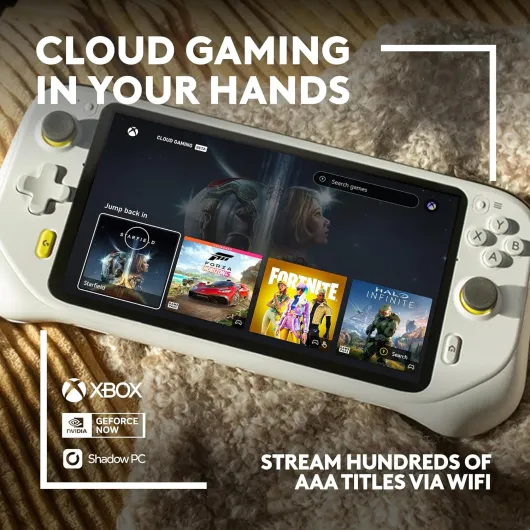
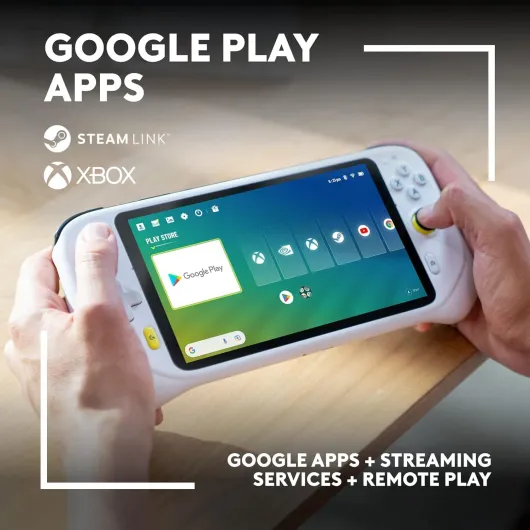
Out of the box, it’s clearly set up for services like Xbox Cloud Gaming, NVIDIA GeForce NOW, and remote play from your own PC or consoles. There’s also full Google Play access, so you can install stuff like Moonlight, Steam Link, Sunshine, emulators, YouTube, Netflix, etc. But the key point: this is a streaming-first device. The internal chip is ok for Android games and emulation, but it’s not meant to run modern AAA games locally. If you buy it expecting a portable PS5 in your hands, you’ll be disappointed.
During setup, it guides you through logging into your Google account, then points you to cloud services. I had Game Pass and GeForce NOW running within half an hour. I also installed Moonlight and Sunshine to stream from my PC, and that’s where this device starts to really shine: the low weight and long battery make it feel like a small, quiet window into your big gaming rig or console.
So the main takeaway from the presentation side is: it’s a cloud window, not a powerhouse. If you already have a console or gaming PC, this thing extends it into bed, the sofa, the balcony, or anywhere with good Wi‑Fi. If you don’t, then you’re basically paying for the privilege to rent hardware in the cloud via subscriptions, which can add up fast.
Pros
- Very comfortable and lightweight for long gaming sessions
- Strong battery life (often close to a full day of mixed use)
- Great for local streaming from PC/console and retro emulation
Cons
- High price for what is essentially mid-range Android hardware
- Heavily dependent on fast, stable Wi‑Fi for a good experience
- Xbox Cloud Gaming performance can be inconsistent even on good networks
Conclusion
Editor's rating
After using the Logitech G Cloud regularly, I’d sum it up like this: great comfort and battery, solid for cloud and remote play, but held back by price and reliance on good internet. The hardware itself is pleasant to use – light, quiet, and comfortable for long sessions. The 1080p screen is clean, the controls feel like a proper console pad, and the battery life is genuinely strong. For streaming from a gaming PC or console over good Wi‑Fi, it does the job very well.
Where it stumbles is value and expectations. The Snapdragon 720G is fine for Android and emulation but nothing special for the price. Xbox Cloud Gaming can be inconsistent, and if your internet is patchy, the whole experience becomes frustrating fast. You’re paying a premium for ergonomics and battery rather than raw performance. If you catch it at a discount and you already have a decent gaming setup plus solid Wi‑Fi, it’s a very handy second screen that lets you free up the TV and play comfortably anywhere at home. If you don’t have good internet, or you want a device that can run modern games locally, you’re better off with something like a Steam Deck or even just sticking to your phone and a controller.