


Understanding the appeal of steam deck custom options
Why Gamers Are Drawn to Steam Deck Customization
The Valve Steam Deck has quickly become a favorite in the handheld gaming world, offering a portable way to enjoy AAA games and indie titles alike. What sets this device apart is not just its power or display size, but the sheer range of custom options available. Gamers are looking for more than just performance—they want a gaming device that reflects their style and fits their unique needs.
Personalizing your Steam Deck goes beyond picking a deck skin or a carrying case. It’s about making the device truly yours, whether you’re focused on design, performance, or convenience. The appeal comes from several factors:
- Visual identity: Custom skins and cases let you express your personality, making your deck stand out from the crowd. The market offers everything from high-gloss finishes to matte textures, and even themed designs inspired by top games or other consoles like the Nintendo Switch.
- Enhanced gaming experience: Upgrades such as a faster NVMe SSD, a higher refresh rate display, or a full-size power supply can transform how you play. These tweaks help you get the most out of your device, whether you’re playing at home or on the go.
- Protection and practicality: Accessories like a durable carrying case or a whr battery pack extend the life of your device and make it easier to travel with. Many gamers shop for these add-ons to keep their deck safe and ready for action.
The Steam Deck’s open design encourages users to experiment with both hardware and software modifications. Valve’s approach gives you the freedom to upgrade storage, swap out deck skins, or even adjust the user interface to suit your preferences. This flexibility is a big reason why the Steam Deck community is so active and creative.
As handheld gaming continues to evolve, devices like the Steam Deck are setting new standards for what’s possible. If you’re curious about how other companies are responding to this trend, check out this first look at the ASUS ROG Ally 2 for a glimpse at the competition and what gamers can expect next.
Popular ways to personalize your steam deck
Visual Customization: Skins and Cases
One of the easiest ways to make your Valve Steam Deck stand out is by applying a custom skin. Deck skins come in a wide variety of designs, colors, and textures, letting you express your style or match your gaming setup. Whether you prefer a minimalist look or bold graphics, there’s a skin for every taste. Many shops offer high-quality skins that are easy to apply and remove, protecting your device from scratches without adding bulk. For extra protection, a custom carrying case is a smart investment, especially if you travel with your handheld gaming device. Look for cases designed specifically for the Steam Deck to ensure a snug fit and proper protection for your display and controls.
Personalizing Controls and Accessories
Beyond skins, you can further personalize your gaming experience by swapping out thumbsticks, buttons, or grips. Some users opt for full-size thumbsticks for improved comfort during long AAA games sessions. There are also custom button sets and grips available for sale, allowing you to tweak the feel and response of your device. These upgrades can make a noticeable difference in how your Steam Deck feels during intense gaming sessions, especially if you’re used to other handhelds like the Nintendo Switch.
Display and Performance Tweaks
For those who want to go beyond aesthetics, adjusting your display settings can enhance your gaming experience. The Steam Deck’s display size and refresh rate can be fine-tuned in the settings, letting you balance performance and battery life. Some users also explore custom screen protectors to reduce glare or improve clarity. If you’re interested in more advanced modifications, such as upgrading your NVMe SSD for faster load times or expanding storage for more games, these options are discussed in detail in other sections of this guide.
Community Inspiration and Unique Builds
The Steam Deck community is full of creative custom projects. From unique deck custom paint jobs to themed skins inspired by top games, there’s no shortage of inspiration. If you’re looking for ideas or want to see what’s possible, online forums and social media groups are great places to start. For a deeper dive into how other handheld gaming devices are being customized, check out this exploration of the Zbox MM features, which highlights trends and innovations in the world of portable gaming.
- Deck skins and cases protect and personalize your device
- Custom controls and grips enhance comfort and gameplay
- Display tweaks and screen protectors improve the visual experience
- Community projects offer endless inspiration for your own deck custom build
Upgrading hardware for better performance
Boosting Performance with Hardware Upgrades
For many handheld gaming fans, the Valve Steam Deck stands out for its flexibility and potential for custom upgrades. If you’re looking to get more out of your device, hardware modifications can make a noticeable difference in your gaming experience. Here’s what you need to know about enhancing your Steam Deck’s performance:
- NVMe SSD Upgrades: The stock storage on the Steam Deck is decent, but swapping in a high-speed NVMe SSD can dramatically improve load times for AAA games and overall responsiveness. Many users opt for a larger capacity NVMe SSD, which is especially useful if you have a big library of games or want to install demanding titles. Be sure to check compatibility and look for SSDs that fit the device’s size constraints.
- Display Enhancements: While the Steam Deck’s display size is already generous for handheld gaming, some enthusiasts explore aftermarket display options with higher refresh rates or improved color accuracy. These upgrades can make games look smoother and more vibrant, though they require technical skill and may void your warranty.
- Battery and Power Supply: Extended gaming sessions can drain the battery quickly, especially with high-performance settings. Upgrading to a higher-capacity WHR battery or investing in a reliable power supply ensures you can enjoy your games longer without interruption. Always use components from reputable shops to avoid damaging your device.
- Carrying Case and Cooling: A custom carrying case not only protects your Steam Deck but can also accommodate additional cooling solutions. Some cases are designed to improve airflow, which helps maintain performance during intense gaming sessions.
Before making any hardware changes, consider the risks and warranty implications. Valve does not officially support all modifications, so proceed with caution and consult community guides for step-by-step instructions. For those interested in deeper technical customization or developing for the platform, exploring the PlayStation PC Software Development Kit can offer valuable insights into advanced gaming device modifications.
Upgrading your Steam Deck’s hardware is a great way to tailor the device to your needs, whether you want faster load times, a better display, or longer battery life. Just remember to balance performance gains with the safety and longevity of your gaming device.

Customizing software and user interface
Personalizing Your Steam Deck’s Interface and Software
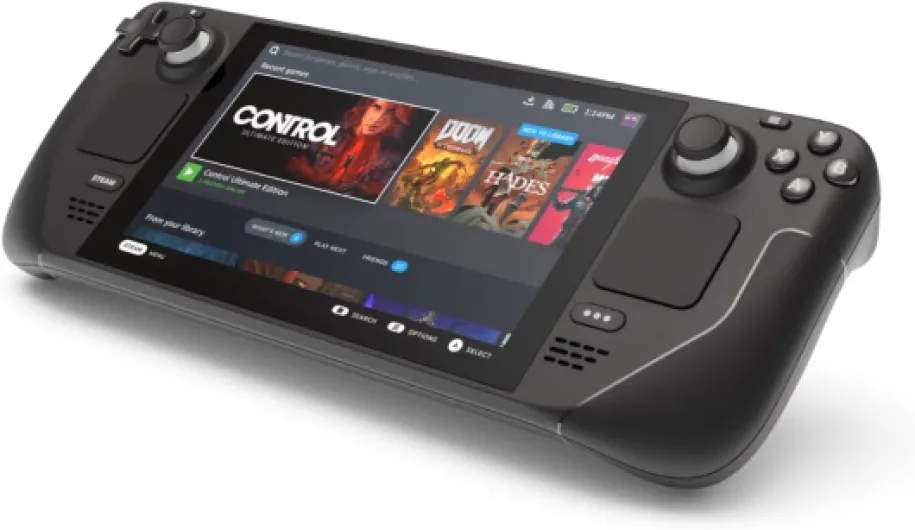
Customizing the software and user interface on your Valve Steam Deck can make your handheld gaming experience feel truly your own. The device runs on SteamOS, which is based on Linux, giving users a surprising amount of flexibility to tailor the look and feel of their gaming device.- Changing Themes and Layouts: Steam offers several built-in themes, but you can also find community-created options to give your display a fresh design. Adjusting the layout, font size, and color schemes can help you create a unique visual identity for your deck.
- Custom Boot Animations: Many users enjoy swapping out the default boot animation for a custom video or logo. This small touch can make powering on your device feel special every time.
- Game Library Organization: With a growing collection of AAA games and indie titles, organizing your library is key. Use custom collections, tags, and even custom cover art to make browsing your games more intuitive and visually appealing.
- Performance Tweaks: Adjusting settings like refresh rate, display size, and power supply profiles can help you balance performance and battery life. The Steam Deck allows you to set per-game performance profiles, so you can get the most out of each title, whether you’re playing on the go or docked at home.
- Third-Party Launchers and Emulators: For those who want to expand beyond Steam, it’s possible to install other game launchers or emulators. This opens up your device to games from other platforms, including classic Nintendo Switch titles or retro favorites, further enhancing your gaming experience.
Tools and Tips for a Seamless Customization
- Deck Skins and Custom Icons: Pairing your physical deck skin with matching software icons or backgrounds can create a cohesive look. Many shops offer downloadable icon packs designed to complement popular deck skins.
- Backup and Restore: Before making major changes, it’s wise to back up your settings and game saves. This ensures you can restore your device if something goes wrong during customization.
- Community Forums: The Steam Deck community is active and supportive. Forums and social media groups are great places to find inspiration, troubleshooting tips, and the latest custom software releases.
Risks and considerations when modifying your steam deck
Potential Drawbacks of Customizing Your Steam Deck
Personalizing your Valve Steam Deck can be exciting, but it’s important to understand the risks before making changes. Whether you’re applying a custom skin, upgrading to a high-speed NVMe SSD, or tweaking the display settings for a higher refresh rate, each modification can impact your gaming device in different ways.
- Warranty Concerns: Opening the device to upgrade hardware like the SSD or battery (such as the whr battery) may void your warranty. Valve’s policy is clear: unauthorized repairs or modifications can affect your coverage, so always check the terms before proceeding.
- Device Stability: Installing custom software or changing the user interface can sometimes lead to system instability. Some games may not run as smoothly, or you might experience crashes, especially with AAA games that push the hardware to its limits.
- Physical Damage: Applying a deck skin or custom skin incorrectly can leave residue or damage the case. Using third-party deck skins or accessories not designed for the Steam Deck might also interfere with heat dissipation or block ports.
- Performance Risks: Upgrading to a faster NVMe SSD or increasing the display size may improve your gaming experience, but it can also increase power consumption and heat. Without the right power supply or cooling, your device could overheat or drain the battery faster.
- Compatibility Issues: Not all accessories, such as carrying cases or skins, are made for the full-size Steam Deck. Using products designed for other handheld gaming devices, like the Nintendo Switch, might not fit properly or protect your device as intended.
- Resale Value: Customizations can affect the resale value of your device. While some buyers appreciate a unique design, others prefer an untouched Steam Deck, especially if it’s still under warranty or in high demand during a sale.
Before making any changes, research the best options for your needs. Check community forums, shop for reputable deck custom accessories, and always consider how modifications might impact your long-term gaming experience. Taking these precautions will help you enjoy a personalized Steam Deck without unnecessary risks.
Community resources and inspiration for steam deck custom projects
Where to Find Inspiration and Support for Your Steam Deck Customization
Personalizing your Valve Steam Deck can be a rewarding journey, especially when you tap into the vibrant community of handheld gaming enthusiasts. Whether you’re looking for a unique deck skin, advice on upgrading to a high-speed NVMe SSD, or ideas for a custom carrying case, there are plenty of resources to guide you.- Online Forums and Social Media: Platforms like Reddit, Discord, and dedicated Steam Deck forums are filled with users sharing their custom designs, deck skins, and hardware upgrades. You’ll find real-world photos of deck custom projects, tips for improving display size or refresh rate, and troubleshooting advice for issues like power supply or whr battery replacement.
- Modding Communities: Sites focused on gaming device modifications often feature step-by-step guides for installing a new NVMe SSD, swapping out the display, or even adding a full size controller grip. These communities can help you avoid common pitfalls and ensure your device remains compatible with AAA games and the latest Steam updates.
- Shops and Marketplaces: Many online shops offer a wide range of deck skins, custom skin designs, and accessories like carrying cases. Look for sellers with high ratings and clear return policies, especially if you’re buying a deck skin or case on sale. Some shops even allow you to upload your own design for a truly unique look.
- Video Tutorials: YouTube and other video platforms are excellent for visual learners. You’ll find demonstrations on everything from installing a new NVMe SSD to applying a deck skin without bubbles. Watching these can help you feel more confident before starting your own project.