Summary
Editor's rating
Is it worth the money, or should you just hunt the original consoles?
Chunky plastic, three slots, and a pretty tight fit for carts
Controllers: usable, but original pads are still better
Build quality and long-term worries
How well it actually plays NES, SNES and Genesis games
What this thing actually does (and what it doesn’t)
Pros
- Plays original NES, SNES and Genesis/Mega Drive cartridges in 720p over HDMI
- Six controller ports with support for original controllers from all three systems
- Simple plug-and-play setup with region switches and included HDMI cable
Cons
- Tight cartridge slots and average build quality raise some long-term concerns
- Genesis/Mega Drive compatibility and region handling can be quirky on some games
- Included controllers feel cheap compared to original pads and may not last

Specifications
View full product page →| Brand | Geek Theory |
One box for three old consoles… on a modern TV
I picked up the Retro-Bit Super Retro Trio HD Plus because I was tired of juggling an old NES, SNES and Mega Drive, plus a mess of cables and adapters for my TV. I just wanted a simple way to plug my original cartridges into an HDMI TV without going down the emulator rabbit hole on a PC or Raspberry Pi. So this was basically me being lazy and wanting less clutter under the TV.
Over a couple of weeks, I threw a bit of everything at it: PAL and NTSC SNES carts, some fairly beaten NES games from a flea market, and a mix of European and import Mega Drive/Genesis carts. I’m not a collector that cleans pins with holy water, I just want stuff to boot and be playable without constant fiddling. That’s the mindset I had testing this thing.
The first thing I noticed is that it does what it says: it takes your original carts and spits them out in 720p over HDMI. It’s not perfect, it doesn’t magically fix ugly sprites or bad sound from old games, but it makes them workable on a modern flat screen without needing weird adapters or a CRT. That’s really the core point here: it’s a convenience box.
If you’re expecting something on the level of a high-end FPGA system or a carefully tuned emulator setup, this is not that. It’s more of a plug-and-play compromise: less hassle than three original consoles, better picture than composite on a modern TV, but with a few quirks and rough edges you have to accept. That’s the lens through which the rest of this review makes sense.
Is it worth the money, or should you just hunt the original consoles?
Price-wise, this sits in that awkward middle ground: cheaper than buying three separate original consoles plus an HDMI solution, but not dirt cheap either. One Amazon reviewer said it feels about £20 overpriced, and I kind of get that. For what is basically a clone system in a plastic shell, you’re paying for convenience more than for premium hardware or perfect accuracy.
If you already own a working NES, SNES and Mega Drive, plus a decent way to get them onto an HDMI TV (like a scaler or good converters), then this box doesn’t bring a lot of extra value. In that situation, it’s more of a space saver than a necessary upgrade. On the other hand, if your old consoles are dead, missing, or you just don’t want to deal with the mess of cables and adapters, the Retro Trio starts to look more reasonable. One box, one HDMI cable, and you’re playing carts again. That simplicity is really what you’re paying for.
Compared to building an emulator setup, this is definitely more expensive in terms of raw performance per dollar. A cheap mini PC or Raspberry Pi with ROMs will give you more systems, better scaling options, and less compatibility weirdness. But that’s a different mindset: here you’re paying to use original cartridges and controllers without sinking hours into configuration. If that matters to you, the value becomes more acceptable.
Personally, I’d say the value is decent but nothing more. It’s not a rip-off, but it’s also not a bargain. You get a functional, convenient way to play most of your NES/SNES/Genesis carts in 720p, plus two controllers and all the ports you need. In return, you accept some quirks, average build quality, and the risk that a few games won’t behave perfectly. If that trade-off sounds fair to you, the price is okay. If you’re very budget-conscious or very picky about accuracy, there are better routes, even if they require more effort.
Chunky plastic, three slots, and a pretty tight fit for carts
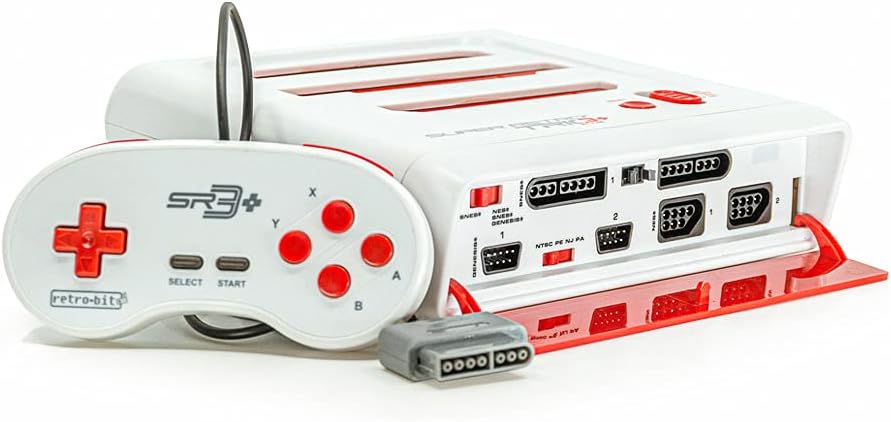
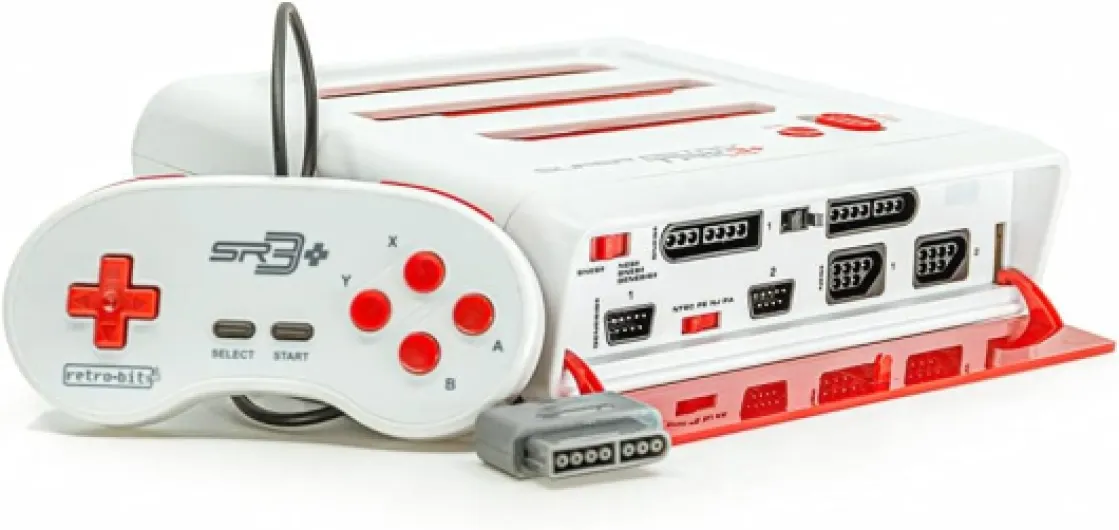
Design-wise, this is very obviously a retro clone box. The red and white color scheme screams "generic Famicom knockoff" more than premium hardware, but honestly, it’s fine. It’s a light plastic shell, pretty compact considering it houses three cartridge slots and six controller ports. It’s not heavy, but it doesn’t feel like it’s going to fall apart in your hands either. Think cheap but serviceable, not collector-grade.
The layout is simple. On top you have three clearly labeled slots: NES, SNES, and Genesis. The power and reset buttons are on the front, next to the controller ports. On the back, HDMI, AV out, and the USB power input. I like that everything is clearly labeled; you don’t have to guess which port is what. The 4:3 / 16:9 switch is also easy to reach. It’s basically designed for people who don’t want to read a manual: plug in, flip a couple of switches, done.
The main design issue I ran into is the tightness of the cartridge slots. Several users mentioned it, and I can confirm: some carts go in really snug. My SNES games felt especially tight going in and out. It’s not to the point where I thought I’d break something, but it’s definitely firmer than the original consoles. If you’re the type who babies your cartridges and hates any resistance, you won’t love this. I found that pushing them straight down and pulling them straight up, no wiggling, worked best.
On the positive side, the small footprint and all-in-one design really help with cable clutter. Compared to having three separate original consoles plus an HDMI converter or AV switch, this is way cleaner. It’s not pretty enough to be a centerpiece under the TV, but it blends in and doesn’t scream for attention. For a device that’s supposed to just sit there and play old games, I’m okay with the no-frills look and basic plastic feel.
Controllers: usable, but original pads are still better
The console comes with two wired 6-button controllers, clearly modeled after Genesis pads. They plug into the Genesis ports, and you use them across the systems via the console’s internal mapping. The cables are around 10 feet, which is actually generous. I could sit on the couch comfortably without dragging the console onto the floor. So in terms of reach, no complaints there.
In the hand, the controllers feel like typical third-party pads: light plastic, clicky buttons, and a D-pad that’s okay but not great. For basic platformers or beat ‘em ups, they’re totally usable. I played a couple of hours of SNES and Genesis games with them and didn’t have any hand pain or serious frustration. But compared to original SNES or Mega Drive controllers, you do feel the difference. The D-pad isn’t as precise, and the face buttons don’t have the same consistent feel. If you’re used to original hardware, you’ll notice this right away.
The good news is that the console has native ports for original controllers from all three systems. I plugged in an original SNES pad and the experience improved immediately. Same with an old Mega Drive controller I still had lying around. If you care about comfort and precision, I’d honestly say: treat the included controllers as backup or for a second player, and use original pads for your main sessions.
From a general comfort point of view, the console doesn’t get hot, doesn’t make noise, and doesn’t need you to sit right next to it thanks to the long cables. So physically playing on it is fine. The only real comfort downside is the slightly cheap feel of the included controllers and the tight cartridge slots that make swapping games a bit more effort than on the original consoles. Not a deal-breaker, but it’s part of the experience.

Build quality and long-term worries
Durability is always the question with this kind of clone hardware. It’s not built like a tank, but it also doesn’t feel like it’s going to crumble in your hands. The plastic shell has a bit of flex if you press hard, but under normal use it’s fine. I moved it around, plugged and unplugged cables a bunch of times, and nothing felt loose or fragile. The buttons still click properly and the ports hold the plugs firmly.
The part that concerns me a bit long-term is the tight cartridge slots. Every time you push in a cart and pull it out, you’re putting stress on both the slot and the cartridge pins. After a couple of weeks of swapping games, I didn’t see any obvious wear, but I can imagine that after a year or two of heavy use, either the slots might loosen, or some carts might start to show more wear on the contacts. It’s not catastrophic, but it’s something to keep in mind if you’re very protective of your collection.
The controllers feel the most disposable. The plastic is light, and the buttons don’t inspire much confidence for the long run. I wouldn’t be surprised if, after a year of regular use, one of the buttons starts sticking or the D-pad gets mushy. Luckily, because you can plug in original controllers, you’re not locked into them. I’d almost treat them as a free bonus rather than a serious, long-term accessory.
There are also a few reports of units arriving dead or failing quickly, like the 1-star Amazon review where the buyer had to return it because it simply didn’t work. That’s the risk with these off-brand retro systems: quality control isn’t on the same level as big-name manufacturers. My unit worked fine, but I’d definitely test it thoroughly as soon as you get it, and maybe buy from a place with easy returns. If you get a good unit, it feels like it should last a reasonable amount of time under normal use, but I wouldn’t bet on it lasting decades like the original NES did.
How well it actually plays NES, SNES and Genesis games
Performance is where this thing is either "good enough" or "annoying" depending on how picky you are. For NES and SNES, I was pleasantly surprised. Most of my standard games booted up on the first try, and I didn’t notice any big input lag or weird slowdowns. Super Mario World, Zelda: A Link to the Past, and a couple of random sports and platformers felt normal to play. The sound is a bit different compared to the original hardware if you really listen for it, but it’s not broken or distracting. For casual play, it’s totally fine.
Genesis/Mega Drive is a bit more mixed. Simple games like Sonic 1 and 2 ran fine, both in terms of speed and controls. But I ran into the same kind of issue one Amazon reviewer mentioned: some games defaulting to Japanese language or having odd region behavior. For example, import carts or certain EA titles can behave differently depending on how you set the region switches. I also saw a bit of screen flicker when I tried to force a different region on one cart. It’s playable, but you can tell the compatibility layer isn’t perfect.
One thing I did like is that the input lag over HDMI didn’t feel bad. I’m sensitive to delay in platformers and action games, and I didn’t have a problem pulling off jumps or combos once I got used to the included controllers. That said, this also depends on your TV’s game mode. If your TV adds a bunch of processing, you’ll feel it no matter what console you use. On a halfway decent TV in game mode, this Retro Trio felt responsive enough for me.
Overall, performance is pretty solid for common games, with the caveat that you’ll hit some edge cases, especially on Genesis and with more exotic carts. It’s not a precision tool for hardcore purists; it’s a convenience device that gets you maybe 85–90% of the way there. If you’re okay with the idea that a few titles might misbehave or not run at all, the day-to-day experience is actually decent and quite playable.
What this thing actually does (and what it doesn’t)
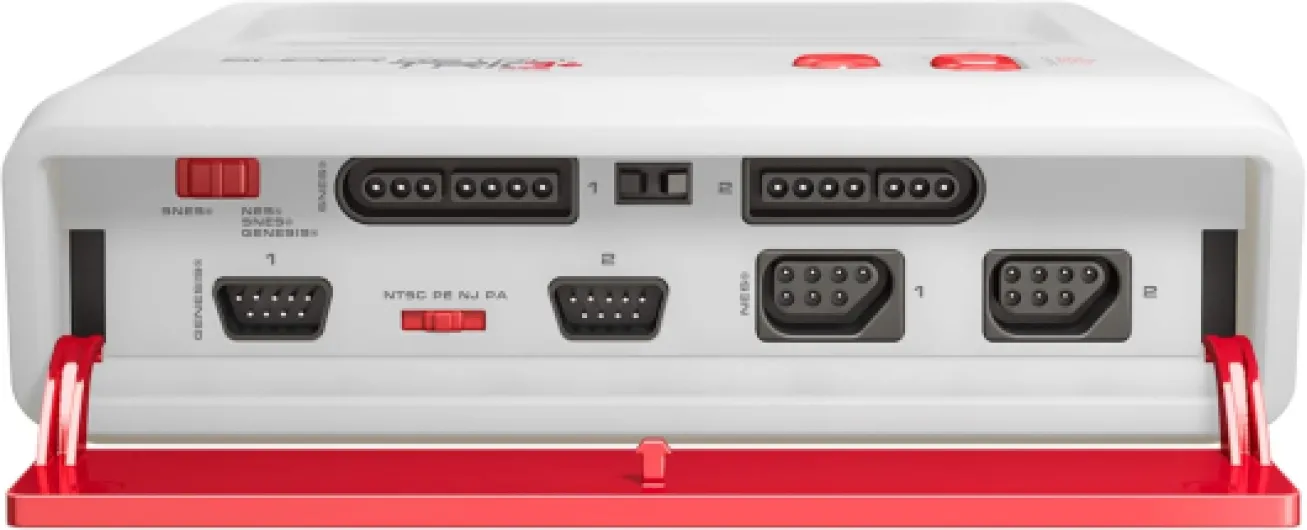
The Retro-Bit Super Retro Trio HD Plus is basically three clone consoles in one plastic shell: one slot for NES, one for SNES, and one for Genesis/Mega Drive. On the front you get six controller ports: two for NES, two for SNES, and two for Genesis. In the box you also get two wired 6-button controllers that plug into the Genesis ports, plus an HDMI cable and a USB power cable. No power brick, so you’ll need any standard USB charger (I used an old phone charger and it was fine).
Setup is straightforward. I plugged HDMI into my TV, USB into a 5V phone charger, set the region switches, shoved in a SNES cart, and it booted right away. There’s a small switch to flip between 4:3 and 16:9 output, and the console outputs at 720p, which is fine for this kind of hardware. It’s not razor sharp like some upscalers, but it’s miles better than composite on a big LCD. There’s also analog AV output if you really want to use a CRT, which is a nice extra.
In practice, the big selling point is compatibility across regions and systems. I tested a mix of PAL and NTSC SNES games, and they all started without any drama. Same for most NES carts I tried. Genesis/Mega Drive is where it gets a bit weirder: some games booted but defaulted to Japanese language or had odd region behavior, which matches a few Amazon reviews. It’s not a total mess, but it’s not 100% reliable either, especially if you have a lot of region-locked or special cartridges.
So overall, the presentation is clear: this is a budget-friendly, all-in-one box for original carts, with decent HDMI output and basic region support. It’s not an official Nintendo or Sega device, and it behaves like a clone: it covers most of the common games well enough, but if you have rare carts, special chips, or are picky about perfect accuracy, you will hit some limits. For someone who just wants to replay Mario, Sonic and a pile of 90s titles on a flat screen, it gets the job done.
Pros
- Plays original NES, SNES and Genesis/Mega Drive cartridges in 720p over HDMI
- Six controller ports with support for original controllers from all three systems
- Simple plug-and-play setup with region switches and included HDMI cable
Cons
- Tight cartridge slots and average build quality raise some long-term concerns
- Genesis/Mega Drive compatibility and region handling can be quirky on some games
- Included controllers feel cheap compared to original pads and may not last
Conclusion
Editor's rating
The Retro-Bit Super Retro Trio HD Plus is basically a convenience tool for people who still own a bunch of NES, SNES and Genesis cartridges and just want to plug them into a modern TV without overthinking it. It handles the basics well: HDMI output at 720p, region support for PAL and NTSC, six controller ports, and two bundled pads so you can play right away. Most common games run fine, especially on NES and SNES, and the input lag over HDMI is low enough that it feels natural once your TV is in game mode.
On the downside, it’s clearly a clone system with compromises. The plastic feels cheap, the cartridge slots are tighter than I’d like, the included controllers are serviceable but clearly below original pads, and Genesis/Mega Drive compatibility can be a bit odd with certain games and regions. There are also the usual risks around long-term durability and quality control that come with this kind of off-brand hardware. It’s not a premium solution, and it’s not trying to be.
I’d recommend this to someone who has a stack of original carts, doesn’t want to mess with emulation or expensive scalers, and just wants an all-in-one box that "mostly works" on a modern TV. If you’re a hardcore purist, a collector worried about cartridge wear, or someone who cares a lot about perfect audio/visual accuracy, you’ll probably be happier either hunting down original consoles and a good scaler, or going the emulator/FPGA route. For everyone else, this is a pretty solid, if slightly overpriced, way to bring old games back into the living room without too much hassle.