Summary
Editor's rating
Value for money: who should actually buy this
Design and build: compact, enclosed, and more serious than it looks
Packaging and unboxing: simple but reassuring
Build quality and long-term feel
Speed and print quality: fast on paper, mostly sensible in practice
What the Adventurer 5M Pro actually offers in real life
Day-to-day use: how well it actually does the job
Pros
- Enclosed CoreXY design with auto bed leveling that makes setup and first layers straightforward
- Quick-swap 280°C nozzle and flexible PEI plate simplify maintenance and part removal
- Good speed and print quality for PLA/PETG with relatively low failure rate once set up
Cons
- Software ecosystem is somewhat closed and Mac installers can lag behind latest OS versions
- Noise level at higher speeds is noticeable, not ideal for very quiet rooms

Specifications
View full product page →| Brand | FLASHFORGE |
A 3D printer for people who don’t want to babysit a 3D printer
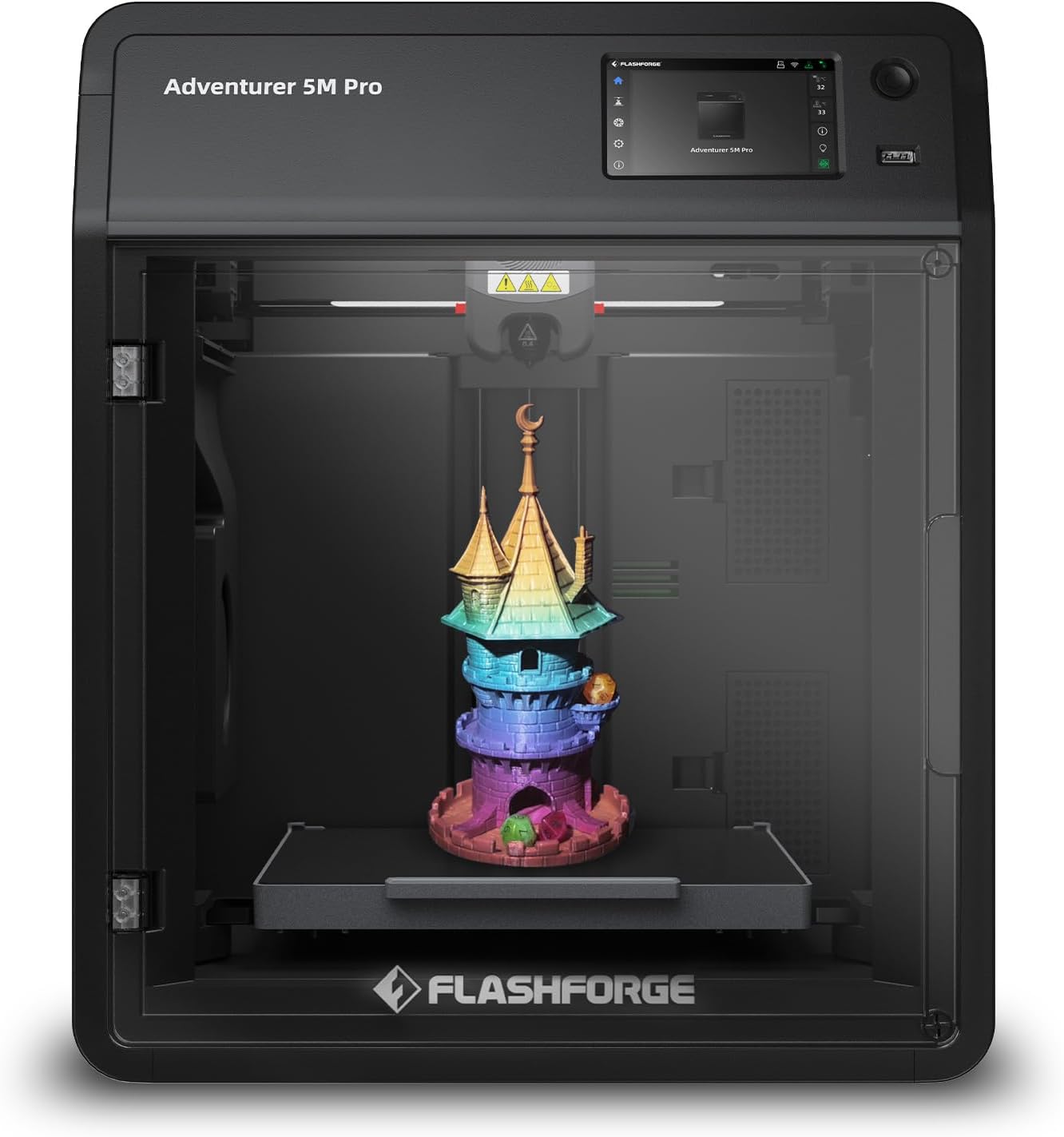
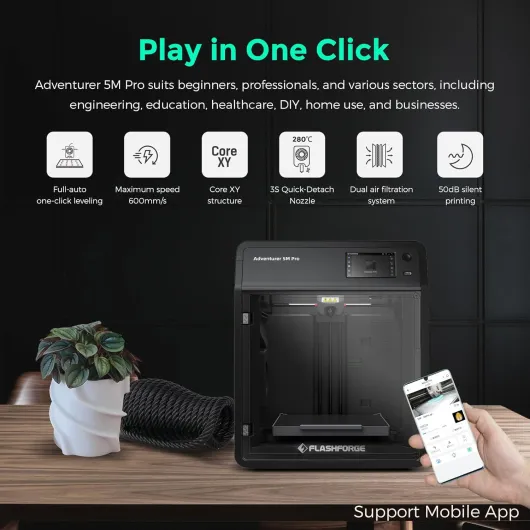
I picked up the FLASHFORGE Adventurer 5M Pro because I was tired of fiddling with open-frame printers that needed constant tweaking. I wanted something enclosed, reasonably quiet, and as close as possible to “hit print and walk away”. On paper, this one checks a lot of boxes: CoreXY, up to 600 mm/s, quick-swap nozzle, auto-leveling, and it supports a bunch of filaments like PLA, PETG, ABS, and even some carbon-fiber blends.
In reality, my experience has been a mix of “nice, that’s exactly what I wanted” and “why is the software side still this clunky in 2026?”. The hardware feels solid and well thought out, but the software and ecosystem clearly lag a bit behind the machine itself. If you’re used to tinkering with Ender-style printers, this will feel like a relief in many ways, but you’ll also bump into some Flashforge quirks.
I’ve been using it mainly for functional parts: brackets, small enclosures, jigs for the workshop, and some decorative stuff for around the house. I’ve run PLA and PETG through it so far, and played a bit with different speeds and layer heights. I’m not a hardcore 3D printing nerd, but I know enough to compare it to common entry-level printers and a couple of mid-range ones I’ve used before.
Overall, it’s a pretty solid “semi-pro” home printer that leans heavily toward convenience. It’s not perfect and it’s not the cheapest, but if you value your time more than spending evenings tuning firmware and re-leveling beds, it’s a serious option. Just be ready to deal with some software friction, especially if you’re on the latest macOS or only use tablets.
Value for money: who should actually buy this
Price-wise, the Adventurer 5M Pro sits in that mid-range spot where you expect more than a basic entry-level printer but you’re not paying for full-blown industrial gear. Looking at what you get—enclosure, CoreXY, 280°C hotend, auto-leveling, PEI plate, HEPA filter, and a decent build volume—the package is pretty solid. It’s especially interesting if you compare it to the money and time you end up dumping into a cheaper open-frame printer to make it behave.
If you’re completely new to 3D printing and you don’t want to tinker, the value is in the time saved. You’re paying to skip the whole “upgrade the springs, change the bed, flash custom firmware” phase. You plug it in, follow the guided setup with the Flash Maker app, and you’re printing. The learning curve then is mainly about 3D design and slicer basics, not about fighting the hardware. For a home user or a parent getting this for a teenager who likes making things, that’s worth quite a bit.
For small businesses or makers who sell prints, the value comes from speed and reliability. The high travel speeds and quick heating mean you can push more jobs through in a day, and the enclosed design plus filtration helps if you’re running it in a shared space. You’re not going to match the ultra-tuned output of a much more expensive pro machine, but for fixtures, jigs, parts, and small products, it’s plenty good.
On the downside, you’re somewhat tied into the Flashforge ecosystem. The slicer is more closed than something like pure Orca or PrusaSlicer, and the software support for the latest macOS versions clearly lags sometimes, which can be a pain. If you’re a hardcore tinkerer who likes modding everything, you might feel a bit boxed in. So in terms of value: it’s good for people who want a mostly plug-and-play enclosed printer and don’t mind using the provided tools; it’s less attractive if your main hobby is tweaking firmware and hardware mods.
Design and build: compact, enclosed, and more serious than it looks
Physically, the Adventurer 5M Pro feels more like a small piece of lab equipment than a hobby kit. The footprint is about 15.75 x 14.96 inches and the height is around 17.83 inches, so it fits on a deep shelf or a sturdy desk. The enclosure panels and door are plastic, but the internal structure is all-metal, and you can tell when it starts moving at higher speeds: it doesn’t wobble or rattle like the cheaper open-frame printers I’ve used.
The CoreXY layout is a big plus. Compared to the usual bed-slinger designs (like an Ender 3), the bed only moves up and down on Z, while X and Y are handled by belts on the top gantry. In practice, that means less shaking at high speed, more consistent layers, and fewer issues with tall prints wobbling. If you’ve ever watched a big print vibrate on an open-frame machine, this feels a lot more controlled. It’s also enclosed, which helps keep drafts away and holds temperature better for ABS or ASA.
The front door gives easy access to the plate, and the magnetic PEI bed just lifts out. This seems minor, but it makes a huge difference when you’re doing multiple prints in a row. Instead of scraping on the machine, you pull the plate, flex it, and the part pops off. I’ve used glass beds, textured plates, and tape before; this is simply more practical and less messy. Inside, cable management is decent, and the quick-swap nozzle is right there at the front of the print head with a latch, so you’re not digging around with hex keys.
If I had to nitpick, the design is more functional than pretty. It’s a grey box with a window and a small touchscreen. No fancy light show, no “look at me” design touches. Also, it’s not tiny: for the build volume, the overall size could be more optimized, but that’s the trade-off of having it fully enclosed with decent airflow and filtration. For me, the design hits the right balance: compact enough for a home office, sturdy enough to feel reliable, and enclosed enough to be kid-safe if you keep the door closed.
Packaging and unboxing: simple but reassuring
The packaging is pretty straightforward: a sturdy, heavy box with thick foam inserts that hold the printer firmly in place. Mine showed up via standard courier and the box took a couple of knocks, but the printer itself was untouched. This matches what other users noted: the packing is done properly, with enough protection that you’re not opening it with a sinking feeling that something might be cracked.
Inside, everything is laid out logically. The printer comes mostly assembled, with foam blocks and tape securing the moving parts. Removing the protective bits took a few minutes but nothing crazy—no hidden screws, just obvious foam and tape. The accessories (power cable, USB stick, manual, and some basic tools) are in separate bags. The included USB drive is actually useful because it contains the slicer installers and some sample files, although, as mentioned, the Mac installers can be out of date compared to the latest OS version.
The printed documentation is okay but not great. It covers the basic steps, but a lot of the real guidance comes from the on-screen wizard and the mobile app. If you’re the type who likes thick manuals with every possible scenario, you won’t get that here. On the other hand, the touchscreen walkthrough is clear enough that I didn’t really miss it. For beginners, the combination of the quick start guide and the on-printer prompts should be enough to get going.
Overall, the unboxing experience fits the product: more practical than fancy. No premium unboxing vibe, no extra goodies, just a printer that arrives well protected and is ready to use quickly. That’s fine by me; I’d rather they spend money on the frame and mechanics than on glossy packaging I’ll throw out after 10 minutes.
Build quality and long-term feel
I haven’t owned this printer for years, but based on a few weeks of regular use and the way it’s built, it feels like it’s meant to last. The all-metal frame and CoreXY rail setup give a sturdy impression. There’s none of that flex you sometimes feel when you push on cheaper open-frame machines. The moving parts glide smoothly, and after several longer prints, I didn’t notice any loosening or weird vibrations developing.
The parts most likely to wear out on any printer are the nozzle, build plate, belts, and fans. Flashforge made at least two of those pretty painless. The quick-detach nozzle means you can replace the whole hotend module without digging into tiny screws, and replacements are reasonably priced compared to some proprietary systems. The PEI plate is also swappable and not expensive, so if you scratch it or wear it out, you’re not crying over it. For a home or small business setup, this is practical: you can just keep a spare plate and nozzle on hand.
The enclosure panels and door are plastic, but they don’t feel flimsy. The hinges are okay; they don’t slam around or feel like they’ll snap off after a month. Internally, cables are mostly tucked away, and the connectors look decent. I didn’t see loose wires hanging or hot glue “engineering” like on some budget printers. Fans are a bit loud at higher speeds, but that’s normal, and they at least move a good amount of air to keep things cool and the chamber ventilated.
Based on user reviews and my own impression, the main “durability” concern isn’t the frame, it’s the ecosystem: firmware and software support over time. If Flashforge keeps updating their slicer and firmware, the hardware should stay relevant for years. If they stop, you’ll still have a solid machine, but you might need to rely on community tools more. From a pure physical standpoint though, it feels more like a small industrial unit than a flimsy hobby kit, and that’s reassuring if you plan to run it a lot.
Speed and print quality: fast on paper, mostly sensible in practice
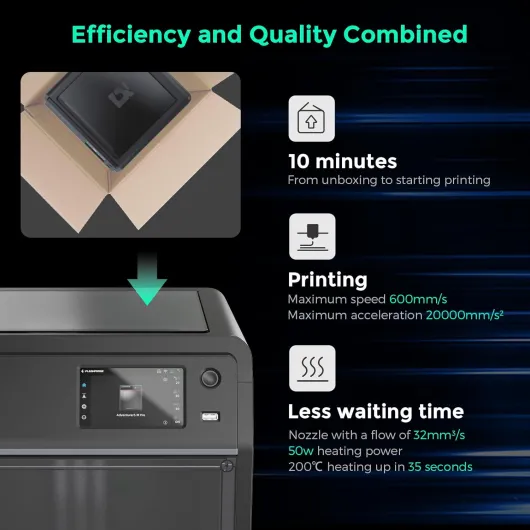
Flashforge advertises up to 600 mm/s and 20,000 mm/s² acceleration, which sounds wild if you’re coming from older printers. In real use, you’ll rarely run it at the absolute max if you care about surface finish, but even at more reasonable profiles it’s clearly quicker than older bed-slingers. The nozzle also heats from room temp to 200°C in about 35 seconds, so you’re not staring at the screen forever before each job.
Out of the box, the test prints (the usual calibration cube and a small model) came out clean: good layer adhesion, decent details on corners, and no obvious stringing at the default PLA profile. I didn’t touch any settings for the first few prints, and they were good enough to use straight away. That’s a big difference compared to some cheaper printers where the first week is just failed noodles and constant tweaks. With PETG, I got usable parts after a single calibration run; no big warping, just a bit of fine-tuning on retraction to reduce small strings.
Where the speed really shows is on medium-sized parts. A bracket that used to take 6–7 hours on a slower printer dropped to about 3–4 hours with a faster profile here, without turning the surface into a mess. If you push it to very high speeds, you do start to see more ringing and small artifacts on sharp edges, but that’s normal physics, not a unique flaw. The CoreXY frame helps keep it under control, and the enclosure reduces environmental issues like drafts.
The main thing for me is reliability. Once the auto-leveling is done, the first layer just sticks. I’m not constantly baby-sitting the first 10 minutes of every print. Over multiple jobs, I had far fewer failures than with my old Ender-style machine. It’s not magic: you can still get clogs or bad filament, but the baseline is much more “it prints” than “it might print if the stars align”. Overall, the performance is strong for the price, especially if your priority is getting parts out quickly with minimal fuss rather than squeezing every possible micron of detail.
What the Adventurer 5M Pro actually offers in real life
On the spec sheet, the Adventurer 5M Pro looks like a compact workhorse. Build volume is 220 x 220 x 220 mm, which is big enough for most household projects and small business parts, but obviously not for huge cosplay armor or massive vases. The whole unit is enclosed, with a door and top cover, and it weighs around 32 lbs (about 14.5 kg), so it’s not a toy. It has a CoreXY motion system, an all‑metal frame, and a direct-drive extruder that can go up to 280°C, which lets you print PLA, ABS, PETG, ASA, TPU, PC, and some carbon-fiber filaments (PLA-CF, PETG-CF).
The printer is sold as “unbox and print in 10 minutes”, and that’s honestly not far off. There’s very little assembly: pull it out of the box, remove packing foam, plug it in, connect to Wi‑Fi, and run the guided setup. Auto-leveling is handled by a pressure sensor, so you don’t mess with knobs or Z-offset manually. For a beginner, this is a big relief. For someone who already knows their way around printers, it’s just nice not to waste time.
The machine comes with a dual-sided PEI build plate that’s flexible, so you just bend it to pop prints off. There’s also a quick-detach nozzle module, which means if you clog it or want a different size (0.25, 0.4, 0.6, 0.8 mm), you can swap the whole thing in seconds instead of doing surgery on a hotend. Internally it also has a dual circulation system and HEPA filtration, which is handy if you’re printing ABS or you just don’t want the whole room smelling like molten plastic.
Flashforge pushes their Flash Maker app for mobile control and remote monitoring, and on the PC side you get FlashPrint 5 and a Flashforge-customized Orca. That’s where some people hit snags: the installer versions can lag behind the latest operating systems, especially macOS, so you may need an older machine or wait for updates. In day-to-day use, though, once everything is installed, the printer behaves like a small appliance: you send a file, it heats up, and it usually just prints without drama.
Day-to-day use: how well it actually does the job
In everyday use, the Adventurer 5M Pro is basically a tool that you turn on and expect to work. The auto bed leveling with pressure sensing is the big win here. You don’t do manual Z-offset guessing; the printer probes multiple points and sets things up. For me, this meant I could switch filaments or remove and replace the plate without constantly re-tuning. First layers were consistent enough that I stopped hovering over the machine after a while.
The dual-sided PEI plate does what it’s supposed to do: good grip when hot, easy release when cool. I’ve printed small and medium parts without rafts, just skirts or brims when needed, and they held fine. With PETG, I used a bit more caution (slightly higher Z offset and some release agent) to avoid over-sticking, but that’s standard practice. The quick-detach nozzle is also very practical. I had one early clog from some cheap filament; instead of tearing everything down, I just swapped in a spare nozzle module and was back printing in a couple of minutes.
The filament runout sensor and resume printing features actually matter when you’re doing long jobs. I had one 10+ hour print where the filament ran out near the end. The printer paused, I loaded a new spool, and it finished the part with only a small line visible if you look closely. That’s the kind of thing that saves you both time and nerves. The enclosure and HEPA filtration also help: with PLA and PETG there’s still some smell, but it’s noticeably less intense than an open printer next to you. For ABS or ASA, having the door closed and filtration running is a lot more comfortable.
It’s not all perfect. The printer isn’t exactly quiet at high speeds; the stepper and airflow noise is more like a loud PC or a small server. If you plan to sleep in the same room, that might be annoying. Also, the effectiveness of the whole system depends on you having the right software setup, and that’s where the friction shows. But purely in terms of putting plastic in, getting usable parts out, and not wasting weekends on calibration, it gets the job done well.
Pros
- Enclosed CoreXY design with auto bed leveling that makes setup and first layers straightforward
- Quick-swap 280°C nozzle and flexible PEI plate simplify maintenance and part removal
- Good speed and print quality for PLA/PETG with relatively low failure rate once set up
Cons
- Software ecosystem is somewhat closed and Mac installers can lag behind latest OS versions
- Noise level at higher speeds is noticeable, not ideal for very quiet rooms
Conclusion
Editor's rating
The FLASHFORGE Adventurer 5M Pro is a good fit for people who want a capable 3D printer that behaves more like an appliance than a long-term DIY project. The enclosed design, CoreXY motion system, auto bed leveling, and quick-swap nozzle all point in the same direction: less fiddling, more printing. Print quality on PLA and PETG is solid out of the box, speeds are genuinely higher than older bed-slingers, and the PEI plate plus filament sensor make everyday use a lot less stressful.
It’s not perfect. The main weak spot is the software side: you depend on Flashforge’s tools, and if you’re on the newest macOS you might have to wait for updated installers or use an older machine. Noise is also not negligible at higher speeds, so placing it in a bedroom is not ideal. And if you’re the type who loves open-source firmware, custom mods, and endless tweaking, this printer might feel a bit locked down.
If you’re a beginner, a casual maker, or a small business owner who values reliability and ease of use over deep tinkering, the Adventurer 5M Pro offers good value for money. It gets the job done with minimal hassle and handles a wide range of materials in a compact, enclosed package. If your main goal is to squeeze every last bit of customization from your printer, or you absolutely need fully open software, you might want to look elsewhere.