Understanding emulator consoles
What Are Emulator Consoles?
Emulator consoles are specialized devices designed to replicate the hardware and software environment of classic gaming systems. They allow users to play retro games from platforms like NES, SNES, Sega Genesis, PlayStation, and more, all on a single device. Unlike traditional consoles, emulator consoles use software emulation to mimic the original systems, making it possible to enjoy a wide library of games without needing the original hardware.
Why Choose an Emulator Console?
For many gaming enthusiasts, emulator consoles offer a convenient way to revisit classic titles without the hassle of collecting old cartridges or discs. These devices are especially popular among those who appreciate the nostalgia of retro gaming but want modern conveniences like HDMI output, wireless controllers, and save states. Emulator consoles can also be a cost-effective solution for accessing thousands of games across multiple platforms.
- Access to a vast library of retro games
- Modern connectivity options (HDMI, USB, wireless controllers)
- Compact and user-friendly design
- Potential for multiplayer gaming with friends and family
How Emulator Consoles Work
At their core, emulator consoles rely on emulation software that interprets and runs game files (ROMs) designed for different gaming systems. The hardware inside these consoles is optimized to handle multiple emulators, ensuring smooth gameplay and compatibility with a wide range of titles. Some models come preloaded with games, while others require users to add their own game files.
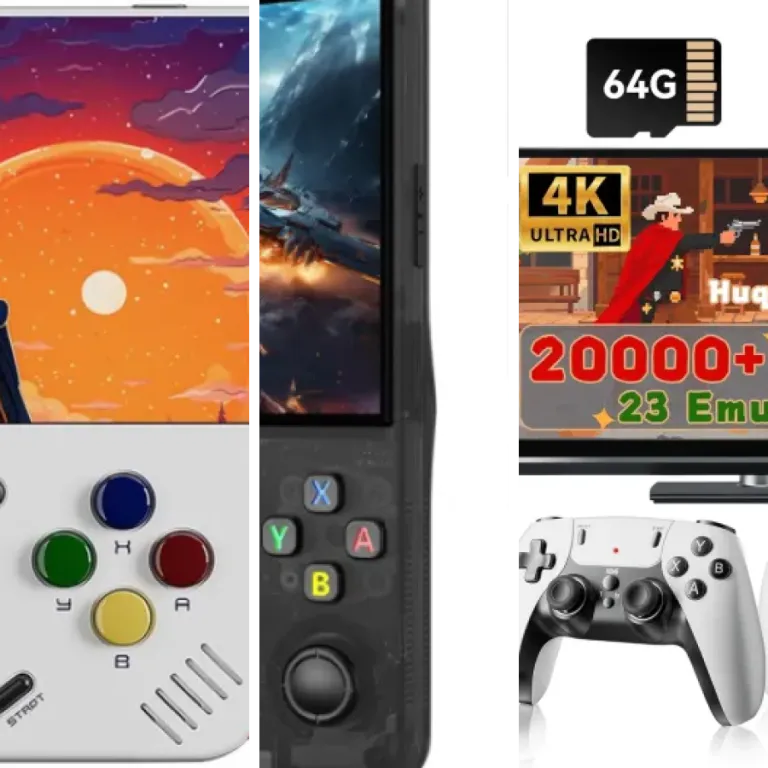
If you're interested in a device that combines plug-and-play simplicity with a massive selection of built-in games and emulators, check out this retro gaming console with 4K HDMI and 20,000 built-in games. This option is ideal for those seeking a hassle-free retro gaming experience.
As you explore emulator consoles, it's important to consider their features, compatibility, and the legal aspects of using emulated games. These topics will help you make an informed decision and get the most out of your gaming setup.
Key features to look for in emulator consoles
Essential Aspects When Choosing an Emulator Console
When exploring emulator consoles, understanding what sets a quality device apart is crucial. The right choice can greatly enhance your retro gaming experience and ensure long-term satisfaction. Here are the most important factors to consider:
- Hardware Performance: Look for consoles with reliable processors and sufficient RAM. This ensures smooth gameplay and reduces lag, especially with more demanding classic titles.
- Build Quality: Durable materials and solid construction matter. A well-built console will withstand frequent use and accidental drops, making it a better investment.
- User Interface: A simple, intuitive menu system makes it easier to browse and launch games. Some consoles offer customizable interfaces, which can be a bonus for advanced users.
- Controller Compatibility: Check if the console supports wired or wireless controllers, and whether it allows for third-party options. Comfortable, responsive controllers are key for enjoyable gameplay.
- Connectivity Options: HDMI output is standard for modern TVs, but some consoles also offer AV outputs for older displays. USB ports and SD card slots can expand storage and game libraries.
- Pre-installed Games and Storage: Many emulator consoles come with a selection of pre-installed games. Consider the size of the internal storage and whether you can add more games via external memory.
- Firmware Updates: Ongoing support from the manufacturer, including firmware updates, can improve compatibility and fix bugs over time.
For a closer look at a device that balances many of these features, check out this review of the Atari Game Station Pro. It highlights how modern emulator consoles can combine nostalgia with up-to-date technology.
As you compare options, keep in mind your own preferences and the types of games you want to play. The next sections will cover which consoles are popular today and how to ensure your favorite titles are supported.
Popular emulator consoles on the market
Leading Choices for Emulator Consoles
When exploring the world of emulator consoles, several models consistently stand out for their performance, versatility, and user satisfaction. These devices are designed to replicate the experience of classic gaming systems, offering a convenient way to revisit retro titles or discover them for the first time. Below, you’ll find a breakdown of some of the most popular emulator consoles available today, each with unique strengths and supported features.
- Anbernic RG Series: Known for robust build quality and a wide range of supported systems, the Anbernic RG series (like the RG351P and RG353M) is favored by enthusiasts. These handhelds run on open-source software, making them flexible for customization and compatible with many classic game libraries.
- Retroid Pocket 3+: This compact handheld offers Android-based versatility, allowing users to install various emulators and apps. Its touchscreen and ergonomic design make it suitable for both retro and modern indie games, supporting a broad spectrum of platforms.
- Miyoo Mini Plus: Praised for its portability and nostalgic design, the Miyoo Mini Plus is a pocket-sized option that delivers impressive performance for 8-bit and 16-bit gaming. Its community-driven firmware enhances compatibility and user experience.
- Super Console X: For those who prefer a plug-and-play experience on the big screen, the Super Console X series offers pre-installed emulators and thousands of games. These devices support multiplayer gaming and are easy to set up with HDMI connectivity.
- Steam Deck: While primarily a PC gaming handheld, the Steam Deck’s open platform allows for extensive emulator support. Its powerful hardware can handle demanding emulation tasks, making it a versatile choice for both retro and modern gaming.
What Sets These Consoles Apart?
The popularity of these emulator consoles is driven by several factors:
- Game Library Size: Devices like the Super Console X and Anbernic RG series support thousands of titles across multiple platforms, from NES and SNES to PlayStation and more.
- Portability: Handhelds such as the Miyoo Mini Plus and Retroid Pocket 3+ are designed for gaming on the go, with compact form factors and long battery life.
- Customization: Open-source systems allow users to tweak settings, add new emulators, and personalize their experience.
- Community Support: Active online communities provide firmware updates, troubleshooting, and tips for maximizing each console’s potential.
For those interested in the enduring appeal of classic handhelds, check out this in-depth look at why the clear GBA remains a favorite among handheld gaming fans. This resource highlights how nostalgia and thoughtful design continue to influence the emulator console market.
Compatibility and supported games
How Emulator Consoles Handle Game Libraries
When exploring emulator consoles, one of the most important aspects is how well they support different game libraries. Compatibility can vary widely between devices, so understanding what each console offers is crucial for an enjoyable experience.
- Supported Platforms: Most emulator consoles aim to cover classic systems such as NES, SNES, Sega Genesis, PlayStation, and Game Boy. Some advanced models even support more recent platforms, but always check the official documentation for a full list.
- Game File Formats: Emulator consoles typically use ROMs or ISO files. Make sure your chosen device supports the formats you need, as some consoles may have restrictions or require additional software.
- Firmware Updates: Regular updates can expand compatibility, fix bugs, and improve performance. Look for consoles with active developer support and a history of updates.
Performance and Playability
Performance is not just about running games, but also about how smoothly and accurately they play. Key factors include:
- Emulation Accuracy: High-quality emulator consoles strive to replicate the original hardware as closely as possible. This means fewer glitches, better sound, and more authentic gameplay.
- Controller Support: Some consoles allow you to use original controllers via adapters, while others rely on modern Bluetooth or USB controllers. This can affect the feel and responsiveness of your games.
- Save States and Cheats: Many emulator consoles offer features like save states, rewind, and cheat support, which can enhance your gaming experience, especially for challenging titles.
Checking Game Compatibility Before Purchase
Before investing in an emulator console, it’s wise to research which games are fully supported. Community forums, official compatibility lists, and user reviews are valuable resources. Some consoles provide open-source firmware, which can be updated to improve compatibility over time.
Considerations for Multiplatform Gaming
If you plan to play games from multiple systems, look for consoles with broad compatibility and flexible software. Devices that support a wide range of emulators and game file types will offer the most versatility. Always verify the product part and specifications to ensure your favorite titles are supported.
Legal and ethical considerations
Understanding the Legal Landscape
When exploring emulator consoles, it’s crucial to recognize the legal boundaries. Emulator consoles themselves are generally legal, as they are hardware or software designed to mimic the functions of classic gaming systems. However, the legality becomes complex when it comes to game files, known as ROMs. Downloading or distributing copyrighted ROMs without permission is illegal in many countries, even if you own the original game. Always check your local laws before acquiring or sharing game files.
Respecting Intellectual Property
Game developers and publishers hold the rights to their creations. Using emulator consoles for games you do not own can violate intellectual property laws. Some emulator consoles come preloaded with games, but it’s important to verify that these titles are either open-source, homebrew, or properly licensed. If you’re considering a product_part, ensure it does not include unauthorized content.
Ethical Gaming Practices
- Support original creators by purchasing games legally whenever possible.
- Use emulator consoles to preserve and enjoy games you already own.
- Avoid downloading ROMs from unofficial sources, as these often infringe on copyrights.
- Consider open-source or public domain games, which are freely and legally available.
Community and Industry Perspectives
Many in the gaming community see emulator consoles as valuable tools for preservation and accessibility, especially for titles that are no longer commercially available. However, the industry’s stance is firm regarding unauthorized distribution. Reputable emulator console manufacturers and retailers will clearly state their compliance with legal standards. Look for transparency in product descriptions and avoid devices that make dubious claims about preloaded content.
Staying Informed
Legal and ethical considerations are constantly evolving as technology and laws change. Stay updated by following credible gaming news sources and official statements from console manufacturers. This approach ensures you enjoy your emulator console responsibly and within the law.
Tips for setting up your emulator console
Preparing Your Emulator Console for First Use
Setting up an emulator console can be straightforward, but taking the right steps ensures a smooth experience. Start by unboxing your device and checking all included product parts. Most packages include the console, power supply, controllers, and sometimes an HDMI cable. Make sure nothing is missing before you begin.
Connecting and Configuring Your System
- Connect to your display: Use the HDMI or AV cable to connect the emulator console to your TV or monitor. Ensure the input source matches the port you used.
- Power up: Plug in the power supply and turn on the console. Some models may require batteries for wireless controllers.
- Controller pairing: For wireless controllers, follow the pairing instructions in the manual. Wired controllers usually work once plugged in.
Loading and Managing Game ROMs
Most emulator consoles require you to load game ROMs onto a microSD card or internal storage. Always use legally obtained ROMs to stay compliant with copyright laws. Organize your ROMs by console type for easier navigation. Some devices support drag-and-drop file transfers, while others may need specific folder structures.
Optimizing Performance and Display
- Adjust video settings: Many emulator consoles offer options to change resolution, aspect ratio, and apply filters for a retro look.
- Audio configuration: Check sound settings to ensure optimal output for your setup.
- Controller mapping: Customize button layouts for comfort and compatibility with different games.
Keeping Your Console Updated
Manufacturers often release firmware updates to improve compatibility and fix bugs. Check the official website or user manual for update instructions. Regular updates help you access new features and enhance stability.
Backup and Maintenance Tips
- Back up your ROMs and save files regularly to avoid data loss.
- Keep your console and controllers clean and store them in a safe place when not in use.
- If your device supports it, use a surge protector to prevent electrical damage.
By following these steps, you can maximize your enjoyment and extend the lifespan of your emulator console. Remember to always refer to the user manual for device-specific instructions and troubleshooting.
