Summary
Editor's rating
Is it worth the price, or are you overpaying for features you won't use?
Design and remote: looks simple, hides some quirks
Build quality, long-term use, and the whole storage headache
Performance and picture quality: fast box, picky about your setup
What this box actually does (beyond all the marketing buzzwords)
Streaming, Plex, and GeForce NOW: does it actually do what it promises?
Pros
- Very fast and smooth performance for 4K HDR streaming, Plex, and heavier apps
- Supports Dolby Vision, Dolby Atmos, Chromecast 4K, and a wide range of streaming services
- USB 3.0 ports, Ethernet, and Plex Media Server make it great for local media and advanced setups
Cons
- Only 16 GB of internal storage, practically forces you to buy external SSD or USB storage
- Price is high compared to other 4K streamers if you only use it for basic apps
- Setup for HDR, CEC, emulation, and GeForce NOW can be fiddly and time-consuming for non‑techy users

Specifications
View full product page →| Brand | nVidia |
A pricey little box that tech nerds keep recommending
I’ve been using the NVIDIA SHIELD Android TV Pro as my main streaming box for a while now, plugged into a 4K TV with a soundbar. Before this, I was bouncing between a Fire TV Stick 4K and the built-in apps on my TV, so I wasn’t exactly starting from nothing. I bought the SHIELD because everyone online kept saying it was the "best" Android TV box, especially if you care about picture quality, Dolby Vision/Atmos and messing around with emulators or Plex.
In practice, it’s a powerful but slightly fussy little box. It’s not the kind of thing I’d give to my parents and expect them to set up alone. Out of the box it works fine for basic Netflix and YouTube, but to really get your money’s worth you end up tweaking settings, installing launchers, setting up storage, and so on. If you like tinkering, that’s fun. If you just want to plug in and forget it, it can feel like overkill.
What stood out to me is how smooth and fast it feels compared to cheaper sticks. Apps open quickly, scrubbing through 4K content is responsive, and it handles heavy apps like Plex and some emulators without choking. On the other hand, the internal storage is tiny, and you pretty much have to plan for an external SSD if you want to store anything serious, especially games or a large library of apps.
Overall, I’d say it’s a strong box for power users, but a bit much in price and complexity for someone who just wants Netflix and Prime Video. It shines when you throw advanced stuff at it (AI upscaling, GeForce NOW, Plex server, emulation). But as a plain streaming box, it’s good, not mind-blowing, and the extra cost only makes sense if you use those extra features.
Is it worth the price, or are you overpaying for features you won't use?
Let’s be blunt: the NVIDIA SHIELD Pro is not cheap compared to other streaming options. You can grab a Fire TV Stick 4K, Chromecast with Google TV, or Roku for a fraction of the price. For someone who just wants Netflix, Prime, Disney+ and YouTube in 4K, those cheaper devices get the job done well enough. So the SHIELD only really makes sense if you plan to use its extra power: Plex server, GeForce NOW, emulation, lots of local media, or if you’re picky about picture processing and responsiveness.
Once you factor in the hidden costs, the price gap gets bigger. The 16 GB internal storage is a joke for a “Pro” device in 2026. If you want to install more than the basics or store games and ROMs, you basically need an external SSD or at least a good quality USB drive. Then maybe a better HDMI cable, possibly an HDMI splitter or switch that can handle full 4K HDR with Dolby Vision, and maybe even a powered USB hub if you’re plugging in multiple devices. Suddenly the total cost can creep up quite a bit.
On the positive side, you’re paying for a box that is fast, flexible, and reasonably future-proof. It handles 4K HDR streaming smoothly, supports Dolby Vision and Atmos, works well with Plex, and can double as a light gaming machine through GeForce NOW and emulators. If you spread that over several years of use, the value isn’t terrible, especially if you’re the kind of person who squeezes every feature out of it. But if you’re just going to watch Netflix and maybe run Kodi, you’re basically paying extra for power you’ll never use.
So in terms of value, I’d call it good for power users, average for everyone else. If you’re tech-savvy, want one box that can handle streaming, local media, and some gaming, and don’t mind spending extra on storage and cables, it’s a solid investment. If you just want a simple streamer for your living room TV, save your money and grab a mid-range stick instead. You won’t miss most of what the SHIELD offers.
Design and remote: looks simple, hides some quirks
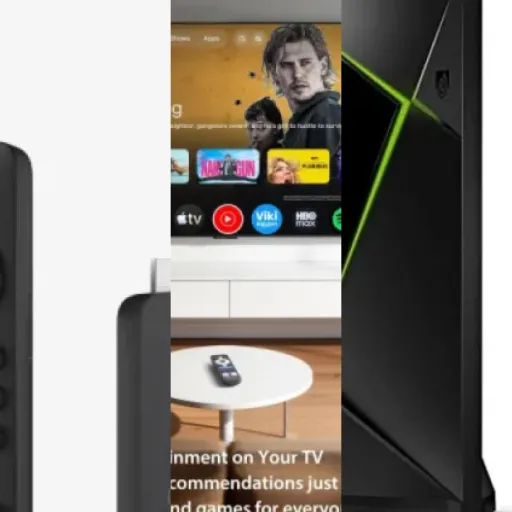
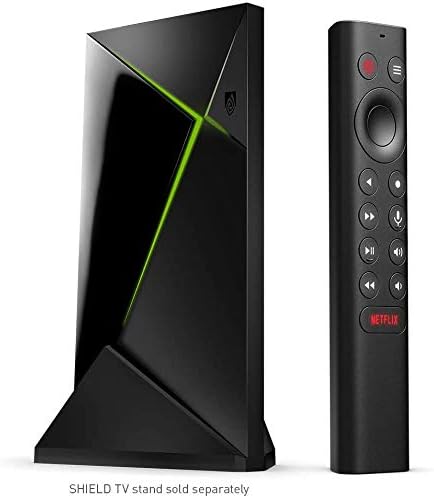
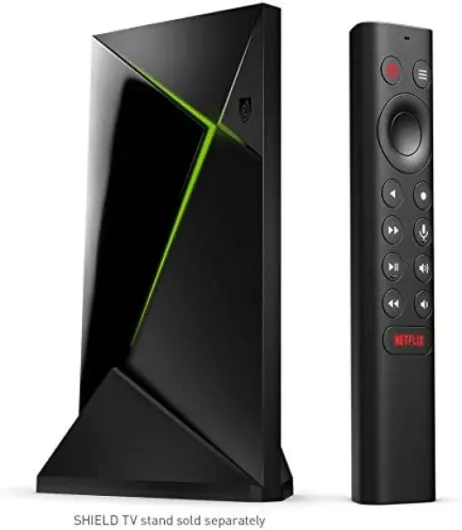
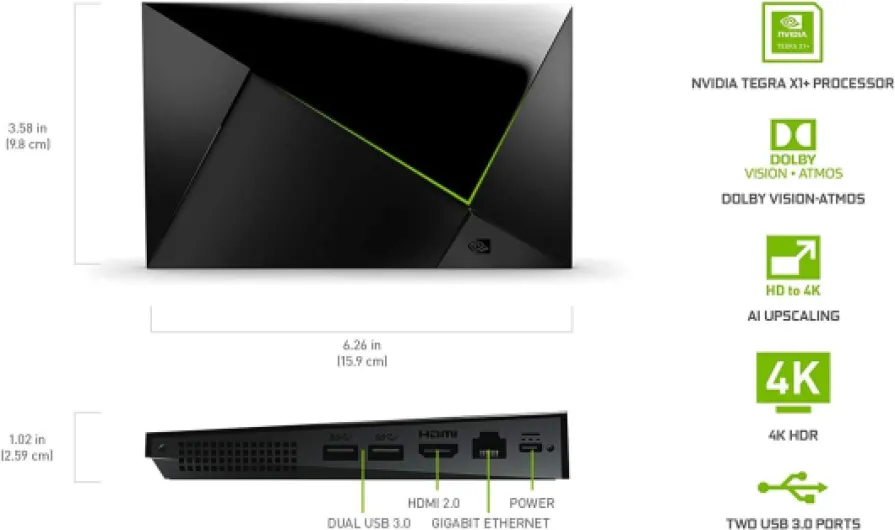
The SHIELD Pro itself is a compact black box, nothing flashy. It’s about 16 x 9 cm and fairly slim, so it disappears in a TV cabinet pretty easily. There are some angular lines and a small green light strip, but it’s not trying to be a console or anything. It feels sturdy enough in the hand, not cheap plastic, and it doesn’t scream for attention, which I like. This is something you set once and forget visually.
On the back you’ve got 2x USB 3.0 ports, HDMI, Ethernet, and power. The port layout is practical: you can plug in a USB SSD, a controller dongle, maybe a USB hub, and you’re good. I like that the Ethernet port is there because Wi‑Fi is fine until you start streaming high bitrate content or doing cloud gaming. One small annoyance: the power brick is external and the unit I saw came with a US two-pin adapter, so depending on your region you might need a plug adapter, which is a bit lazy at this price.
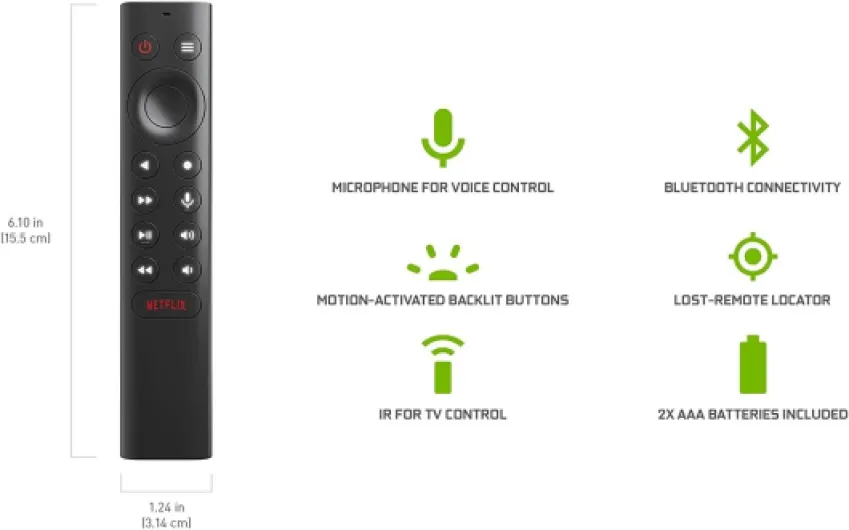
The remote is where opinions split. It’s a triangular stick-style remote, very light, with backlit buttons and a built-in microphone. On the plus side, it feels more premium than the cheap plastic remotes from many budget streamers, and the backlight is handy in a dark room. The layout is mostly fine: D‑pad, back, home, Netflix shortcut, volume, and a customizable button. But the buttons are quite sensitive, and I did trigger commands by accident more than once, especially when picking it up in the dark.
Another thing: CEC and IR control are powerful but a bit fiddly. You can have the remote control your TV and soundbar, but getting everything to behave perfectly (no random shutdowns, no weird volume jumps) takes some trial and error in the settings. Once dialed in, it works decently: one remote for TV, soundbar and SHIELD. Overall, I’d say the design is practical and low-profile, with a nice remote that just needs a bit of getting used to and some patience in the settings.
Build quality, long-term use, and the whole storage headache
Physically, the SHIELD Pro feels solid and well-built. It’s not metal, but the plastic doesn’t feel flimsy, and the box doesn’t get worryingly hot even after long streaming or gaming sessions. I’ve run it for hours with Plex streaming and some emulator tests, and it stayed stable without crashes or random reboots. Compared to cheaper Android boxes I’ve tried in the past, this one feels like it’s built to last several years rather than a year and then slowly die.
Software-wise, NVIDIA has a pretty good track record of long-term updates. This model has been updated up to Android TV 11, which is more than what many TV manufacturers manage for their built-in systems. That gives me a bit more confidence that apps will stay supported and security patches will keep coming for a while. The interface is still Android TV, which is not my favourite, but at least it’s maintained and compatible with most new apps.
The weak point for long-term use is clearly the 16 GB storage. That’s just not enough on a device positioned as a “Pro” box. Once you start adding GeForce NOW, a few Android games, emulators, and large streaming apps, you hit the limit fast. Yes, you can expand via USB with an SSD and format it as internal storage, but that adds cost and complexity. And if you use a cheap SSD or flash drive, you can run into performance issues, crashes, or games refusing to launch properly. I had to replace a cheap drive with a Samsung SSD before everything behaved.
In terms of ports and connectivity, having USB 3.0, Ethernet, Wi‑Fi, and Bluetooth 5.0 makes it more future-proof. You can add a powered USB hub later if you need more ports for drives and controllers. The remote also feels like it’ll survive normal use, although it is light and easy to drop between couch cushions. Overall, I’d say durability is solid: the hardware should last, the software is still being updated, but you almost have to budget for a decent external SSD to avoid storage headaches down the line.
Performance and picture quality: fast box, picky about your setup
In terms of raw performance, the SHIELD Pro is still quick, even though the hardware isn’t brand new anymore. Apps open fast, switching between Netflix, YouTube, and Plex is basically instant, and I almost never saw stutters in the interface. Compared to my Fire TV Stick 4K, the difference is clear: scrolling feels smoother, and heavy apps like Plex with large libraries run better and crash less. The 3 GB of RAM seems to help keep things in memory without constant reloads.
For picture quality, the AI upscaling is the feature that stands out. If you watch a lot of 1080p or even 720p content on a 4K TV, turning on AI upscaling does make things sharper. Faces and text look cleaner, and older HD content looks closer to native 4K. It’s not magic, and sometimes it can make things look a bit too sharp or artificial, but overall I preferred having it on for most shows. You can toggle it and see the difference, and on a good TV it’s noticeable.
Dolby Vision and HDR performance is good, but here’s the catch: your TV and HDMI setup really matter. If your TV doesn’t have enough high-bandwidth HDMI ports, or you’re running everything through an older receiver or splitter, you might not get Dolby Vision or HDR10+ working properly. In my case, I had to reshuffle devices because only two ports on my TV support full bandwidth, and one was used for ARC to my soundbar. So be ready to buy a decent HDMI cable and possibly a better splitter or switch if your current setup is older.
On the streaming side, all the big apps run in 4K HDR where supported, and the SHIELD handles it without breaking a sweat, as long as your internet connection is stable. Scrubbing through 4K content on Netflix or Disney+ is smooth, and I didn’t run into buffering issues that weren’t related to my ISP. Overall, performance is the main reason to get this: it feels like a proper mini-computer hooked to your TV instead of a cheap stick that struggles after a year.
What this box actually does (beyond all the marketing buzzwords)
The NVIDIA SHIELD Android TV Pro sells itself as this all-in-one 4K HDR streaming + gaming + smart home hub. On paper, it supports pretty much every service I actually care about: Netflix, Amazon Video, Disney+, Apple TV+, YouTube, plus things like Plex, Kodi, and GeForce NOW. It outputs 4K (3840x2160), supports Dolby Vision and Dolby Atmos, and has Chromecast 4K built in, so you can cast from your phone without an extra dongle.
Under the hood there’s the Tegra X1+ chip, 3 GB of RAM and 16 GB of internal storage. The RAM is fine; the storage is not. Once you install the usual suspects (Netflix, Prime, Disney+, a couple of streaming apps, maybe Plex, Kodi, and a few emulators), you’re basically staring at the "storage almost full" warning. So although the spec sheet looks decent, 16 GB including the system is pretty tight. You almost need an external SSD or USB drive if you plan to do more than basic streaming.
Function-wise, it’s running Android TV (now on Android TV 11) with Google Assistant built in and support for Alexa via Echo devices. You can use it as a Plex Media Server, which is a big deal if you have a local media library. It also has two USB 3.0 ports, Ethernet, Wi‑Fi, and Bluetooth 5.0, so you can plug in storage, controllers, keyboards, or a USB hub without much drama. That’s a big difference from cheap sticks that have zero or one USB port and no proper Ethernet.
In real use, the SHIELD feels like a mini media PC more than a dumb streamer. You can run emulators, connect gamepads, use it for GeForce NOW cloud gaming, or just run it as a headless Plex server. If you don’t care about any of that and just want to watch TV, a Fire TV or Chromecast with Google TV will do the job for less money. But if you like having a box that can handle more demanding tasks and stay responsive, the SHIELD actually earns its spot under the TV.
Streaming, Plex, and GeForce NOW: does it actually do what it promises?
As a pure streaming box, the SHIELD Pro does the job very well. Netflix, Prime Video, Disney+, Apple TV+, YouTube and the usual suspects all run in 4K where available, and I didn’t hit any weird compatibility issues. The only thing that annoyed me is the standard Android TV home screen with ads and recommendations all over the place. It works, but it’s cluttered. I ended up installing a different launcher to clean it up, which makes the overall experience nicer but adds another layer of setup.
Where it really pulls ahead of cheaper devices is Plex and local media. It can act as a Plex client and as a Plex Media Server. If you have a NAS or a USB drive with movies, TV shows, or home videos, the SHIELD handles playback very well, including high bitrate 4K files that made my Fire TV cry. You can plug in an external SSD, set it up properly, and basically use the SHIELD as a mini server for the whole house. Just keep in mind that transcoding heavy 4K for multiple users at once is still asking a lot, but for a small household it works fine.
On the gaming side, GeForce NOW is pretty solid if your internet is good and you’re okay with cloud gaming limitations. With the RTX 3080 membership, you can stream games in 4K HDR with ray tracing and DLSS in supported titles. Latency is obviously not as good as a local PC, but for slower games or casual play on the couch it’s surprisingly usable. Fast competitive shooters are still better on a local machine, but that’s more of a cloud gaming thing than a SHIELD problem. You can also install emulators and turn it into a retro gaming box, but that requires fiddling with cores, BIOS files, shaders, and controller configs. It works, but it’s not plug-and-play.
So in terms of effectiveness, it checks the boxes it claims: strong 4K streaming, good HDR and Dolby Vision support (with the right setup), solid Plex capabilities, and workable cloud/retro gaming. The downside is that a lot of the "cool" stuff takes effort: setting up external storage, tweaking Android TV, configuring emulators, and sometimes fighting with HDMI and CEC settings. If you’re willing to spend time on it, the SHIELD is very capable. If you just want something that works out of the box with zero tinkering, there are simpler options that cost less.
Pros
- Very fast and smooth performance for 4K HDR streaming, Plex, and heavier apps
- Supports Dolby Vision, Dolby Atmos, Chromecast 4K, and a wide range of streaming services
- USB 3.0 ports, Ethernet, and Plex Media Server make it great for local media and advanced setups
Cons
- Only 16 GB of internal storage, practically forces you to buy external SSD or USB storage
- Price is high compared to other 4K streamers if you only use it for basic apps
- Setup for HDR, CEC, emulation, and GeForce NOW can be fiddly and time-consuming for non‑techy users
Conclusion
Editor's rating
The NVIDIA SHIELD Android TV Pro is a strong streaming box for people who like to tinker and actually use advanced features. As a daily driver, it’s fast, stable, and handles 4K HDR content with Dolby Vision and Atmos without breaking a sweat, as long as your TV and HDMI setup are up to it. The AI upscaling is a nice bonus if you watch a lot of non-4K content, and having proper Ethernet, USB 3.0 ports, and Bluetooth 5.0 makes it feel more like a small media PC than a basic stick.
Where it really stands out is if you want more than basic streaming: running Plex (even as a server), using GeForce NOW for cloud gaming, or turning it into a retro gaming and media box with external storage. In that scenario, the price starts to make sense, even with the annoying need to buy a decent SSD because 16 GB of internal storage is just too tight. The main downsides are the cost, the storage limitation, and the fact that getting the “perfect” setup (HDR, CEC, emulation, launchers) takes time and patience.
If you’re a power user, home theater nerd, or someone who wants one box that can do a bit of everything, the SHIELD Pro is still one of the best options out there and feels more polished than random cheap Android boxes. If you’re not into tweaking settings and just want to stream shows, I’d say skip this and buy a cheaper 4K stick or a Chromecast with Google TV. You’ll save money and won’t lose much for your use case.