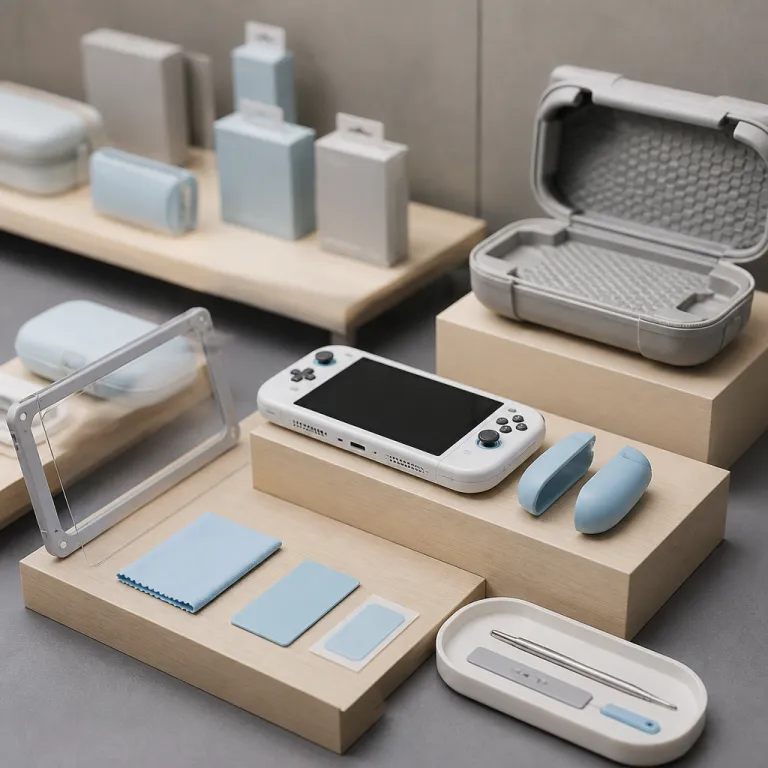
How to think about the best Switch 2 accessories for a family
The best Switch 2 accessories in 2026 start with protection and comfort, not flashy gadgets. A modern Nintendo Switch system lives in backpacks, on coffee tables and in kids’ hands, so every accessory choice should reduce risk and friction rather than add clutter. When you compare any switch accessories, always ask whether they make daily gaming safer, easier or genuinely more joyful.
Families moving from an older Nintendo Switch quickly notice that the new Switch 2 screen is larger and more exposed at the edges. That bigger screen looks fantastic for games, but it also means your first purchases should be a high quality screen protector and a properly fitted protective case instead of another cheap controller stand. Treat the Switch 2 as a shared household device, and build a small kit of accessories that protects the hardware, keeps joy con controllers charged and makes long sessions comfortable for both kids and adults.
Think of the Switch 2 as a portable console first and a living room machine second. That mindset pushes carrying case choices, charging cable reliability and power bank safety to the top of the list, while the switch dock and wireless pro controller options come slightly later. When you shop on Amazon or in a local store, ignore the regular price and sale price banners at first and focus on build quality, warranty and how each accessory will survive being tossed into a school bag three times a week.
Carrying cases and protective shells that actually fit the new Switch 2
The larger Switch 2 chassis and revised joy con rails mean many old Nintendo Switch cases simply do not fit correctly. A good carrying case now needs a deeper shell to clear the taller analog sticks and slightly wider joy cons, plus a softer inner lining to avoid micro scratches on the new screen. When you see a case Nintendo listing that claims universal compatibility, be sceptical and check whether it explicitly mentions the latest switch system dimensions.
For commuters and students, a slim protective case that slides into a backpack sleeve beats a bulky hard shell that demands its own bag. Look for a carrying case with a rigid outer frame, a soft microfiber inner layer and a flap that holds at least ten game cards without pressing directly on the screen. Families who travel by car more often may prefer thicker switch accessories with room for extra controllers, charging cables and even a compact power bank, accepting a little extra bulk for better organisation.
Third party brands now offer Switch 2 specific shells that wrap around the console while it stays dockable in a standard switch dock. These hybrid protective case designs protect the back and corners from drops while still letting you slide the switch nintendo console into the dock without removing anything. When comparing options on Amazon, prioritise models that clearly state compatibility with the new Switch 2 dock cut outs and avoid generic listings that only mention the original Nintendo Switch or Switch Pro era hardware.
Because the best Switch 2 accessories in 2026 must survive real family life, pay attention to zippers, handles and hinge design on every case. A weak zipper is usually the first failure point on a cheap case nintendo product, and once it goes, the entire carrying case becomes useless. Choose metal zipper pulls, double stitching around the handle and a hinge that opens fully so kids can place the switch system inside without forcing the screen against loose game cards.
When you already own a favourite messenger bag or backpack, consider a form fitting inner case that focuses purely on impact protection. These minimalist switch accessories often skip game card storage and instead wrap the console in dense foam with a soft lining, which works well if you keep physical cards in a separate organiser. For households that share one Switch 2, a single high quality protective case that everyone uses consistently is far better than three flimsy cases that never quite get zipped.
If you plan to connect the Switch 2 to multiple televisions, remember that some thicker shells can interfere with third party switch dock designs. Before buying a dock alternative, check the manufacturer’s fit notes and look for photos that show a Switch 2 with a case installed. For more detail on how docks and HDMI routing affect console setups, guides about choosing the best HDMI switch for your gaming console can help you plan a clean living room layout without stressing the console’s USB C port.
Screen protectors for the larger Switch 2 display
The Switch 2 display is brighter and larger than the original Nintendo Switch panel, which makes scratches and smudges more visible during dark scenes. A good screen protector is no longer optional, especially if you dock and undock the console frequently or let younger kids handle it. For the best Switch 2 accessories in 2026, a tempered glass screen protector with a precise fit and clean adhesive layer should sit near the top of your list.
Look for tempered glass between 0.3 and 0.5 millimetres thick, which balances impact resistance with touch sensitivity and keeps the screen looking sharp. Thinner film style protectors can work, but they tend to show micro scratches faster and often feel slightly rubbery when you slide a finger across the screen during fast paced gaming. A high quality screen protector should include an oleophobic coating to resist fingerprints, clear alignment tools and dust removal stickers so you can install it once and forget about it.
Families who travel a lot should pair a glass screen protector with a structured carrying case that prevents pressure points on the display. When a case has a stiff game card flap that presses directly on the screen, even a good protector can crack under heavy weight in a backpack. Check product photos carefully and choose designs where the card storage sits away from the central screen area, or where a padded divider keeps the Switch 2 display isolated from accessories.
Because the Switch 2 uses a different bezel shape, older Nintendo Switch protectors often leave tiny exposed strips at the edges. Those gaps collect dust and can create visible lines during handheld gaming, especially in dark games with lots of static UI elements. Always buy a screen protector that explicitly lists Switch 2 compatibility and avoid multipacks that mix models without clear labelling.
If you have kids who tend to tap the screen aggressively in touch heavy games, consider keeping a spare protector in your accessories drawer. Swapping a cracked protector is far cheaper than repairing a scratched Switch 2 panel, and it keeps the console looking new for longer when you eventually consider resale. For parents who also enjoy racing games with wheel accessories, pairing a clean screen with comfortable grips and even specialised racing gloves can make longer sessions more pleasant and less fatiguing.
Remember that a screen protector only works properly when installed on a clean, dust free surface. Take ten minutes at a table with good lighting, wash your hands, and follow the instructions slowly rather than rushing before a school run. That small investment of time turns a fragile bare screen into a durable, easy to clean surface that shrugs off daily wear from joy cons being snapped on and off beside it.
Grips, comfort shells and joy con ergonomics for longer sessions
The revised Joy Con 2 design on the Switch 2 improves stick feel slightly, but it still remains a flat, compact controller that can cause hand fatigue in longer sessions. Comfort grips and ergonomic shells are some of the best Switch 2 accessories in 2026 for adults who play handheld for more than an hour at a time. A good grip transforms the switch from a thin tablet into something closer to a traditional pro controller in the hands.
Brands like Satisfye and Skull & Co now offer Switch 2 specific grip cases that lock the console into an offset design, shifting weight into the palms. These grips usually combine a protective case with sculpted handles, so you gain both drop resistance and better ergonomics in one accessory. When comparing options, check whether the grip allows you to remove joy cons easily for multiplayer games, and whether it still fits into your preferred carrying case.
For families, consider keeping one comfort grip primarily for adult use and leaving the Switch 2 bare for smaller hands. Kids often prefer the lighter feel of the console without bulky shells, while parents benefit from the extra support during late night gaming. If you buy multiple grips, label them clearly so older children do not try to force a Switch 2 into an original Nintendo Switch shell, which can stress the rails and damage the joy con locking mechanism.
Some grips include built in kickstands and card storage, but these extras can add weight and bulk that make the console less portable. Focus first on how the grip feels during a two hour session of a demanding game, not on how many game cards it can hold. A simple, well shaped grip that keeps your wrists neutral and your thumbs relaxed will always beat a feature packed shell that turns the Switch 2 into a heavy brick.
If you experience tingling fingers or cramped thumbs after handheld play, experiment with different grip thicknesses and textures. Rubberised surfaces can feel secure but may trap heat, while harder plastics stay cooler but can become slippery with sweat. For players who also enjoy racing setups or arcade sticks, pairing a comfortable handheld grip with specialised accessories like racing gloves can spread pressure more evenly across the hands during intense sessions.
Remember that joy cons remain relatively fragile compared with a full size pro controller, so any grip that requires frequent removal should have smooth, well finished rails. Avoid designs that flex the plastic around the joy con slots or require you to bend the Switch 2 frame to install them. Over time, gentle accessories that respect the console’s tolerances will keep your switch system feeling solid and rattle free.
Controllers, docks and charging gear that are worth the money
Once you have a solid case and screen protector, the next tier of the best Switch 2 accessories in 2026 revolves around controllers, docks and reliable charging. Nintendo’s own Pro Controller remains the safest pick for most families, with consistent wireless performance, strong battery life and full compatibility across all Switch games. For serious TV play, a good pro controller turns the Switch 2 from a handheld first device into a credible living room console.
Third party pro controller alternatives with Hall effect sticks now compete strongly on value, reducing the risk of stick drift that plagued some earlier joy cons. When you compare a Nintendo Switch Pro Controller with a Hall effect model from brands like 8BitDo or Gulikit, weigh the trade off between Nintendo level build quality and the long term stick reliability of magnetic sensors. For many families, one official pro controller for the main player and a cheaper Hall effect pad for siblings strikes a good balance between cost and durability.
The standard Switch 2 dock works well, but some households benefit from a second switch dock near another television or monitor. Compact third party docks can reduce clutter and travel more easily, but they must respect Nintendo’s power delivery specifications to avoid damaging the switch system. Avoid no name docks with vague listings and instead choose models from reputable brands that clearly state Switch 2 compatibility and include proper over current protection.
Charging gear deserves as much attention as controllers, because a bad charging cable or power bank can shorten battery life or cause intermittent disconnects. Look for USB C charging cables rated for at least 60 watts with proper shielding, and avoid ultra cheap options that feel flimsy or kink easily. A quality power bank with around 20 000 milliamp hours can recharge a Switch 2 several times, but make sure it supports USB Power Delivery profiles that match the console’s needs.
Families often get tempted by elaborate charging docks that hold multiple joy cons, pro controllers and even game cards in one plastic tower. Many of these stands add lights and logos but do not actually improve charging safety or speed compared with a simple USB hub and official cables. Before buying a large charging dock, ask whether it will genuinely reduce cable clutter or just become another dust collecting accessory beside the television.
When you start comparing consoles or considering a second system for competitive play, it can help to read broader guides about top gaming consoles for competitive gaming to understand where the Switch 2 fits. That context clarifies whether you should invest more heavily in pro controller options and wired docks, or keep the Switch 2 focused on family friendly, flexible gaming. Either way, prioritising safe power delivery and comfortable input devices will keep the console enjoyable for years.
Storage, game cards and how to avoid running out of space
The Switch 2 continues to rely on microSD storage for digital games, screenshots and updates, which makes a reliable card one of the best Switch 2 accessories in 2026. A high quality microSD card with fast read speeds keeps loading times reasonable and reduces stutter in larger open world titles. For most families, a 512 gigabyte microSD card hits a sweet spot between capacity and price, especially if you still buy some games on physical cards.
When shopping, look for microSD cards from established brands like Samsung, SanDisk or Lexar, and avoid unbranded listings that promise unrealistic speeds at suspiciously low prices. The Switch 2 does not fully exploit the latest microSD Express or express card standards yet, so paying a premium for those formats rarely makes sense for typical family gaming. Instead, focus on U3 or V30 rated cards that guarantee sustained performance for both games and occasional video capture.
Physical game cards still make sense for households that share cartridges between siblings or trade titles with friends. A small, rigid game card case that fits into your main carrying case keeps those tiny cartridges from disappearing into sofa cushions or school lockers. Choose organisers with individual slots that grip each card firmly, and avoid soft pouches where cards can rub against each other and wear down labels over time.
Digital only families should still consider a small card organiser for backup microSD cards, especially if you plan to expand storage over the console’s life. Label each microSD card clearly with a permanent marker or sticker so you know which one holds kids’ games and which one stores larger adult titles. That simple habit prevents accidental formatting and makes it easier to manage space when the Switch 2 internal storage fills up.
Remember that every downloaded game, patch and screenshot eats into available storage, so teach kids how to archive games they no longer play. The Switch 2 system software makes it relatively easy to delete and redownload titles, but a fast microSD card still reduces waiting time when you reinstall a favourite game. Over several years, investing in one or two good cards costs less than constantly juggling space on a tiny, cheap card that slows everything down.
For parents comparing the regular price and sale price of different storage options, pay attention to cost per gigabyte rather than headline discounts. A slightly higher upfront cost for a reputable brand with a long warranty usually pays off in fewer corrupted downloads and less frustration. In the long run, reliable storage is as fundamental to a smooth Switch 2 experience as a sturdy protective case or a well fitted screen protector.
What to skip and how to spot landfill bound accessories
The flood of Switch 2 accessories on Amazon and other marketplaces makes it tempting to fill a cart with cheap add ons. Many of these products look clever in photos but end up unused in a drawer within weeks, adding clutter without improving your Nintendo Switch experience. To focus on the best Switch 2 accessories in 2026, you need a clear sense of what to skip.
Multi tier plastic stands that promise to hold the console, multiple controllers, game cards and even headphones often wobble, creak and collect dust. They rarely offer better charging than a simple USB hub and can block airflow around the switch dock, which is the last thing you want during long gaming sessions. Instead of buying a towering stand, invest in a compact, stable dock and a few well made charging cables that you can route neatly behind your television.
Clip on fans and cooling pads for the Switch 2 fall into a similar category of low value accessories. The console’s thermal design already accounts for handheld and docked use, and external fans usually add noise without meaningfully lowering temperatures. Unless you play in an unusually hot environment, you are better off keeping vents clear and avoiding thick, non ventilated cases that trap heat around the switch system.
Cheap third party joy cons and mini controllers often cut corners on wireless performance, stick quality and button feel. While they may advertise a lower regular price or flashy sale price, they can introduce input lag or fail within months, leading to more frustration than savings. For extra players, consider sharing a high quality pro controller or buying one additional official joy con pair rather than scattering the living room with unreliable pads.
Screen protectors and protective cases sold in large multipacks at extremely low prices also deserve caution. These bundles often use lower grade plastics that yellow, warp or peel quickly, leaving the Switch 2 looking worse than if you had used a single, better made accessory. Spending a little more on one or two trusted items usually delivers better protection and a cleaner feel in daily use.
Finally, be wary of any accessory that requires you to force the Switch 2 into a shape or position that feels unnatural. If a grip bends the console frame, a dock requires you to press hard on the USB C port, or a case makes joy con removal difficult, walk away. The most reliable accessories respect the console’s design tolerances, support safe charging and let you enjoy games without constantly thinking about the hardware.
Key figures on Switch accessories and family gaming habits
- Market analysts have reported that Nintendo Switch family consoles account for a significant share of handheld gaming time worldwide, with usage often split between docked and handheld modes in roughly equal proportions according to recent industry surveys.
- Consumer testing organisations have found that tempered glass screen protectors can reduce visible scratch damage on portable console screens by more than half compared with unprotected displays over a similar period of daily use.
- Accessory sales data from major retailers show that carrying cases and screen protectors consistently rank among the top selling Switch accessories, indicating that most buyers prioritise basic protection before more specialised gear.
- Surveys of parents who own Nintendo Switch systems suggest that many households share a single console among multiple players, which increases wear on joy cons and makes durable cases and grips especially important for long term reliability.
- Industry reports on microSD card reliability highlight that cards from established brands have significantly lower failure rates than unbranded alternatives, reinforcing the value of paying slightly more for trusted storage in a family console.
FAQ about Switch 2 accessories for families
Do I really need a screen protector for the Switch 2 ?
Yes, a screen protector is strongly recommended for the Switch 2 because its larger display is more exposed to scratches from docking, travel and everyday use. A good tempered glass protector adds impact resistance and makes fingerprints easier to wipe away. It is a relatively low cost accessory that can prevent expensive repairs or a visibly worn screen later.
What type of carrying case works best for kids ?
For younger children, a hard shell carrying case with a handle and simple zipper is usually the safest option. It should have a soft interior, a secure strap to hold the console and limited loose storage so accessories do not press on the screen. Bright colours or clear labelling also help kids recognise their own case and reduce mix ups at school or during visits.
Is the official Nintendo Pro Controller worth the price ?
The official Nintendo Pro Controller costs more than many third party pads, but it offers consistent wireless performance, strong battery life and full compatibility with all Switch games. For families who play a lot of TV mode games, it can significantly improve comfort compared with joy cons in a grip. If budget is tight, pairing one official pro controller with a reputable third party pad for extra players can balance cost and quality.
How much microSD storage does a family really need ?
Most families do well with at least 256 to 512 gigabytes of microSD storage for the Switch 2, especially if they download many digital games. Physical cartridges reduce storage pressure, but updates and downloadable content still consume space. Choosing a reliable, mid sized card from a trusted brand usually offers enough room for a varied library without constant deletion.
Which accessories should I buy first with a new Switch 2 ?
When you buy a new Switch 2, prioritise a fitted carrying case, a high quality tempered glass screen protector and at least one comfortable controller for TV play. Those three categories protect the console, keep it portable and make longer sessions more enjoyable for adults. After that, consider storage upgrades, comfort grips and a second dock only if they match your family’s actual gaming habits.