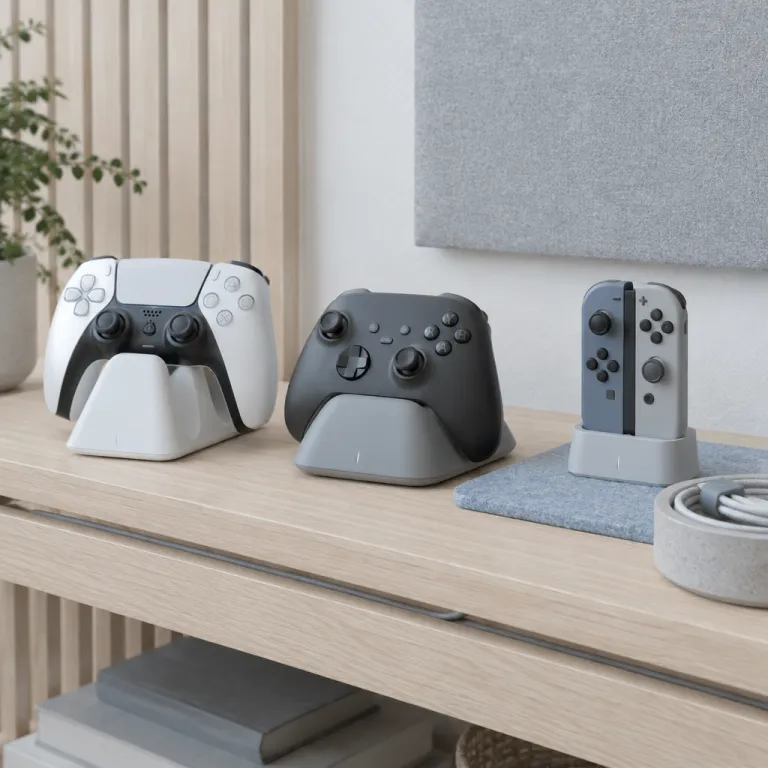
Why a good charging dock matters more than another controller skin
A dead controller ruins a ranked match faster than any lag spike. A carefully chosen charging station or charging stand keeps every controller ready, cuts cable clutter and quietly protects each battery over hundreds of charge cycles. When people talk about the best controller charging dock 2026, they are really talking about never starting a session with a flat pad again.
Competitive players juggle multiple controllers, headsets and sometimes a Nintendo Switch 2 or a gaming laptop, so a reliable charger station becomes part of the core setup rather than a throwaway accessory. The right dock or wireless charger manages power intelligently, offers fast charging through modern USB Type C connectors and avoids the cheap voltage spikes that slowly cook lithium ion cells. That is why the best controller charging dock 2026 is less about RGB and more about safe, predictable charging for all your devices.
Think about how you actually play, not just how the dock looks on Amazon. If you rotate between a DualSense Edge, an Xbox controller and a Switch Pro Controller, a multi platform charging station with several USB ports and a stable stand will serve you better than three separate plastic cradles. For a single console household, a compact controller charger with magnetic alignment and clear LED indicators often beats a bulky charging dock that tries to do everything and ends up blocking half your desk.
PS5 DualSense and DualSense Edge: official dock versus USB C stands
Sony’s official PlayStation 5 DualSense charging station remains the safest default pick for most players. It uses a drop in design with small pogo pins, so you avoid wear on the USB port and get consistent controller charging without fumbling for a cable in the dark. For anyone chasing the best controller charging dock 2026 for PlayStation, this official station nails the basics while keeping the footprint small.
The same dock works with both the standard DualSense controller and the DualSense Edge controller, because both pads expose the same bottom contacts while still supporting USB C charge through a separate cable. That means you can keep a USB cable connected to your console for wired play with zero latency while the dock handles wireless charging duties for your second pad. If you prefer third party options, several USB C charging stands from brands like Anker and Razer offer a vertical stand design that grips the controller securely and often adds a front LED bar to show charge status at a glance.
Multi device players sometimes skip the official dock and instead use a compact USB C charger station that can top up a DualSense, a Switch 2 Pro Controller and even a wireless headset from the same power adapter. These hubs rarely look as clean as Sony’s white and black design, but they give you more flexibility when you travel or when you reconfigure your gaming station around a VR case or other accessories, as explained in guides about choosing the right VR case for your gaming console experience. Whichever route you choose, avoid ultra cheap wireless chargers that rely on loose USB dongles sticking out of the controller, because one bad knock can damage both the dongle and the controller’s USB Type C port.
Xbox charging: stands, play and charge kits and the AA battery debate
Xbox controllers are the most flexible and the most confusing when it comes to charging. Microsoft still ships every Xbox controller with a compartment for AA batteries, which means you can run disposable cells, rechargeable AAs or an official play and charge battery pack that turns the pad into a rechargeable device. For players hunting the best controller charging dock 2026 for Xbox, the first decision is simple but important ; dock elegance or instant battery swaps.
The official Xbox charging stand integrates a shaped cradle and a custom battery door, letting you drop the Xbox controller onto the stand for clean controller charging without opening the back every time. Third party twin docks, such as the tested twin charging dock with two rechargeable battery packs for Xbox Series X and Xbox One, bundle a charging dock and batteries so you can keep two controllers ready while using a single power adapter and a short USB cable. This style of charger station looks tidy on a desk, offers clear LED indicators and usually supports fast charging that fills a depleted battery in a couple of hours.
Rechargeable AA batteries like Panasonic Eneloop remain popular because they separate the battery from the controller charger and let you swap cells in seconds during a match. You lose the visual appeal of a dedicated charging stand, but you gain redundancy, since any basic USB charger with AA slots can restore power without relying on a specific dock. For many competitive players, the best controller charging dock 2026 for Xbox is actually a hybrid setup ; one dual controller dock for casual evenings and a box of charged AAs on standby for tournament nights when a dead pad is not an option.
Switch 2 and multi platform docks: Joy Con quirks and Pro Controller power
The Nintendo Switch 2 ecosystem complicates charging because Joy Con controllers, Pro Controllers and handheld devices all sip power differently. Joy Con pads charge while attached to the console, but a dedicated Joy Con charging station or Joy Con charging grip is almost mandatory for families who leave the console in a docked TV mode. When you evaluate the best controller charging dock 2026 for Switch 2, think about how many Joy Cons and Pro Controllers you actually rotate through in a week.
Standalone Joy Con docks line up four or more controllers in a vertical stand, using a single USB cable and modest power draw to keep everything topped up between Mario Kart sessions. For the Switch Pro Controller, a dedicated controller charger or a universal USB C charging stand works well, especially if it supports fast charging and has a weighted base that will not tip when you grab the pad quickly. Some multi platform charging stations combine slots for Joy Cons, a cradle for a Pro Controller and extra USB ports for a wireless charger that can handle a phone or an Apple Watch, turning one dock into a compact hub for several devices.
Households that mix a PlayStation 5, an Xbox Series X and a Nintendo Switch 2 often benefit from a single USB C charger station with multiple USB Type C outputs and at least one USB Type A port for legacy devices. This kind of dock will not match the sculpted design of first party stands, but it simplifies cable management and lets you charge controllers, wireless headsets and even a small tablet from one power adapter. If you care more about clean lines than about raw flexibility, a dedicated Switch 2 charging dock for Joy Cons plus a separate Pro Controller stand might still feel like the best controller charging dock 2026 for your living room.
What separates a great dock from a desk ornament
Not every charging dock that looks good in product photos earns a place on a serious gaming desk. The best controller charging dock 2026 shares a few traits ; reliable magnetic alignment, clear status LEDs, safe power delivery and a design that respects your limited space. When you evaluate a charging station, treat it like any other piece of performance gear rather than a decorative stand.
Magnetic drop in systems on PlayStation and some third party Xbox docks guide the controller into place, so you can park a pad one handed without scraping plastic or bending a USB connector. Good docks integrate over charge protection and temperature monitoring, using a quality power adapter and properly rated USB cables to avoid stressing the battery during overnight charging. Look for clear labeling on voltage and current, ideally matching USB Power Delivery standards, and avoid anonymous wireless chargers that promise unrealistic fast charging speeds without listing any certification.
Desk footprint matters more than most people admit, especially when you already run a large monitor, a headset stand and maybe a small speaker pair. A compact dual controller charger station that stacks controllers vertically often beats a wide, flat dock that eats half your mouse space. Before you check price tags, map where the dock will sit, how the cables will route and whether the design lets you grab a controller without knocking over other devices.
Platform mixing, cable management and long term battery health
Many competitive players now own at least one premium pad, such as a DualSense Edge or an Xbox Elite Series 2, alongside standard controllers for guests. These high end devices cost enough that the best controller charging dock 2026 for them must prioritize gentle charging and secure mounting over flashy RGB. A detailed guide to when a premium controller earns its price shows how much long term value depends on keeping those batteries healthy and ports intact.
For mixed setups, a central charger station with several USB ports can handle a PlayStation controller, an Xbox controller, a Switch Pro Controller and even a phone or tablet, as long as you use quality USB cables and a certified power adapter. Pair that hub with a separate wireless charger for your phone or Apple Watch if you want to keep heat away from your gamepads, because wireless charging pads can run warmer than wired docks. Good cable management, using short USB Type C leads and a few clips under the desk, turns a tangle of charging stations into a clean gaming station where every device has a predictable home.
Battery health comes down to shallow, frequent top ups rather than deep discharges and emergency fast charging. A dock that makes it effortless to park controllers between matches will extend battery lifespan more than any marketing claim about smart power. When you finally check price on different docks, remember that replacing a swollen controller battery or a damaged USB port costs far more than spending a little extra on a safe, well engineered charging dock today.
Key figures about controller charging habits and dock reliability
- According to a survey by the Entertainment Software Association, over 70 % of console players report owning at least two controllers per console, which makes a dual controller dock or stand more practical than a single slot charger.
- Battery manufacturers such as Panasonic estimate that high quality rechargeable AA cells can retain around 70 % of their original capacity after 500 charge cycles, while poorly regulated fast charging can cut that lifespan by half.
- USB Implementers Forum data shows that certified USB Power Delivery chargers reduce the risk of over voltage events compared with unregulated adapters, which is critical for protecting controller batteries and USB ports.
- Consumer testing labs have found that docks with clear LED charge indicators reduce accidental overnight charging by up to 30 %, which helps keep controller temperatures lower and slows long term battery wear.
- Market research on console accessories indicates that multi platform charging stations now account for a growing share of dock sales, reflecting how many households own both a PlayStation and an Xbox or a Nintendo Switch 2.
FAQ: choosing the right controller charging dock
Is it better to use a dock or a USB cable for charging controllers ?
Both methods can be safe, but a well designed charging dock reduces wear on the USB port and makes it easier to avoid deep discharges by encouraging frequent top ups. A direct USB cable connection is useful for travel or emergency charging, yet repeated plugging and unplugging can eventually loosen the port. For everyday use at home, a stable dock paired with an occasional wired session offers a strong balance between convenience and longevity.
Can one charging station handle PlayStation, Xbox and Switch controllers together ?
Many modern charger stations use USB Type C outputs and standard USB ports, so they can charge multiple brands as long as each controller supports wired charging. You may still want a dedicated dock for Joy Cons or for controllers that use custom battery doors, while using a central hub for Pro Controllers and headsets. Always check compatibility lists and avoid docks that rely on proprietary connectors which lock you into a single brand.
Does fast charging damage controller batteries over time ?
Moderate fast charging within USB Power Delivery limits is generally safe, but extreme quick charge modes that push high current into small batteries can accelerate wear. Most first party docks from Sony, Microsoft and Nintendo use conservative charging profiles that prioritize battery health over speed. If a third party dock advertises very aggressive fast charging without clear technical details or certifications, it is safer to skip it.
How many controllers should a dock support for a typical household ?
For a single player or a couple, a dual controller dock usually covers one active pad and one backup. Larger households or shared apartments often benefit from a four slot charging station or from combining a dual dock with a separate USB hub for guest controllers. The key is to match dock capacity to the number of controllers that regularly see play, not to the total number you own.
What signs show that a charging dock is unsafe or poorly designed ?
Warning signs include a very light plastic shell, no visible safety certifications, vague power ratings and cables that become hot during normal use. Unstable stands that wobble when you place a controller, or docks that rely on loose USB dongles, also increase the risk of physical damage. When in doubt, choose a dock from a reputable brand with clear specifications and a solid track record in console accessories.