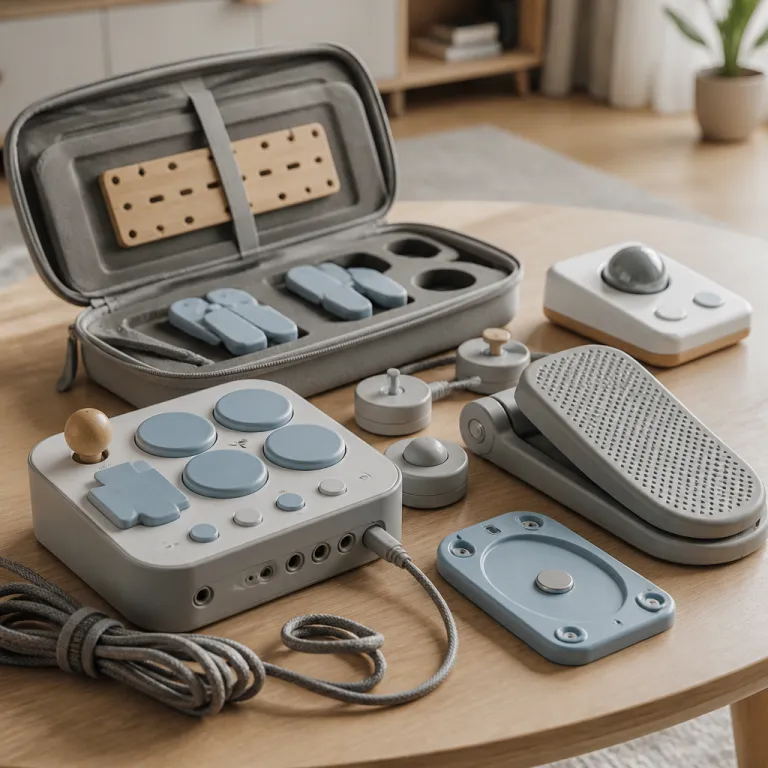
How adaptive controllers changed what a “family console” can be
Adaptive controllers turned accessibility from a niche add on into a core gaming feature. For a family buyer weighing an adaptive controller gaming console 2026 purchase, that shift matters more than any teraflop number. The right controller now decides who in your home can actually play games.
On Xbox, the Xbox Adaptive Controller remains the reference design for adaptive gaming and limited mobility, because it treats every port as a customizable input rather than a fixed button. This flat rectangular controller from Microsoft Xbox exposes nineteen 3.5 mm jacks and two USB ports for external switches, pedals, and adaptive joystick modules, so players can rebuild the layout around one hand, feet, or even head mounted switches. When you pair the Xbox Adaptive Controller with standard Xbox controllers or a wireless controller, you can share inputs between players, letting a parent handle camera movement while a child just presses the main buttons.
PlayStation took a different route with the PlayStation Access controller, which Sony positions as a modular hub for adaptive gaming on PS5. The Access Controller uses swappable button caps and an adaptive joystick that can be repositioned, so players with limited mobility can angle the stick and buttons around their strongest range of motion. While it lacks the sheer number of external switches that the Xbox Adaptive Controller supports, it integrates tightly with the PS5 accessibility settings, including full button remapping, haptic tuning, and system level profiles for different players.
Nintendo’s current Switch hardware does not offer a first party adaptive controller, yet its detachable Joy Con controllers still create flexible options for families. One Joy Con can act as a complete game controller in horizontal mode, which lets a player with one functional hand still play many games, especially simpler party titles. Third party adapters and controllers bridge the gap by letting the Xbox controller or other adaptive controllers connect to the Switch, but that adds price and setup complexity that a busy parent should factor into any adaptive controller gaming console 2026 decision.
Xbox Adaptive Controller and the wider Xbox ecosystem
For a household that wants the broadest adaptive hardware, Xbox Series consoles still lead the pack. The Xbox Adaptive Controller works across the Xbox Series X, the Series S, older Xbox One consoles, and Windows PCs, which stretches its value over several hardware generations. That cross platform support matters when you are buying one adaptive controller for multiple players and devices.
Each large programmable pad on the Adaptive Controller can mirror any face buttons, triggers, or D pad directions from a standard Xbox controller. Families can plug in external switches for jump, shoot, or menu actions, then use an adaptive joystick or a traditional joystick to handle movement, depending on what feels stable. Because Microsoft designed the Xbox Adaptive Controller as official Xbox hardware, it shows up cleanly in the Xbox Accessories app, where you can remap every input, create multiple profiles, and adjust sensitivity without digging through game specific menus.
On the price side, the Adaptive Controller costs more than a regular wireless controller, but it replaces several third party devices that used to be required for similar setups. You can often find it through the Microsoft Store, specialist accessibility retailers, or mainstream electronics shop chains, which makes warranty support and returns easier for cautious buyers. When you add the Logitech Adaptive Gaming Kit or other Xbox accessories with extra buttons and external switches, the total price climbs, yet the flexibility usually outlasts at least one console generation.
Xbox Series consoles also layer in strong software accessibility that pairs well with adaptive controllers. System level remapping lets you change every button on any controller Xbox recognizes, including third party game controller models, so you can standardize layouts across games. Features like Copilot mode allow two controllers to act as one, which is powerful when a child with limited mobility uses the Xbox Adaptive Controller while a parent on a standard controller quietly handles camera control or complex combos.
For players who care about long sessions, the Elite Wireless Controller Series 2 adds more granular tuning, though it is not an adaptive controller in the strict sense. Its adjustable tension sticks, rear paddles, and trigger stops can reduce strain for players who struggle with full trigger pulls or constant thumb pressure on the joystick. If you are weighing that premium option, a detailed hands on review such as the one on the Elite Wireless Controller Series 2 performance test helps you judge whether its price makes sense next to a dedicated adaptive controller.
PlayStation Access Controller and PS5 accessibility tools
Sony’s Access Controller finally gives PlayStation players a first party adaptive option that talks directly to the console’s deep accessibility menu. The circular layout with swappable buttons lets players arrange inputs around the edge, so they can press with a palm, knuckles, or a single finger instead of stretching across a traditional controller. For a family buyer, that means one Access Controller can be reconfigured for different players without buying multiple devices.
The Access Controller supports up to four external switches and one adaptive joystick through standard ports, which is fewer than the Xbox Adaptive Controller but still enough for many limited mobility setups. You can pair two Access Controllers together, or combine one Access Controller with a DualSense, so one player can handle movement while another manages face buttons and triggers. This shared control model mirrors Xbox Copilot in spirit, and it works well when a parent wants to quietly assist a child through tougher games without taking the controller away.
PS5 itself offers strong accessibility features that benefit every controller, not just the Access Controller. System wide button remapping lets you change any input on a DualSense, a third party game controller, or the Access Controller, so you can standardize layouts across games. The console also includes a built in screen reader, high contrast UI themes, subtitle customization, and granular haptic feedback controls, which help players with low vision, hearing differences, or sensory sensitivity.
PlayStation’s colorblind modes depend on each game, yet many first party titles now include presets for common forms of color vision deficiency. Audio visual alerts, such as visual indicators for important sounds, help players who cannot rely on directional audio alone, and they also help kids who play with the TV volume low. When you combine these software tools with the hardware flexibility of the Access Controller and the upcoming PlayStation Access ecosystem, you get an adaptive controller gaming console 2026 setup that works for a wide range of players.
Parents should still weigh price and availability, because the Access Controller often sells in limited batches through the PlayStation direct shop and major retailers. Compared with a standard DualSense, the Access Controller costs more, but it can replace several improvised third party solutions that used to be necessary on PlayStation. For players who want more traditional precision and style, high end pads such as those analyzed in this deep dive on precision focused controllers can complement an adaptive setup rather than replace it.
Nintendo Switch flexibility and the role of third party adaptive gear
Nintendo’s current Switch hardware does not ship with a dedicated adaptive controller, yet its Joy Con design still opens some doors. Each Joy Con can function as a standalone controller, which allows one handed play in many simpler games and party titles. For a family with mixed abilities, that means a child or grandparent can hold a single Joy Con while another player uses the full pair.
The Joy Con rails and grip accessories also let you rearrange how you hold the controllers, which can help players with limited mobility in one arm or hand. Some third party grips bring the two Joy Cons closer together or angle them differently, reducing strain on wrists and thumbs during long gaming sessions. While this is not a full adaptive joystick solution, it can make the Switch a more comfortable adaptive controller gaming console 2026 option for casual play.
To reach true adaptive setups on Switch, many families rely on third party adapters that let the Xbox Adaptive Controller or other game controllers connect to the console. Devices from brands like 8BitDo or Mayflash can translate inputs from an Xbox controller, a PlayStation Access Controller, or a PC joystick into Switch compatible signals. This approach adds cost and configuration time, yet it lets you reuse existing adaptive hardware instead of buying Switch specific controllers.
Specialized hardware such as the Hori Flex or Logitech Adaptive Gaming Kit extends this ecosystem further. The Hori Flex acts as a hub for external switches and custom buttons, similar to the Xbox Adaptive Controller but tuned for Nintendo systems, while the Logitech kit adds large, easy to press buttons and triggers that plug into existing adaptive controllers. When you combine these with Switch software features like button remapping and motion control adjustments, you can build a surprisingly capable adaptive gaming setup, though it requires more research than on Xbox or PlayStation.
Parents should pay close attention to compatibility lists, firmware updates, and regional availability when shopping third party adaptive gear. Some adapters only support specific controller Xbox models or certain firmware versions, and not every wireless controller works reliably in every mode. If you want a simpler path, focusing on Xbox Series or PS5 as the main adaptive controller gaming console 2026, then treating Switch as a secondary, lighter use system, often reduces frustration.
Beyond physical disability: visual, audio, and cognitive accessibility
Accessibility on modern consoles now stretches far beyond physical controllers and buttons. All three major platforms offer tools for players with visual, hearing, or cognitive differences, and these tools quietly help young children and older relatives too. When you are choosing an adaptive controller gaming console 2026 for a family, these software features can matter as much as any adaptive joystick or access controller.
On Xbox Series consoles, system wide color filters help players with different types of colorblindness distinguish UI elements and in game markers. Many games also include their own colorblind modes, high contrast outlines, and customizable HUDs, which pair well with the precise input from an Xbox controller or Xbox Adaptive Controller. Visual audio indicators, such as on screen icons for important sounds, support players who cannot rely on surround sound, and they also help kids who play with headphones off or the TV muted.
PlayStation offers similar tools, with a strong emphasis on guided modes and cognitive load reduction in first party games. Options like simplified control schemes, puzzle hints, and navigation assists reduce the number of simultaneous inputs a player must manage on a controller Xbox or Access Controller. For a parent, that means a child can gradually grow into more complex games without feeling overwhelmed by too many buttons or rapid camera movement.
Nintendo leans on visual clarity and simple UI design, especially in family oriented games, though its system level accessibility still trails Xbox and PlayStation. Many Switch titles include scalable text, clear iconography, and forgiving timing windows, which help players with slower reaction times or attention challenges. When paired with a comfortable game controller layout, even a basic Joy Con setup can feel approachable for non gamers who only play occasionally.
Across all platforms, subtitles, captioning, and audio mix controls are now standard, yet the details differ. Some games allow you to change subtitle size, background opacity, and speaker labels, which is crucial for players with low vision or auditory processing differences. Others still ship with tiny text that assumes a close PC style viewing distance, so a family buyer should look for accessibility sections in game menus and prioritize titles that treat accessibility as a first class feature.
Practical buying guide: matching consoles, controllers, and budgets
Choosing the right adaptive controller gaming console 2026 for a household starts with one question. Who in your family struggles with standard controllers today, and why exactly do they struggle. Once you map those needs, the trade offs between Xbox, PlayStation, and Switch become clearer.
If you need maximum hardware flexibility for limited mobility, Xbox Series consoles paired with the Xbox Adaptive Controller remain the most capable option. The combination of external switches, adaptive joystick modules, and deep remapping in the Xbox Accessories app lets you build highly customized setups. Because the Adaptive Controller also works on Windows, you can reuse the same hardware for PC gaming, which stretches your budget and simplifies training for players who move between platforms.
For families already leaning toward PS5 exclusives, the Access Controller and broader PlayStation Access ecosystem now make Sony a serious accessibility contender. The modular buttons and joystick, combined with robust system settings, cover many common mobility challenges without third party gear. You can still add external switches for specific actions, but the base hardware already supports a wide range of grips and motion ranges.
Switch remains the most flexible for casual couch play and younger kids, thanks to its detachable controllers and forgiving game design. Yet it demands more research and third party hardware if you need a full adaptive setup with an access controller or Xbox Adaptive Controller. In many homes, the practical answer is to treat Xbox or PS5 as the main adaptive console, then use Switch for lighter games where one handed Joy Con play is enough.
Whatever you choose, plan for at least one spare standard controller and a reliable charging solution, because dead batteries can derail a carefully planned family gaming night. For PlayStation households, a dedicated charging dock such as the one reviewed in this PS5 controller charging station test keeps DualSense and Edge controllers ready alongside any Access Controller units. On Xbox, consider how many wireless controller units you need for guests, and whether rechargeable battery packs or wired connections make more sense for your budget and play habits.
Setting up and maintaining an accessible family gaming space
Once you pick a console and controllers, the real work starts with setup. Accessibility features only help if they are enabled, tuned, and easy for every player to reach. Treat this like configuring parental controls or Wi Fi, not an optional extra.
Begin by creating individual profiles for each player, then customize accessibility settings per profile instead of using one shared configuration. On Xbox, use the Microsoft Xbox Accessories app to remap buttons, adjust joystick sensitivity, and save multiple profiles for the Xbox Adaptive Controller, Elite pads, and standard controllers. On PS5, walk through the guided accessibility setup, then fine tune options for subtitles, haptics, and controller remapping so the Access Controller or DualSense feels comfortable for each player.
Hardware placement matters as much as software. Mount adaptive controllers on a stable surface at wheelchair height, route cables safely to avoid tripping, and keep external switches within easy reach of the body part that will activate them. For wireless controller units, consider short USB extension cables or charging stands near the seating area, so players with limited mobility do not need to cross the room just to plug in.
Families should also plan for maintenance and troubleshooting, because adaptive setups use more components than a single stock controller. Keep a small box for spare external switches, cables, and mounting tape, and label each accessory with the player or profile it belongs to. When a game behaves oddly, check whether it is overriding system level remapping, and be ready to adjust in game settings so they align with your carefully tuned Xbox, PlayStation, or third party game controller layouts.
Finally, involve the player who needs accessibility in every decision, from controller choice to button mapping. What feels intuitive to a parent may be awkward for a child with limited mobility, and the best layout is the one they can use without thinking. A good adaptive controller gaming console 2026 setup is not just about hardware or price, but about giving each player reliable access to play, experiment, and share games with the rest of the family.
Key statistics on console accessibility and adaptive controllers
- Microsoft reported that the Xbox Adaptive Controller was developed with input from multiple disability advocacy groups, reflecting a broader industry trend toward co design with players who have limited mobility.
- Surveys from major accessibility organizations indicate that a significant share of players with disabilities rely on remapping and subtitle options even when they do not use specialized hardware, which underlines the importance of strong software accessibility on every console.
- Industry analyses show that the number of games shipping with at least one colorblind mode has grown steadily across the current console generation, driven by platform holder guidelines and public feedback from players.
- Accessibility focused hardware such as adaptive controllers and external switches often costs more upfront than standard controllers, yet families can extend their lifespan across multiple console generations and Windows PCs, improving long term value.
- Platform comparison studies consistently find that Xbox offers the most extensive first party adaptive hardware, PlayStation provides strong system level accessibility tools with its Access Controller, and Nintendo relies more heavily on third party solutions and flexible Joy Con configurations.
FAQ
Which console is best for a player with limited mobility
Xbox Series consoles paired with the Xbox Adaptive Controller generally offer the most flexible setup for players with limited mobility. The large number of ports for external switches and adaptive joystick modules, combined with deep remapping in the Xbox Accessories app, allows highly customized layouts. PlayStation with the Access Controller is catching up quickly, but Xbox still leads in raw hardware flexibility.
Do I need special controllers for a child who just struggles with complex controls
Not always, because many children benefit first from simplified control schemes and remapping before they need adaptive hardware. On all current consoles, you can reduce cognitive load by turning on guided modes, aim assist, and simplified inputs in game settings. If a child still struggles with grip or reach, then an adaptive controller or modular pad like the Access Controller can help.
Can adaptive controllers work on more than one platform
Yes, but with caveats that depend on adapters and official support. The Xbox Adaptive Controller works natively on Xbox consoles and Windows PCs, and it can connect to other systems like Switch through third party adapters that translate inputs. The Access Controller is designed for PS5, and cross platform use usually requires similar adapters, so always check compatibility lists before buying.
Are third party adaptive accessories safe to use with consoles
Reputable third party adaptive accessories from brands like Logitech, Hori, and 8BitDo are generally safe when used as directed. The main risks involve firmware updates that temporarily break compatibility or low quality adapters that cause input lag or disconnections. Buying from established brands and checking recent user reports helps reduce those issues.
How much should a family budget for an accessible gaming setup
A basic accessible setup can start with a single console, one standard controller, and careful use of built in accessibility settings. Adding an adaptive controller, external switches, and mounting hardware often raises the budget by the cost of one or two extra premium controllers. Because these devices usually work across console generations and Windows, many families treat them as long term investments rather than single console purchases.