Summary
Editor's rating
Value: strong storage and specs for the price, with trade-offs
Big, purple-ish, and chunky – in a good-enough way
Battery: the clear weak spot
Comfort: good grips, but your wrists feel the weight
Durability and build: feels sturdy enough, not premium tank-like
Performance: handles most games, as long as you’re realistic
What the Legion Go S actually offers in practice
Pros
- 8-inch 1920 x 1200 screen gives a nice big image for a handheld
- 16GB RAM and 1TB SSD provide plenty of space and smooth multitasking
- SteamOS integration makes it easy to access your Steam library and saves
- Good value for money compared to some Windows-based handhelds
Cons
- Battery life is mediocre, especially in demanding games
- Heavy and wide, which can tire your wrists in long handheld sessions
- Fan noise and average speakers make headphones almost mandatory

Specifications
View full product page →| Brand | Lenovo |
A PC gamer tries the Legion Go S on the couch
I’ve been a PC gamer for years, mostly on a desktop with mouse and keyboard, and I picked up the Lenovo Legion Go S because I wanted something I could use on the sofa and on trips without dragging a laptop around. I used it for about three weeks, mainly for Steam games, a bit of emulation, and some quick indie sessions in bed. I’m not sponsored, I paid for it myself, so I’m not trying to justify a freebie here.
The first impression when you take it out of the box is pretty simple: this thing is big and not exactly light. At 740g, it feels closer to holding a small tablet with a controller glued to it than a Nintendo Switch-style toy. If you’ve only used small handhelds before, it’s a bit of a shock, but after a few days I got used to it. The upside of the size is that the 8-inch screen really does feel like a mini portable monitor.
My use case was mainly: plug in Steam account, download my usual games (Hades, Elden Ring, Doom Eternal, some indies), and see what breaks. I didn’t tweak it like a madman; I wanted to see how it behaves for someone who isn’t going to spend hours in performance menus. Overall, it runs most of my library at decent settings, but you do have to think about power modes and battery a bit more than I’d like.
In short, the Legion Go S feels like a solid compromise: strong hardware for the price, especially the 16GB RAM and 1TB SSD, but with some clear trade-offs. If you’re expecting console-level simplicity and all-day battery, you might be annoyed. If you’re a PC gamer used to fiddling a bit, it’s easier to live with. I’ll break down the details by design, performance, battery, comfort and value, because that’s where the real story is.
Value: strong storage and specs for the price, with trade-offs
For me, value is where the Legion Go S makes the most sense. At around under £500 for 16GB RAM and a 1TB SSD, it sits in a pretty sweet spot. One Amazon user said it was a no-brainer at £449 compared to other handhelds, and I get that. Just the jump from 512GB to 1TB alone saves you from immediately thinking about upgrades or external drives. Considering M.2 prices and RAM costs, you’re getting a decent chunk of hardware for the money.
Compared to a Steam Deck, you’re paying more than the base Deck but getting more storage and a bigger, sharper 8-inch 1920 x 1200 screen. Compared to something like the ROG Ally X, you’re usually paying less, but you also accept slightly lower performance and the SteamOS environment instead of Windows. So it really sits as a mid-range alternative: more screen and storage than some, less brute power than the top-tier ones, and a price that reflects that middle ground.
The main thing that drags the value down a bit is the battery. If this thing had clearly better battery life, I’d rate the value even higher because you’d get a more balanced machine. As it stands, the price is good, but you have to accept that you’ll be near a plug quite often or carrying a power bank. For some people that’s fine (sofa gamers, people who play at home mostly). For travellers who want 4–5 hours straight, it’s a problem.
Still, if your budget is around this level and you want a handheld that can play most of your Steam library, has plenty of storage, and doesn’t feel like a toy, the Legion Go S is good value for money. It’s not the best at everything, but the price lines up reasonably well with what you get: strong storage, decent performance, nice screen, and some clear compromises around battery and weight.

Big, purple-ish, and chunky – in a good-enough way
Design-wise, the Legion Go S is basically a big slab with grips. The Nebula Nocturne colour (that blue/purple matte finish) is actually nicer in person than in photos. It doesn’t scream “toy”, it looks more like a serious bit of kit, and the matte finish helps hide fingerprints compared to glossy plastic. After tossing it in a backpack a few times, I didn’t see any obvious scratches or weird marks, so at least the finish doesn’t feel cheap.
The first thing you notice is the size. The 8-inch screen dominates the front, which is great when you’re actually playing, but it also means the whole device is wide. If you’re used to a Switch, this feels like someone put a PS5 controller on both sides of a small iPad, which is pretty much what one Amazon reviewer said and I agree. On the plus side, the big body gives Lenovo room for proper grips and buttons that don’t feel cramped. On the downside, it’s not the kind of thing you casually toss in a small handbag or hold one-handed.
The buttons and sticks feel decent. Nothing mind-blowing, but they don’t feel like they’ll die in two weeks. The layout is standard: dual sticks, D-pad, ABXY, shoulders and triggers. I didn’t run into mispress issues or weird dead zones in my tests. The only thing I noticed is that, because of the width, my thumbs travel a bit more than on a compact controller, so if you have smaller hands you might feel like you’re reaching slightly further than you’d like for some inputs.
Ports and connectivity are simple but fine: USB, Wi-Fi, Bluetooth. I used Bluetooth for a headset and Wi-Fi 6 for downloads and remote play and didn’t hit major problems. It’s missing some fancy extras like detachable controllers or a built-in kickstand that some people like, but honestly, for a Steam handheld, I’m more interested in how it plays than gimmicks. Overall, the design is practical and a bit chunky
Battery: the clear weak spot
The battery is where the Legion Go S clearly falls short. Multiple Amazon reviews mentioned it, and I’d agree: it’s basically “okay at best”. In light indie games or 2D titles with a lower power profile, I was getting around 2.5 to 3 hours before needing a charge. That’s fine for a train ride or a couple of couch sessions, but not exactly all-day gaming. The moment you switch to heavier 3D AAA games in performance mode, you’re looking more at 1.5–2 hours, sometimes less if you push brightness and frames.
To be clear, this is not unique to Lenovo; most powerful handheld PCs struggle with battery. But here, given the screen size and the performance level, I was hoping for a bit more. It’s the main reason a couple of users said they returned it despite liking everything else. I didn’t return mine, but I did change how I used it: I started playing plugged in more often at home and keeping a power bank handy when travelling. That kind of defeats some of the “pure handheld freedom” vibe, but it’s the reality of this device.
There are ways to stretch the battery: lower brightness, cap FPS to 30, use a lower power profile in SteamOS, and avoid boosting the APU too much. Doing that, I could push some games closer to 3 hours, but then you’re giving up smoothness or visual quality. For slower games or turn-based stuff, that trade-off is tolerable. For fast action games, it feels like a downgrade. So you constantly juggle between “looks and feels good” and “lasts long enough”.
Charging speed is acceptable. You can get from low to a decent level relatively quickly, so short top-ups during a break help. But overall, if battery life is your top priority and you want long unplugged sessions, the Legion Go S is not its strongest point, just like one of the reviewers said. It’s usable, it gets the job done for short to medium sessions, but it’s definitely the area where I’d like to see Lenovo do better in the next version.

Comfort: good grips, but your wrists feel the weight
Comfort is where the Legion Go S is both good and a bit tiring. The grips themselves are shaped well. Lenovo clearly learned from the original Legion Go: the curves and thickness feel more natural in the hand, and the overall ergonomics are better than a flat slab like a tablet with a clip-on controller. If you’re coming from keyboard and mouse, like me, the transition isn’t too painful. After an evening of Hades and Dead Cells, I didn’t have any finger cramps, which is already a win.
But, and it’s a big but, the 740g weight is noticeable. For short sessions of 30–45 minutes, no problem. Once you push past an hour, especially lying in bed or on the couch holding it up, your wrists and forearms start to complain. The width of the device adds to this: the further apart your hands are, the more leverage on your wrists. I ended up propping it on my knees or on a cushion for longer sessions, which fixes most of the problem, but kills the fantasy of “fully handheld anywhere for hours” a bit.
Button placement is mostly fine. The sticks sit at a comfortable height, and the triggers are easy to reach without stretching. The D-pad is usable for platformers and retro games, though it doesn’t feel like a premium fighting-game D-pad or anything special. What I did like is that the surface texture on the back gives enough grip so it doesn’t feel like it’ll slip out of sweaty hands during intense moments. I’ve had cheaper handhelds that felt like a bar of soap after 20 minutes; this one doesn’t.
Noise also matters for comfort, and here the fans are… noticeable. In performance mode, they’re clearly audible, especially in a quiet room. It’s not jet-engine bad, but it’s not discreet either. For me, that pushed me toward using headphones most of the time, which solves both fan noise and the average built-in sound. Overall, I’d say comfort is pretty solid for a heavy handheld, but if you’re sensitive to weight or want to play fully handheld for 3–4 hours straight, you’ll need to rest it on something or your wrists will complain.
Durability and build: feels sturdy enough, not premium tank-like
On the durability side, after a few weeks of daily use, the Legion Go S held up fine. The plastic shell doesn’t creak when you twist it lightly, and there were no weird noises from the chassis. The matte finish on the Nebula Nocturne colour helps hide small scuffs and fingerprints, which gives it a more solid feel than glossy plastic that shows every mark. I tossed it into a backpack (in a simple sleeve) a few times, and it came out without any noticeable damage or new scratches on the body.
The sticks and buttons also feel reasonably sturdy. No drift, no mushy feeling developing, and the triggers kept the same resistance they had on day one. Obviously, I can’t simulate years of use in a few weeks, but based on what I felt, it doesn’t scream “fragile toy”. It sits somewhere in the “pretty solid consumer electronics” category, not ultra-premium, but not cheap either. If you take basic care of it and don’t sit on it or drop it from a height, it should last.
The 8-inch screen is always the part I worry about most on these devices. I used it without a screen protector initially, and I didn’t see any scratches from normal cleaning and use. Still, it’s a glossy screen, so if you’re planning to throw it in bags a lot, I’d add a protector just for peace of mind. The bezels give a bit of safety margin, but not enough to survive being slammed into hard objects repeatedly.
Internally, the fact that you have a 1TB SSD is nice not only for storage but also because SSDs are generally more reliable than spinning drives and easier to replace if you’re comfortable opening devices (though that’s for more advanced users). Overall, I’d say durability is good enough for everyday use: not bulletproof, but it doesn’t feel like it’s going to fall apart quickly either. Treat it like a small gaming laptop, not like a toy you throw around, and it should be fine.
Performance: handles most games, as long as you’re realistic
In terms of raw performance, the Legion Go S is in that middle ground: not a powerhouse, but strong enough for most people’s libraries if you’re ready to tweak settings a bit. The AMD Ryzen Z2 Go with Radeon graphics plus 16GB RAM handles indie games and older AAA titles very easily. Stuff like Hades, Hollow Knight, Stardew Valley, and similar games run smooth at high settings with no drama. These are the types of games where the 8-inch 1920 x 1200 screen really shines, because you get sharp visuals without needing extreme horsepower.
For newer or heavier games like Elden Ring, Cyberpunk 2077, or recent big-budget titles, you need to be a bit more careful. I usually ended up running them at medium settings, 30–40 FPS targets, sometimes dropping resolution or using FSR-like scaling where available. It’s playable and looks good enough on the small screen, but if you’re used to 144Hz desktop gaming, you will notice the compromise. The upside is that SteamOS generally manages performance profiles decently, so you don’t spend hours buried in obscure menus, but you still need to accept that this is a handheld, not a full gaming PC.
Compared to the original Legion Go with the Z1 Extreme that I tried briefly before, the Go S is less powerful on paper but feels closer than you’d think in actual gaming, especially under SteamOS. One Amazon user mentioned it roughly matches the Windows performance of the Z1 Extreme, and I’d say that lines up with what I saw: it’s not blasting past it, but it doesn’t feel miles behind either. The combo of Linux/SteamOS and a more modest chip seems to be used fairly well.
Emulation is another area where performance is decent. Retro stuff (PS1, GameCube, etc.) is no issue, and even some more demanding emulators run fine if you’re willing to tweak. I wouldn’t buy this solely as an emulation machine, but as a side use, it works. Overall, performance is good enough for most users: if you accept medium settings and aim for 30–40 FPS in modern games, you’ll be happy. If you want ultra settings and rock-solid 60 FPS on everything, this isn’t the device for you.
What the Legion Go S actually offers in practice
On paper, the Lenovo Legion Go S is pretty straightforward: an 8-inch WUXGA (1920 x 1200) handheld running SteamOS, with an AMD Ryzen Z2 Go chip, AMD Radeon graphics, 16GB of RAM and a 1TB SSD. In real life, that translates into a machine that boots straight into Steam, so if you already live in the Steam ecosystem, it feels familiar from the first minute. Sign in, let it sync your library and saves, and you’re ready to install games. No Windows setup, no OEM bloat, just the usual Steam interface adapted to a handheld.
Compared to something like an ASUS ROG Ally or the original Legion Go running Windows, the SteamOS angle is both a blessing and a small headache. It’s cleaner and lighter, and performance per watt is decent, but you do hit the usual Linux compatibility wall with some games or launchers that don’t play nice. Most of my library worked fine thanks to Proton, but if you’re heavily into anti-cheat-heavy multiplayer stuff, you’ll want to check compatibility lists before buying. For single-player and indies, I had far fewer issues.
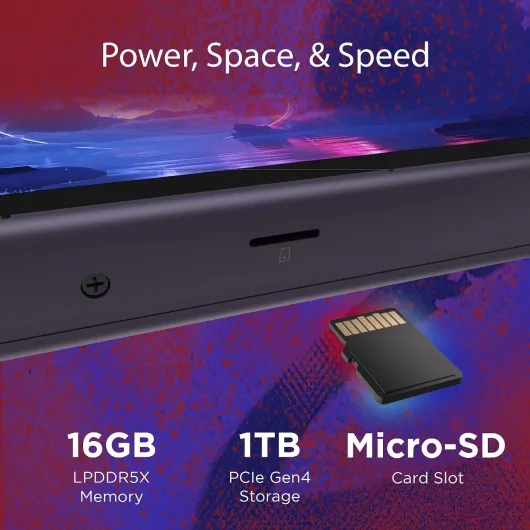
The version I used has 1TB of storage, which is honestly one of the main reasons I think this model is good value. Modern AAA games eat 80–120GB each, so 512GB feels cramped very fast. Here, I could have a mix of big titles, a chunk of indies, and some emulators without micromanaging space every week. The 16GB RAM is also fine for current games; I never hit a wall there in normal use.
In day-to-day use, the Legion Go S feels like someone took a modest gaming laptop spec, shrunk it, and slapped it behind an 8-inch screen with controller grips. It’s not the most powerful handheld out there, but for the price bracket it sits in, the combo of SteamOS, 1TB SSD and decent APU makes sense. Just don’t go in expecting desktop-ultra performance at 60+ FPS in every recent AAA; you’ll be living in the world of medium settings and frame caps to balance heat and battery.
Pros
- 8-inch 1920 x 1200 screen gives a nice big image for a handheld
- 16GB RAM and 1TB SSD provide plenty of space and smooth multitasking
- SteamOS integration makes it easy to access your Steam library and saves
- Good value for money compared to some Windows-based handhelds
Cons
- Battery life is mediocre, especially in demanding games
- Heavy and wide, which can tire your wrists in long handheld sessions
- Fan noise and average speakers make headphones almost mandatory
Conclusion
Editor's rating
The Lenovo Legion Go S is a solid handheld for PC gamers who mainly live in the Steam ecosystem and want a bigger screen and plenty of storage without going into crazy price territory. The 8-inch 1920 x 1200 display, 16GB RAM, and 1TB SSD make it practical for real-world use: you can install several big games, keep a bunch of indies and emulators, and not constantly juggle storage. Performance is good enough for most games as long as you accept medium settings and 30–40 FPS targets on newer titles, and SteamOS keeps things relatively clean and straightforward.
On the downside, the battery is clearly the weak point and the weight is noticeable. If your idea of a handheld is something you can use for 4–5 hours straight on a plane or train, this isn’t it. You’re looking at 1.5–3 hours depending on what you play and how hard you push it, and you’ll often end up near a charger or using a power bank. The fan noise and average built-in sound also push you towards using headphones. So, who is it for? People who mostly play at home on the couch or in bed, want a big screen, like the idea of SteamOS, and care a lot about storage and decent performance for the price. Who should skip it? Those who want all-day battery, ultra settings, or a very light device. For the money, though, it’s a pretty solid option with clear strengths and clear flaws.