Summary
Editor's rating
Is it worth the price, or are you better off elsewhere?
Compact layout, clean look, but very gamer RGB
Typing feel, noise, and day-to-day comfort
Build quality and keycaps: solid, but not luxury
Long-term feel and reliability concerns
Where it shines: FPS performance and responsiveness
What you actually get with the Huntsman V3 Pro Mini
Pros
- Rapid Trigger and adjustable actuation make movement in FPS games feel very responsive once tuned
- Compact 60% layout frees up a lot of mouse space and keeps the desk clean
- Doubleshot PBT keycaps and solid chassis give a sturdy, durable feel
Cons
- Heavily dependent on Razer Synapse and firmware, with some users reporting disconnects and profile issues
- Default sensitivity is very high, causing accidental keypresses until you spend time tweaking
- Clacky, slightly rattly sound and no included wrist rest make it less comfortable for long typing sessions

Specifications
View full product page →| Brand | Razer |
A tiny keyboard built for sweaty ranked games
I’ve been using the Razer Huntsman V3 Pro Mini 60% for a few weeks, mostly for Valorant, Apex and some general typing. I came from a normal TKL mechanical board with standard linear switches, so this was my first real dive into analog optical switches and all the fancy stuff like Rapid Trigger and Snap Tap. I didn’t buy it to stare at RGB; I just wanted faster movement and more desk space for my mouse.
Right away, the keyboard feels like it’s clearly built with competitive FPS in mind. Everything about it screams, “you’re here to hold angles and jiggle peek,” not “write a novel.” The layout, the features, even the way the software is set up is focused on actuation, reset points, and movement control. If you just want something to type emails on, this is probably overkill and a bit of a waste of money.
In daily use, it’s a mix of really strong performance and a few annoying quirks. When it works like it should, it’s fast, consistent, and honestly makes strafing and counter-strafing feel cleaner than on my old board. But you also have to be ready to spend some time tweaking actuation, profiles, and Synapse settings, especially if you’re not used to ultra-sensitive keys. Out of the box, it can feel way too twitchy.
So this review is from the angle of a regular gamer who grinds ranked a few nights a week, not a pro player or keyboard modder. I’ll go through what actually matters in practice: how it feels, how it behaves in matches, what’s annoying, and if it’s worth the price compared to something like a Wooting or a cheaper mechanical board. It’s not perfect, and I wouldn’t recommend it blindly to everyone, but it definitely has some strong points if you play a lot of FPS.
Is it worth the price, or are you better off elsewhere?
Let’s be blunt: the Huntsman V3 Pro Mini is not cheap. You’re paying a premium mainly for the analog optical switches, Rapid Trigger, Snap Tap, and the Razer name. If you’re just a casual gamer or you don’t play much competitive FPS, you’re probably overpaying. A decent standard mechanical keyboard at half the price will feel fine for most people and won’t require as much tweaking or software babysitting.
Where the price starts to make sense is if you’re deep into ranked FPS and you actually care about tiny movement details. Compared to a regular mechanical board, this does give you more control over actuation and reset, and that can translate into cleaner strafes and more responsive movement. Compared to something like Wooting (which also does analog stuff), this Razer feels a bit more locked into its own ecosystem and less flexible in terms of modding, but it’s easier to find in mainstream stores and often has discounts.
The downside for value is the software dependency and the potential issues people reported: random disconnects, profiles resetting, keys being too sensitive by default, and support that isn’t always helpful. If you get a flawless unit and you’re okay with Synapse, the value is decent for a high-end competitive board. If you hit any of those problems, the price suddenly feels steep, especially when a cheaper no-name keyboard can just plug in and work without drama.
So from a practical point of view: if you’re a competitive FPS player who wants analog optical, Rapid Trigger, and a small footprint, and you’re willing to tinker with settings, then the price is easier to justify. If you mostly play casually or you hate dealing with software quirks, your money is probably better spent on a simpler mechanical board or saving up for a Wooting if you want analog without as many Razer-specific headaches. It’s good, but not unbeatable for the price, and definitely not for everyone.
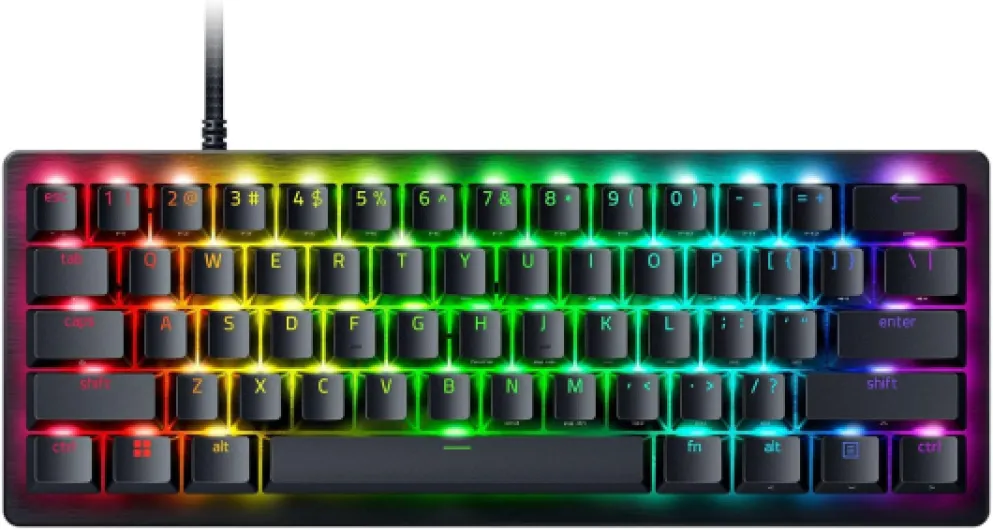
Compact layout, clean look, but very gamer RGB
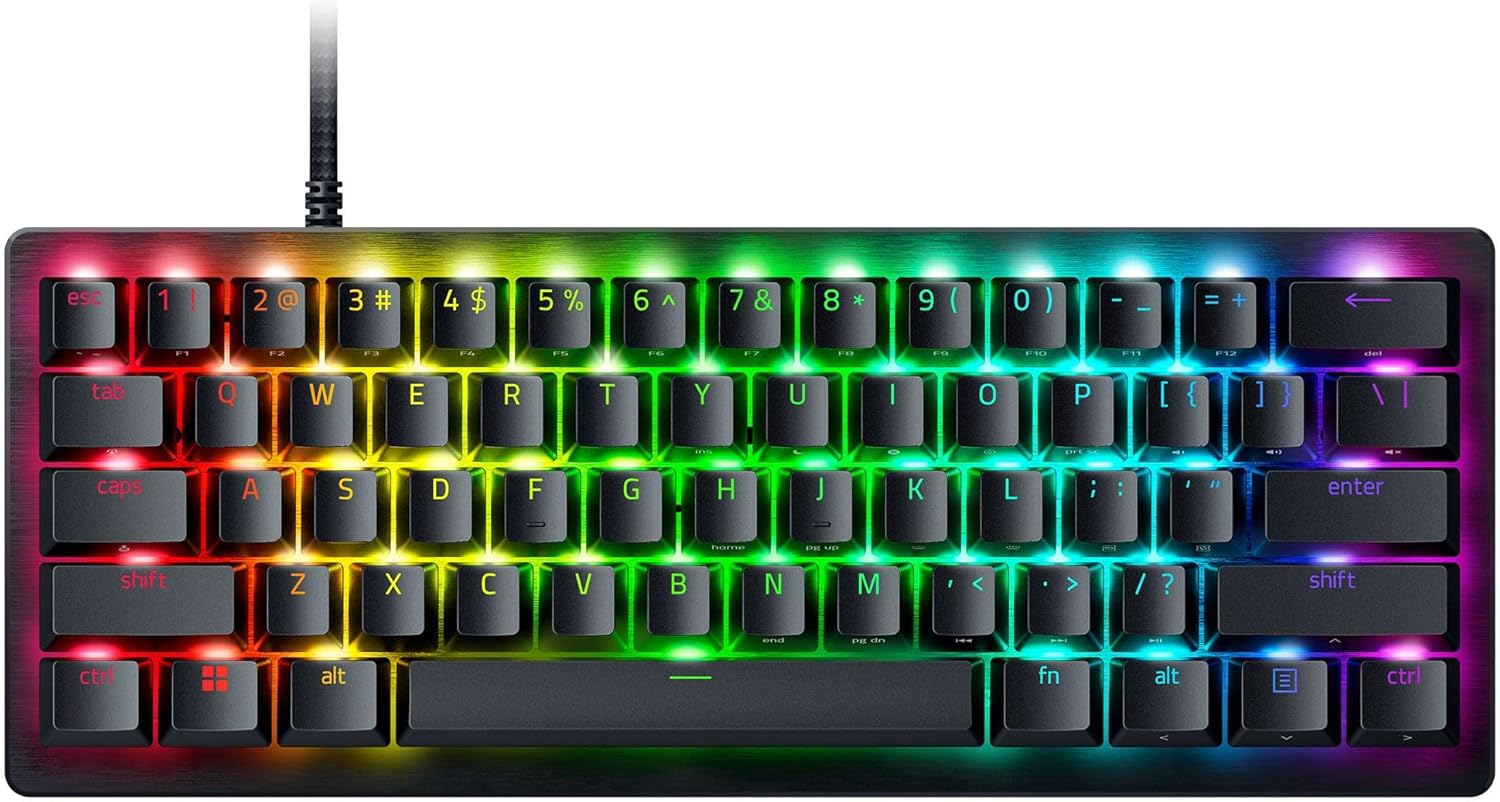
Design-wise, the Huntsman V3 Pro Mini is pretty straightforward: black case, black doubleshot PBT keycaps, RGB per key, and a small footprint that frees up a lot of mouse space. On my desk, it actually looks fairly clean and low-key when the RGB is set to a static color or turned off. If you crank the lighting effects, it turns into the usual rainbow gamer light show, which some people like and others will hate. At least you have full control through Synapse, and the LED strip at the top is also used as a status/adjustment indicator, not just decoration.
The 60% layout is both a win and a pain depending on what you do. For FPS, it’s great. My mouse has way more room, and I don’t hit the keyboard with my mousepad anymore. For anything that involves a lot of function keys, arrows, or Home/End, it’s a bit annoying at first. Razer tries to solve this with dual-function modifier keys for arrows and media, and after a few days I got used to it, but if you do a lot of work or editing on the same PC, you’ll notice the missing keys.
One thing I liked is the overall footprint and weight. It feels compact but not flimsy. There are flip-out feet with two height options, and the keyboard doesn’t slide around during intense matches. The cable is detachable USB-C, which is standard now but still nice to have for portability or if you want to use your own custom cable. The port is recessed enough to hold the cable firmly but not so deep that only the stock cable fits.
In terms of overall look, it’s clearly a gaming product, but it’s not covered in weird angles or aggressive branding. There’s a small Razer logo, RGB everywhere, and that’s about it. If you want something that looks like a plain office board, this isn’t it. But if you’re fine with a clean black board with customizable lighting, the design is pretty solid and does the job without being too flashy when you don’t want it to be.
Typing feel, noise, and day-to-day comfort
Comfort is where things are a bit mixed. On the one hand, the linear analog optical switches feel smooth and light. Once you dial in your actuation point, key presses feel effortless, and for gaming that’s great. In fast matches, I noticed less finger fatigue compared to heavier mechanical switches because I don’t have to bottom out nearly as much. Rapid Trigger also means smaller finger movements still register and reset, which is nice once you get used to it.
On the other hand, for typing, it’s not exactly pleasant out of the box. The sound profile is more on the clacky and slightly rattly side, especially on larger keys like spacebar, Enter, and Shift. It’s not insanely loud, but if you were hoping for a deep, muted sound, this isn’t it. One Amazon review mentioned the sound being a bit rattly, and I’d agree. It’s fine for a gaming room with a headset on, but in a quiet office or shared space, people will notice it. There’s also no included wrist rest, which matters more than you’d think on a small board.
Because it’s a 60% layout, your hands stay fairly close together, which I actually like for gaming. My mouse arm has more room, and my keyboard hand doesn’t move around much. For longer typing sessions, though, I did start to feel my wrists getting a bit tired, mainly because there’s no cushion and the board sits at a slightly higher angle if you use the feet. A soft wrist rest fixes this, but you have to buy it separately, which is annoying at this price.
Once you tune the actuation to something reasonable (I ended up around 1.5–2.0 mm for gaming and a bit higher for typing), the accidental presses calm down and comfort improves a lot. Out of the box, the default sensitivity is too low for me and caused a lot of accidental key touches, which feels stressful in-game. So comfort here isn’t just physical; it’s also about how sensitive the switches are. After tweaking, I’d say the comfort is good for gaming and just okay for long typing sessions.

Build quality and keycaps: solid, but not luxury
The materials are generally pretty solid for a gaming keyboard. The keycaps are doubleshot PBT, which is good news: they don’t feel greasy after a long session, the legends are sharp, and they should hold up well over time. Compared to the cheap ABS caps on many mid-range boards, these feel better and don’t shine as quickly. They aren’t the thickest PBT I’ve ever used, but for a stock set they’re decent and don’t feel cheap.
The case itself is mostly plastic with a metal top plate. It has a decent heft to it at around 1.7 pounds, so it doesn’t feel hollow or toy-like. There’s a bit of flex if you really twist it, but nothing that shows up in normal use. On the desk, it feels sturdy. I didn’t notice any creaks or weird noises when moving it around or pressing harder on the keys. The bottom has standard rubber pads that keep it in place even during aggressive WASD spamming.
The switches being analog optical obviously aren’t something you can easily swap out or mod like regular mechanical hot-swap boards. So if you’re into heavy modding, foam, lube, and all that, this isn’t the right product. It’s more of a closed system: you get Razer’s analog optical switches as they are, and you tune them through software and actuation adjustments, not by physically changing them. The rated lifespan is 100 million keystrokes, which is more marketing than something any of us will realistically test, but they do feel consistent so far.
Overall, the materials feel like what you’d expect from a high-end Razer keyboard: sturdy enough, no nonsense, but not boutique custom-level. You’re paying more for the tech and features than for premium case materials or fancy finishes. If you want a thick aluminum case and super thick PBT caps, you’re better off with a custom board. If you just want something that feels solid and durable for daily gaming, this does the job well enough.
Long-term feel and reliability concerns
In terms of pure build, the Huntsman V3 Pro Mini feels like it will last. The switches are rated for 100 million presses, the PBT keycaps shouldn’t shine quickly, and the case has enough heft that I’m not worried about it breaking from normal use. I tossed it in a backpack a couple of times (in its box) and it came out fine. No loose keys, no weird bending, nothing like that. So physically, it seems solid enough for heavy daily gaming.
The bigger durability question for me is software and firmware stability. A few Amazon reviews mentioned random disconnects, profile resets, and keys acting on their own because of super sensitive default settings. I didn’t get random disconnects personally, but I did notice that when I alt-tabbed out of a game, sometimes the keyboard seemed to jump back to a default profile for a second before returning to my custom one. In a couple of cases, my WASD felt off until I manually reselected the profile on the board. That kind of behavior doesn’t give a ton of confidence long term.
Also, because so much of the functionality is tied to Razer Synapse and firmware, you’re kind of locked into their ecosystem. If Synapse breaks after a Windows update, or if a firmware update introduces a bug, you’re at their mercy. One user mentioned tech support being difficult and the troubleshooting steps being overkill for a keyboard, and I get that feeling. It’s not like a simple mechanical board where you just plug it in and it works forever. Here, you’re dealing with layers of software logic.
So my view on durability is: hardware seems good, software is the weak link. If you’re okay with the idea that you might have to occasionally fight with drivers, profiles, or firmware, then it’s probably fine. If you want a “set it and forget it” keyboard that never needs software, this isn’t it. For now, mine has held up without physical issues, but I’m cautious about future updates and how long Razer will keep things stable for this specific model.
Where it shines: FPS performance and responsiveness
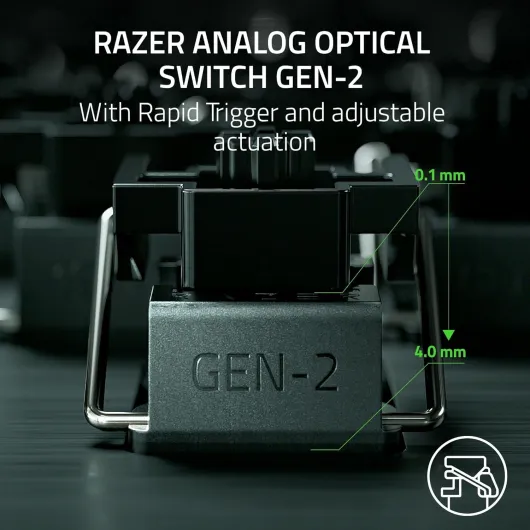
This is the part where the Huntsman V3 Pro Mini actually justifies its existence. In FPS games Rapid Trigger in practice means that small finger movements matter a lot. The downside is that if you keep the default actuation and reset points super low, you’ll probably get accidental movements or inputs just by resting your fingers. I had a couple of games where my character drifted or did tiny unwanted strafes until I raised the actuation a bit. Once tuned, though, it feels very consistent. You can also save different profiles per game, which is handy if you want ultra-light movement in one title and a bit more stability in another. Razer Snap Tap is more niche but can be useful. It basically prioritizes the most recent directional input between two keys, which can make directional changes feel snappier. It’s not something that instantly changes your gameplay, but if you’re the type of player who cares about tight peeks and clean direction swaps, it’s another small advantage. Some people might not even notice a huge difference, but the feature is there if you want to experiment. Outside of FPS, the performance benefits are less obvious. In MMOs, MOBAs, or general use, Rapid Trigger and analog actuation don’t really change your life. Typing speed is fine, but not mind-blowing. Latency feels low, as expected from a wired keyboard, and I didn’t run into input lag. Where the experience can dip is when Synapse bugs out or when profiles don’t behave like they should, which a few Amazon users complained about. I didn’t get random disconnects, but I did see some profile weirdness when tabbing between full-screen games and desktop, which I’ll talk about more in the value/downsides part.
What you actually get with the Huntsman V3 Pro Mini
The Huntsman V3 Pro Mini is a 60% wired gaming keyboard with Razer’s Gen-2 analog optical switches. In plain terms: no numpad, no F-row, no nav cluster, just the basics plus layers. It connects via a detachable USB-C cable, works only on PC officially, and relies heavily on Razer Synapse if you want to fully use Rapid Trigger, Snap Tap, and all the RGB and actuation tuning. There are also onboard adjustments using the LED strip and key combos, but realistically, most people will end up in Synapse at some point.
The key selling points Razer pushes are: adjustable actuation (0.1–4.0 mm), Rapid Trigger (keys reset as soon as you lift your finger a bit), and Razer Snap Tap (prioritizes the latest input between two keys, used for fast directional changes). All of this is clearly aimed at FPS players who care about tight strafing and movement. For casual gaming or normal office work, a lot of these features are kind of overkill, and you’re paying extra for tech you might not use.
Out of the box, you get the keyboard, a braided USB-C cable, a keycap puller, and some basic paperwork. No wrist rest, no extra keycaps, nothing fancy. The default layout uses dual-purpose modifier keys (like holding a mod key to get arrow keys), which is nice once you get used to it, but there’s a short learning curve. The board does have onboard memory, so you can save profiles and not rely entirely on the cloud, which is nice if you move between PCs.
Overall, the package is pretty straightforward: compact form factor, advanced switches, and a heavy focus on movement precision. It’s not a feature monster outside of that. No wireless, no hot-swap, no crazy extras. If you’re buying it, you’re mainly doing it for the analog optical switches, Rapid Trigger, and the 60% footprint. Everything else is pretty standard for a high-end gaming keyboard in 2024.
Pros
- Rapid Trigger and adjustable actuation make movement in FPS games feel very responsive once tuned
- Compact 60% layout frees up a lot of mouse space and keeps the desk clean
- Doubleshot PBT keycaps and solid chassis give a sturdy, durable feel
Cons
- Heavily dependent on Razer Synapse and firmware, with some users reporting disconnects and profile issues
- Default sensitivity is very high, causing accidental keypresses until you spend time tweaking
- Clacky, slightly rattly sound and no included wrist rest make it less comfortable for long typing sessions
Conclusion
Editor's rating
After spending a good amount of time with the Razer Huntsman V3 Pro Mini, my overall take is that it’s a strong niche keyboard rather than a universal recommendation. When you use it for what it’s built for—competitive FPS—it delivers. Rapid Trigger, adjustable actuation, and Snap Tap actually have a real impact on how movement feels, as long as you’re willing to spend time tuning your settings and profiles. The compact 60% size is also great if you want more mouse space and a cleaner desk.
Where it stumbles is around comfort for long typing sessions, sound profile, and software behavior. It’s a bit clacky and rattly out of the box, there’s no wrist rest, and the default sensitivity can be too high, causing accidental inputs until you tweak it. On top of that, relying on Razer Synapse and firmware for core functions means you’re exposed to random bugs, profile issues, and the quality of Razer’s support. Some users have had a smooth experience, others clearly haven’t, and that’s something to keep in mind before dropping this much money.
If you’re a serious FPS player who wants more control over movement and doesn’t mind tinkering with software and sensitivity settings, this keyboard can be a very solid tool. If you’re more casual, hate dealing with software, or want a board that just plugs in and behaves like a normal keyboard forever, I’d skip it and grab a simpler mechanical or look at Wooting if you want analog without going all-in on Razer’s ecosystem. It’s a good product in the right hands, but not the best choice for everyone.