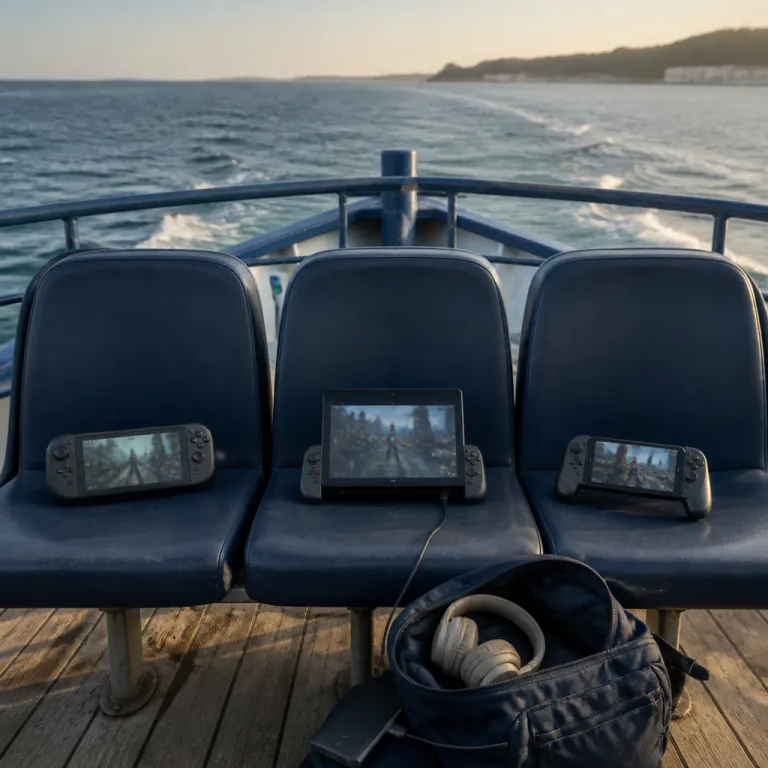
What cloud gaming really means when you are commuting
Cloud gaming on a handheld sounds like magic until the train moves. The promise is simple: your games run on powerful servers in the cloud while your handheld gaming device just streams video back and sends your inputs forward. In practice, every extra frame of latency, every Wi‑Fi dropout and every battery dip decides whether you will actually play or just stare at a loading screen.
On PlayStation Portal, you are not using true cloud gaming because the device only performs remote play from your home PlayStation console over the internet. Xbox Cloud Gaming, which many people still call Xbox Cloud, streams each Xbox game from Microsoft data centers and is bundled with the Game Pass Ultimate subscription for a predictable monthly price. Nvidia GeForce Now instead connects your handheld to a virtual PC in the cloud that runs your Steam, Epic or Ubisoft games, so the service feels closer to a remote high end gaming rig than to a console.
For a commuter, the key question is not which platform has the best handheld marketing pitch but which one survives a shaky 5G hotspot or crowded café Wi‑Fi. A modern cloud gaming setup for travel must balance screen quality, battery life and wireless performance, because the weakest link will always define the experience. When you pair a Steam Deck or another gaming handheld with these services, the operating system, Wi‑Fi chip and even LPDDR memory speed can subtly change how responsive each streamed game feels.
PS Portal, Steam Deck and ROG Ally as cloud companions
PlayStation Portal is purpose built for remote play, with a bright screen and DualSense controls, but it depends entirely on your home network quality. If your router sits behind thick walls or your PlayStation console uses Wi‑Fi instead of Ethernet, the Portal will show compression artifacts and input lag long before a tuned Steam Deck or Asus ROG Ally even flinches. That is why many handheld gaming commuters still prefer a flexible PC style device that can run both local games and cloud streaming apps.
Steam Deck and Steam Deck OLED run SteamOS, which is a Linux based operating system that now handles Nvidia GeForce Now and Xbox Cloud Gaming through browser or app workarounds. Once configured, the Deck family becomes a powerful portable cloud client, letting you jump between a local Steam game and an Xbox title streamed from the cloud in seconds. If you want a deeper breakdown of how Steam Deck compares with the Asus ROG Ally for commuting, the analysis in this portable commute comparison is particularly useful.
Asus ROG Ally and similar Windows based devices like MSI Claw or Lenovo Legion Go treat cloud gaming as just another Windows app, which makes installing Xbox Cloud Gaming, Nvidia GeForce Now and even PlayStation remote play straightforward. These gaming handheld devices usually ship with faster LPDDR memory and stronger CPUs than the Deck, so raw performance for local games is higher, but battery life can be shorter when the screen runs at high refresh rates. For a commuter, that trade off means you will often cap frame rates, dim the screen and lean more on cloud streaming to stretch the battery during a long day.
Internet reality check on trains, buses and cafés
Cloud gaming services advertise minimum bandwidth numbers, but commuters quickly learn that latency matters more than raw speed. For Xbox Cloud Gaming and Nvidia GeForce Now, you want at least 25 megabits per second down and a stable ping under about 40 milliseconds to keep fast action games playable. These figures broadly match the ranges Microsoft and Nvidia publish in their support documentation, though real world tests by outlets such as Digital Foundry and PC Gamer show that stability often matters more than hitting a specific headline speed.
Hotel Wi‑Fi and home fiber with a modern router are usually good enough for most portable streaming setups, especially when your device sits close to the access point. A 5G hotspot can also work well when you are stationary, but once the train starts crossing cells, packet loss spikes and your beautifully calibrated screen turns into a blocky mess. Crowded public Wi‑Fi in stations or coffee shops is the worst case scenario, because dozens of phones compete for the same bandwidth while your gaming handheld tries to maintain a clean video stream.
That is why many commuters still keep a Nintendo Switch or other best handheld consoles for purely local games alongside a cloud focused device. A Switch Lite, for example, remains a smart backup for offline play, and detailed tests such as this Switch Lite turquoise review show how reliable a simple cartridge based system can feel on the move. When the network fails, a local game on Switch, Steam Deck or Lenovo Legion hardware will always beat the fanciest Xbox Cloud or Logitech G Cloud session that keeps freezing.
Cost, battery life and long term value for commuters
Choosing between a cheap cloud first handheld and a powerful local gaming device comes down to how and where you play. A low price Android handheld paired with Xbox Cloud Gaming or Nvidia GeForce Now can feel attractive, because you offload performance to the cloud and only pay for the screen, controls and battery. Over time, though, subscription costs for Game Pass, GeForce Now and individual games will stack up, especially if you also buy titles on Steam or other stores.
High end devices like Asus ROG Ally, MSI Claw or Lenovo Legion Go cost more upfront, yet they give you full Windows or SteamOS flexibility for both local and cloud gaming. Their LPDDR memory, faster CPUs and better cooling deliver stronger performance in demanding games, so you can still play when the cloud connection fails, which is inevitable on some commutes. The trade off is that battery life on these gaming handheld systems can drop below two hours when you push the hardware, as shown in many third party battery benchmarks, forcing you to carry a power bank or lower the screen brightness.
Battery life is where simpler devices such as Logitech G Cloud handhelds or even Nintendo Switch models still shine for everyday handheld gaming. They sip power because they either stream compressed video or run less demanding games, so you can play for several hours without hunting for an outlet. When you plan a portable cloud gaming setup, think in terms of total life cost: hardware price, subscription fees, replacement batteries and even the time you will spend troubleshooting Wi‑Fi all belong in the real budget.
Which handheld pairs best with each cloud platform
Each cloud service has a natural handheld partner, and matching them well matters more than chasing raw performance numbers. PS Portal is the obvious choice for PlayStation remote play, but a Windows handheld like Asus ROG Ally or Lenovo Legion can also run the remote play app while adding Xbox Cloud Gaming and Nvidia GeForce Now on the same device. Steam Deck, especially with SteamOS updates and community tools such as Legion SteamOS forks, has become a surprisingly capable hub for cloud gaming, local Steam games and even retro titles.
For Xbox Cloud Gaming, a Windows based gaming handheld still offers the smoothest path, because the Xbox app, Game Pass library and every Xbox game integration are native. Microsoft has also signaled its long term cloud commitment through ongoing Xbox app updates and server upgrades that aim to reduce cloud gaming latency, which should help both Xbox Cloud and any future portable Xbox focused devices. When that ecosystem pairs with a handheld that has a strong Wi‑Fi 6E radio and efficient LPDDR memory, the whole chain from button press to on screen action tightens up.
Nvidia GeForce Now pairs beautifully with Steam Deck, Asus ROG Ally, MSI Claw and Lenovo Legion handhelds, because each can run the GeForce Now client while also hosting local PC games. If you care about retro gaming as well, a curated guide to classics such as the one on the best Sega Saturn games for serious retro players shows how cloud and local libraries can complement each other. In the end, the best handheld or best handhelds for a commuter will be the ones that let you play your games, on your schedule, without worrying whether the cloud will cooperate during that last ten minutes before your stop.
FAQ
Is cloud gaming actually playable on a moving train ?
Cloud gaming can work on a moving train, but only under specific conditions. You need a strong and stable 5G signal with low latency, which many routes still do not provide consistently. Independent tests from reviewers such as Digital Foundry and The Verge generally find that performance is acceptable on quieter routes but degrades quickly when coverage drops or the train passes through tunnels.
Which handheld is best for Xbox Cloud Gaming on the go ?
Windows based handhelds such as Asus ROG Ally, MSI Claw and Lenovo Legion Go currently offer the best experience for Xbox Cloud Gaming. They run the native Xbox app, integrate directly with Game Pass and support every Xbox game that the service streams. Android handhelds and Logitech G Cloud devices can also work, but they usually rely on browser or mobile app versions with more limitations.
How much internet speed do I need for smooth cloud gaming ?
Most services recommend at least 15 megabits per second, but commuters should aim for 25 megabits per second or more. Latency under about 40 milliseconds is just as important, especially for shooters and fighting games. These targets line up with the official guidance from Microsoft and Nvidia, but your own tests on your usual route will tell you more than any single number.
Does cloud gaming drain handheld battery faster than local play ?
Cloud gaming often uses less CPU and GPU power than running a demanding local game, but it keeps Wi‑Fi radios and video decoders active constantly. On devices like Steam Deck or Asus ROG Ally, that can still drain the battery in two to four hours, depending on brightness and refresh rate. Reviews from outlets such as PCMag and Eurogamer broadly confirm these runtimes, especially when you stream at higher resolutions.
Is it cheaper to buy a cloud focused handheld or a powerful local device ?
A cloud focused handheld usually has a lower upfront price, because it relies on remote servers for performance. Over several years, though, subscription fees for services like Game Pass Ultimate or Nvidia GeForce Now can exceed the cost difference to a more powerful device. If you commute daily and play a lot of games, a versatile handheld that supports both local and cloud play often delivers better long term value.