Summary
Editor's rating
Value: worth it if you really want original hardware
Design: comfy layout, dated screen
Battery life: boring but reliable AA power
Durability: tough little brick, but age shows
Performance: old hardware that still runs games smoothly
What you actually get with this old-school GBA
Pros
- Comfortable horizontal design with good D-pad and responsive buttons
- Runs GB, GBC, and GBA cartridges reliably with no setup or lag
- Long battery life on simple AA batteries and easy to keep running for years
Cons
- Non-backlit screen is very dark by modern standards and needs good lighting
- All units are used/refurbished, so condition varies and may require cleaning or repairs
- Not the best value if you mainly care about comfort and could accept emulation or a modded GBA instead

Specifications
View full product page →| Brand | Nintendo |
| ASIN | B00005B8G3 |
| Release date | June 21, 2001 |
| Customer Reviews | 4.4 4.4 out of 5 stars (843) 4.4 out of 5 stars |
| Best Sellers Rank | #31,602 in Video Games (See Top 100 in Video Games) #36 in Game Boy Advance Consoles |
| Product Dimensions | 6.5 x 5.5 x 2 inches; 2.12 ounces |
| Type of item | Console |
| Rated | Everyone |
A 20‑year‑old handheld I still actually play
I grabbed a used Game Boy Advance Indigo recently, mostly out of nostalgia, but I ended up actually using it more than I expected. This is the original AGB-001 model, not the SP, so no clamshell and no built-in frontlight. I knew that going in, but it still hit me how dark the screen feels compared to anything modern. If you remember playing this in the back of the car as a kid and twisting your body to catch the light, yeah, it’s exactly that experience again.
I tested it with a mix of old Game Boy, Game Boy Color and GBA carts over a couple of weeks. Stuff like Pokémon, Advance Wars, some random platformers. The good news: compatibility is great. I didn’t hit a single cart that wouldn’t boot. The thing just starts up, logo pops, and you’re in. No OS, no updates, no waiting. Coming from a Switch or a phone, it’s actually kind of nice to just slide in a game and play instantly.
On the flip side, you really feel its age in day-to-day use. The screen is small by today’s standards and with no light, you need either daylight or a bright lamp. Under good lighting, it’s totally playable and the colors still look decent for a 2001 device. Under bad lighting, it’s plain annoying; you’ll be tilting the console around a lot just to see what’s going on. If you’re used to an IPS phone screen, this will feel like a pretty big step back.
Overall, after a couple of weeks, my feeling is: it’s still fun and pretty solid if you specifically want original hardware and you understand what you’re getting. If you just want to replay old games in the most comfortable way, there are better options (emulation or a modded GBA with an IPS screen). But as a simple, no-frills handheld that runs cartridges reliably, it still gets the job done.
Value: worth it if you really want original hardware
On the value side, it depends a lot on what you’re actually looking for. If your goal is simply to play old Game Boy and GBA games in the easiest, most comfortable way, this is not the best option anymore. Emulators on a phone, PC, or a cheap modern handheld can give you a bright screen, save states, and a bunch of convenience features for less money and hassle. The original GBA, especially the non-backlit one, feels dated the second you compare it side by side with anything modern.
Where the Indigo GBA makes sense is if you care about authentic hardware. Cartridges, original feel, original controls. In that context, the price for a working used unit is not crazy, and the library you get access to is huge. Being able to pop in original GB and GBC carts in the same device is a nice plus. Also, if you’re willing to tinker a bit, this model is a good base for mods: new shell, IPS screen, different buttons. Several Amazon reviewers did exactly that and were happy with the results. So you can see it as a starting point rather than a finished product.
Compared to the SP model (which has a built-in light and a clamshell design), the original GBA is often a bit cheaper, but you pay for it in comfort. Personally, if someone just wants to replay a bunch of GBA games in bed or on the couch, I’d say: either get a GBA SP AGS-101 or a modded original with an IPS screen. The stock Indigo AGB-001 is more for people who are okay with the old-school experience and maybe plan to upgrade it later.
So in terms of value: decent but not outstanding. It’s not a rip-off if you know its limits and the price is fair for the condition, but it’s also not the smartest choice if all you care about is gameplay comfort. It makes the most sense for collectors, modders, or nostalgic players who want that exact feel of an early 2000s handheld, quirks and all.
Design: comfy layout, dated screen
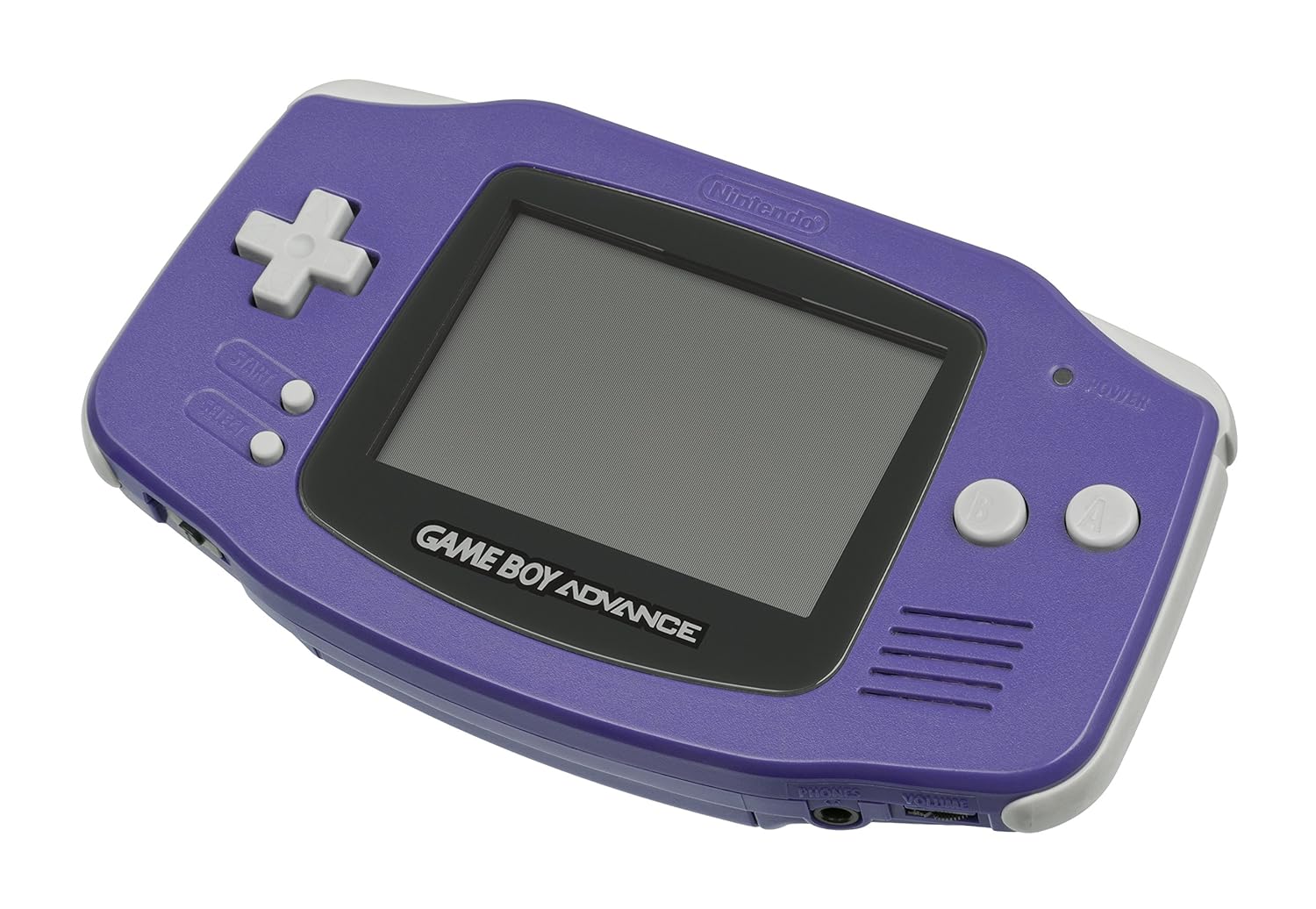
The design is honestly one of the reasons I still like using this thing. The horizontal layout with grips on each side feels more natural than the tall brick shape of the original Game Boy or Game Boy Color. The Indigo color is just a solid dark-ish purple/blue; it doesn’t scream for attention, but it looks fine on a desk and doesn’t feel toy-like in a bad way. It’s very obviously early-2000s Nintendo, in a good, slightly chunky way.
The button layout is simple: D-pad on the left, A/B on the right, Start/Select in the middle, and L/R on the shoulders. After a couple of sessions, I stopped thinking about the buttons completely, which is what you want. The D-pad is still one of the better ones out there: precise, not mushy, good for platformers and puzzle games. L and R are small but easy enough to hit; playing things like racing games or shooters where you need the shoulders feels natural, not cramped.
The weak point of the design is clearly the screen. Size-wise, it’s okay for GBA-era graphics, but the lack of backlight is rough in 2026. Under a bright desk lamp, the colors and sharpness are actually pretty decent; pixels are crisp, and the 2D art holds up well. But as soon as the lighting isn’t perfect, you’re squinting and angling the console. More than once I caught myself thinking, “why am I doing this when I could just emulate this on my phone with a bright screen?” That’s really the main design compromise you feel today.
One thing I do like: the console is light and compact. It fits easily in a jacket pocket or a small bag, and because it runs on AA batteries, you don’t stress about charging cables. Toss a spare pair of AAs in your bag and you’re covered. So overall: the physical ergonomics are still pretty solid, the button layout works well, but the screen design is clearly stuck in its time. If you grab this specifically to mod with an IPS screen, the base design is a good foundation. If you plan to use it stock, just be aware that the screen is the limiting factor.
Battery life: boring but reliable AA power
The power setup is very simple: the GBA takes two AA batteries. No built-in rechargeable pack, no USB charging, nothing fancy. I used standard alkaline AAs (Duracell and a random store brand) and tracked roughly how long they lasted. With medium volume and no backlight to worry about, I got something in the ballpark of 12–15 hours, which lines up with the official specs. For casual use (an hour or two here and there), that meant swapping batteries maybe once every couple of weeks.
This is one of those things that will either annoy you or you’ll see it as a plus. Compared to modern handhelds that you have to charge constantly, it’s actually kind of nice to not be tied to a charger. If the batteries die, you just drop in a new pair and you’re back in the game in 10 seconds. For travel, it’s pretty practical: grab a pack of AAs at any gas station or airport and you’re covered. On the downside, if you play a lot, you’ll go through batteries and produce more waste unless you invest in rechargeables.
I also tested it with NiMH rechargeable AAs. With those, the runtime was a bit shorter than with fresh alkalines, but still totally fine for a couple of long sessions. The console didn’t seem picky about battery type; it either turned on and ran normally or, once the voltage dropped, the screen would dim and it would shut off like you’d expect. No weird behavior. The low-battery behavior is pretty old-school: you’ll notice the screen start to fade or the sound get crackly before it dies completely.
So in practice: the battery situation is simple and dependable, but not modern. If you hate dealing with loose batteries, this will annoy you. If you like the idea of a device that can sit in a drawer for months and still fire up instantly as long as the AAs aren’t dead, you’ll probably be fine with it. Personally, with a couple of rechargeable AAs in rotation, I didn’t find it to be a big problem.
Durability: tough little brick, but age shows
Physically, the Game Boy Advance feels like a solid piece of plastic. It’s lightweight, but it doesn’t feel fragile. The shell has some flex if you really twist it, but normal use is no problem. Mine is a used unit that’s at least 20 years old, and structurally it’s still in good shape: no cracks, no loose seams, no rattling parts. I wouldn’t throw it against a wall, but it seems like it can handle being tossed into a backpack or dropped on a couch without drama.
Where the age shows is in the cosmetic wear. Most used units will have small scratches on the shell and especially on the clear plastic over the screen. On mine, the lens had some fine scratches that you only really notice when the light hits at certain angles. During gameplay, they’re not too distracting, but if you’re picky, they’ll bug you. The Amazon reviews match this: some people get almost spotless units, others get ones with obvious wear. That’s basically the used market gamble.
The buttons and D-pad on my unit still feel surprisingly good: clicky enough, no sticking, and no dead inputs. It lines up with what I’ve seen on older Nintendo handhelds in general; the rubber domes under the buttons hold up pretty well over time. The cartridge slot also feels sturdy: carts click in with a firm push and don’t wobble. I didn’t see any stripped screws or signs of someone butchering it with a cheap screwdriver, which is always a risk with old consoles.
Internally, these things are pretty simple, which is good for long-term use. If something does go wrong (screen, shell, buttons), there’s a whole modding scene with replacement parts, shells, and even upgraded screens. So even if you end up with a slightly beat-up unit, you can often refresh it instead of tossing it. In my case, stock condition was good enough to keep as-is, but if I keep using it, I might swap in a new lens or an IPS screen later. Overall, I’d say durability is pretty solid for the age, as long as you accept some cosmetic wear and tear.
Performance: old hardware that still runs games smoothly
For a 2001 handheld, the performance is actually fine for what it needs to do. I tried a mix of heavier GBA titles and older GB/GBC games, and everything ran smoothly with no slowdowns that felt like the console’s fault. The hardware was already tuned for these games, so as long as your cartridge is good, it just works. No frame drops, no weird stutters. Compared to emulation on a cheap handheld or phone, it’s nice not having to mess with settings or worry about input lag.
Where you feel the age is more in the visual capabilities than raw performance. The 32-bit graphics are clean but basic, and you can forget about any fancy visual effects beyond scaling, rotation, and transparency. For GBA-era sprite-based games (Pokémon, Advance Wars, Metroid Fusion, etc.), it’s perfectly fine and actually kind of charming. But if you’re coming from modern indie games that mimic retro style at higher resolutions, this will look rougher and more pixelated.
Audio performance is decent but basic. The small mono speaker on the front does the job: music and sound effects are clear enough, but there’s not much depth. At higher volume, it can sound a bit harsh. Plugging in headphones helps a lot; with a decent pair of wired earbuds, the chiptune-style music and soundtracks actually sound pretty good, and you notice more detail than through the speaker. There’s no fancy audio features here, just simple output that works.
In day-to-day use, the biggest “performance” issue is actually user-related: dirty contacts or old carts. A couple of my older cartridges needed a gentle clean before they would boot consistently. Once cleaned, the console loaded them every time. So as long as you keep your carts and the slot clean, the system is reliable. No crashes, no freezes during my testing. From a pure gameplay perspective, it’s still a stable and predictable little machine, which is more than I can say for some newer, buggy devices.
What you actually get with this old-school GBA
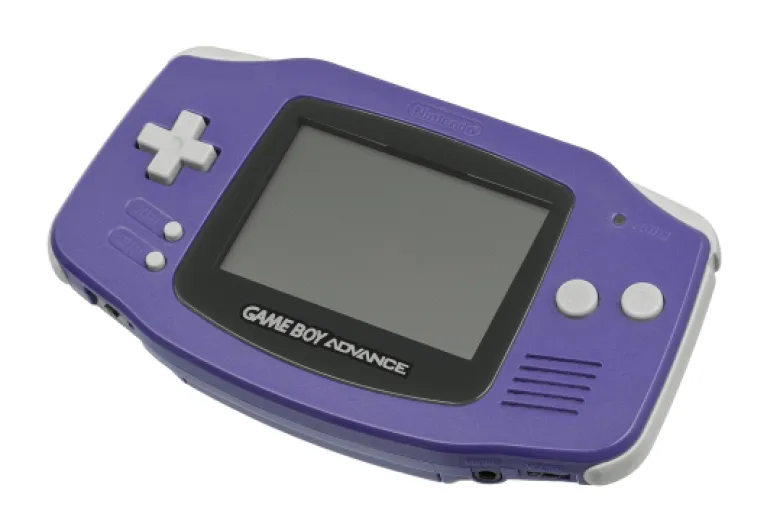
The Indigo Game Boy Advance is the first wide-format GBA: horizontal layout, screen in the center, controls on the sides. Mine came as a loose console only, no box, no charger (it uses AA batteries anyway), and in used condition. That seems to match what most people on Amazon are getting: some light wear, sometimes a missing battery cover, but usually working fine. Don’t expect a pristine collector’s piece unless you pay extra or pick a seller that clearly says “like new”.
From a pure spec point of view, it’s a 32-bit handheld with a bigger screen than the old Game Boy Color, better color depth, and two extra shoulder buttons (L and R). It takes standard AA batteries (most listings say 2, the product data mentions 3 which looks like a typo — mine and every GBA I’ve owned takes 2). Battery life is advertised around 15 hours, which lines up with my experience using decent alkaline batteries; I got roughly two long weekends of casual play before swapping them out.
One important detail: this model is discontinued. Everything you buy now is used or refurbished. That explains the wide range of reviews: some people get a perfectly clean unit, others complain about scratches, weird smells, or sticky residue. My unit was somewhere in the middle: a few small scratches on the shell, slightly cloudy screen lens but no deep gouges, and it worked straight out of the box. I still wiped it down and cleaned the cartridge slot with a bit of isopropyl just to be safe.
So in practice, what you get is a lightweight, simple console that feels like a “fire and forget” device. Slide in a cart, power on, play. No Wi‑Fi, no online store, no menus. For some people that’s dull, for others it’s exactly the point. If you’re okay with the random nature of used hardware and you just want to play GBA and older GB games on original hardware, the basic package is fine. If you’re picky about condition, you’ll need to hunt a bit or be ready to do some cleaning and maybe some shell/screen swaps.
Pros
- Comfortable horizontal design with good D-pad and responsive buttons
- Runs GB, GBC, and GBA cartridges reliably with no setup or lag
- Long battery life on simple AA batteries and easy to keep running for years
Cons
- Non-backlit screen is very dark by modern standards and needs good lighting
- All units are used/refurbished, so condition varies and may require cleaning or repairs
- Not the best value if you mainly care about comfort and could accept emulation or a modded GBA instead
Conclusion
Editor's rating
After using the Indigo Game Boy Advance for a couple of weeks, my take is pretty straightforward: it’s a fun, simple handheld if you specifically want original hardware and you accept the trade-offs. The controls still feel good, the console runs games smoothly, and the battery life on AA batteries is practical and predictable. For quick sessions with real cartridges, it does the job without any menus, updates, or nonsense. As a physical object, it’s light, fairly tough, and comfortable to hold for long stretches.
The downsides are just as clear. The non-backlit screen is the big one; in 2026, it feels very dated and can be annoying unless you’re in perfect lighting. Because the console is discontinued, condition is a lottery unless you pay close attention to the seller and are ready to clean or even refurbish it. And in terms of pure comfort and features, emulation or a modded GBA with an IPS screen simply beats the stock experience.
I’d say this model is for people who care about nostalgia, collecting, or modding. It’s also fine if you just want a cheap way to play original carts and you don’t mind the dark screen. If you just want to enjoy old games in the easiest, most comfortable way, look at a GBA SP, a modded unit, or emulation instead. As long as you know what you’re getting into, the Indigo GBA is still a pretty solid little handheld, just not magic.
![One 500 GB Console - Black [Discontinued]](https://www.gaming-console-guru.com/storage/675595/conversions/51fCaIO6JsL._SL1000_-medium.webp)