Summary
Editor's rating
Value for money: worth it depends a lot on what you already own
Design: same idea, finally feels less like a toy
Battery life: decent, but depends a lot on what you play
Comfort and everyday use: great screen, average ergonomics
Durability and build: better, but still not bulletproof
Performance: same old Switch, for better and worse
What you actually get with the Switch OLED
Pros
- OLED screen looks much better than the old LCD, especially in handheld
- Improved full-width kickstand makes tabletop mode actually usable
- Dock with wired LAN port gives more stable online and downloads
- Still fully compatible with existing Switch games and accessories
Cons
- No real performance improvement over older Switch models
- Joy-Con design and potential drift issues remain
- 64 GB internal storage is small if you buy a lot of digital games
- Price premium over the standard Switch can be hard to justify for mostly docked play

Specifications
View full product page →| Brand | Nintendo |
A quick reality check on the Switch OLED
I’ve been using the Nintendo Switch (OLED Model) Neon Blue/Neon Red for a few weeks now, after owning the original Switch since 2017. So this is not my first contact with the ecosystem. I bought it because my old Switch was getting noisy and the screen looked pretty dull next to my phone and my Steam Deck. I didn’t expect some magical upgrade, just a cleaner, nicer version of the same console.
Right away, the big difference is the screen. It’s still a 720p panel, but the OLED makes colours pop a lot more and the blacks are actually black, not that grey wash the old LCD had. In handheld mode it genuinely feels like a modern device instead of something from a decade ago. If you mainly play docked on a TV, though, the jump is way less impressive because the internals are basically the same.
I used it in all three modes: docked on a 55" TV, handheld on the sofa and in bed, and tabletop on a train table with a friend. Day to day, it’s still a Switch: same games, same menus, same little quirks. If you hated the original concept, this won’t suddenly convert you. But if you liked the idea and just wanted it to feel a bit more solid and less toy-like, this version does that pretty well.
It’s not perfect. The Joy-Con drift problem still worries me, the internal storage is still tight at 64 GB, and performance in some newer games is clearly showing the age of the hardware. But in terms of overall experience, especially in handheld, this is the nicest Switch version right now. The question is really whether that nicer experience is worth paying the extra cash over a standard model or a second-hand unit.
Value for money: worth it depends a lot on what you already own
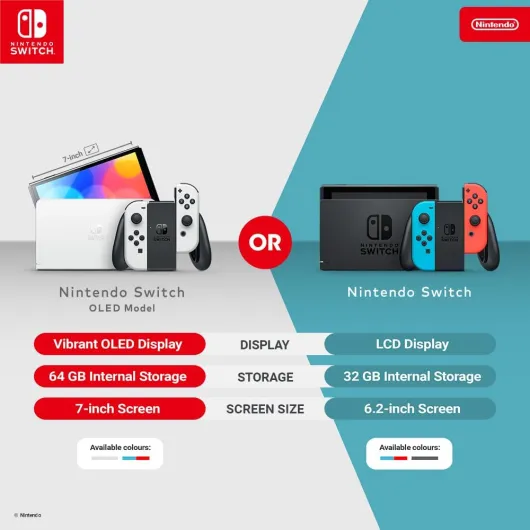
On the value side, the Switch OLED sits in a weird spot. It’s more expensive than the standard Switch but doesn’t bring any real performance boost. What you pay for is basically the better screen, the improved kickstand, a nicer dock with LAN, and double the internal storage (64 GB instead of 32 GB, which still isn’t huge). If you mostly play handheld and you don’t already own a Switch, I’d say the OLED is the one to get. The extra cost makes sense because this is just a nicer device to use every day.
If you already have the revised standard Switch (the one with better battery life compared to the original launch unit), the upgrade is harder to justify. You’re paying a fair chunk of money mainly for a prettier screen. If you play 80–90% docked on a TV, you won’t see much difference at all. In that case, the money might be better spent on games, a Pro Controller, or even a different console. For people like me who had the very first, more worn-out Switch and use handheld a lot, the jump felt more reasonable.
Compared to other options on the market, like a Steam Deck or a mobile plus controller setup, the Switch OLED is not the best raw power per euro. But it has Nintendo’s exclusive games, and that’s really what you’re paying for. If you want Zelda, Mario, Mario Kart, Animal Crossing, etc., this is the best version of the hardware to play them on, at least in portable form. If you don’t care about those, the value drops sharply, because third-party games often run better elsewhere.
So in simple terms: the Switch OLED offers good value if you care about handheld quality and Nintendo games, and you’re either buying your first Switch or replacing a very old one. As an upgrade from a recent standard model, it’s more of a luxury than a smart financial move. It’s not a rip-off, but it’s not some crazy bargain either. Pretty solid, but very dependent on your use case.

Design: same idea, finally feels less like a toy
Design-wise, the Switch OLED is still very much a Switch, just cleaned up. The bezels are thinner, so the front looks less dated, and the OLED panel fills more of the body. In the hand, it doesn’t feel much bigger than the original, but the extra screen size is noticeable right away. The neon blue/neon red Joy-Con are the classic colours; if you’ve seen a Switch ad in the last few years, that’s what this looks like. Personally, I still like the colour combo because you can instantly tell which side is which when you detach them.
The biggest design improvement is the kickstand. The old Switch had that flimsy little strip that snapped off if you looked at it wrong. This one has a full-width stand that runs across the back and is properly adjustable. You can set the angle quite precisely, which actually makes tabletop mode usable. I used it on a small coffee table and even on a wobbling train tray, and it stayed up without feeling like it would collapse if someone bumped the table.
The dock also got a small redesign. It’s still plastic, but it looks cleaner, with softer edges and a little door on the back that hides the cables. Inside, there’s now the LAN port, HDMI, and power. One thing I noticed: sliding the console in and out feels smoother than on my old dock. I always worried about scratching the screen on the first model; with this one, the fit feels a bit more forgiving, though I still use a screen protector just in case.
On the downside, Nintendo didn’t really fix the Joy-Con ergonomics. They’re okay for short sessions, but for longer play I still end up grabbing a Pro Controller. Also, the overall look is still quite plasticky. It doesn’t feel cheap, but if you’re coming from something like a Steam Deck or a premium tablet, you’ll notice the difference. In short, the design is more mature and more practical, but it’s still the same basic Switch idea with all its pros and cons.
Battery life: decent, but depends a lot on what you play
On paper, the Switch OLED has the same battery as the revised standard Switch model (the one that quietly replaced the original a few years ago). In practice, I’m getting roughly 3 to 6 hours of handheld use depending on the game and brightness. With something light like Stardew Valley or an old SNES game, I can push closer to 6 hours at medium brightness. With heavier stuff like Zelda: Tears of the Kingdom at higher brightness, I’m more in the 3–3.5 hour range.
Compared to my very first launch Switch, the battery life on this OLED feels a bit better and more consistent. I did a small test: one hour of handheld Zelda, brightness at about 60%, Wi‑Fi on, volume around 50%. The battery dropped roughly 30–35%, which lines up with that 3-hour estimate for more demanding titles. For quick sessions on the sofa or in bed, that’s fine. For a long train ride or flight, you either lower brightness and volume or you bring a power bank.
The USB-C charging is straightforward, and you can charge it with the official adapter or a decent phone/laptop charger that supports the right power. I often plug it into a regular USB-C charger next to my bed and it tops up fast enough. Going from around 20% to full took me a bit under 2 hours using the original adapter. It’s not blazing fast, but it’s okay. The console also charges in the dock, obviously, so if you mostly play on TV you rarely think about battery at all.
For me, the battery is good but not impressive. It gets the job done for a hybrid console, but if you’re used to some handhelds that last all day on indie games, you’ll notice the difference. The OLED screen doesn’t seem to kill the battery any more than the old LCD did in real use, which is nice. Just don’t expect to binge a big open-world game for 7 hours straight without plugging in, because that’s not happening.
Comfort and everyday use: great screen, average ergonomics
In terms of comfort, it’s a mix. The console itself is light enough and well balanced, so handheld gaming is pretty pleasant for short to medium sessions. The OLED screen is honestly the main comfort upgrade: it’s easier on the eyes, especially in darker games, and you don’t have to crank the brightness as high to see details, which helps during longer sessions. Playing in bed with the lights off feels nicer on this than on the old Switch because the blacks aren’t glowing grey.
The weak point is still the Joy-Con shape. They’re small and quite flat, and if you have bigger hands, you’ll probably feel some discomfort after an hour or two. My thumbs in particular get a bit cramped when playing games that need constant use of both sticks, like shooters or fast action titles. For more relaxed games (turn-based RPGs, puzzle games, platformers), it’s fine. I quickly switched to a Pro Controller for docked play and even sometimes for tabletop mode because it’s just more comfortable.
Tabletop mode itself is much improved thanks to the new kickstand. You can finally set the angle properly, so you’re not hunched over trying to see the screen. I used it on a kitchen table for Mario Kart with a friend and it worked well. The main limitation is the small screen size when you’re sharing it; it’s playable but not ideal for long sessions. Still, for quick multiplayer when you’re travelling or don’t have a TV handy, it’s actually useful now, where before I almost never used it.
Noise and heat are fine. The fan is there, but in handheld I rarely noticed it unless the room was totally quiet and I was playing something heavier. The console gets warm but not uncomfortable to hold. Overall, I’d say the Switch OLED is comfortable enough, but if you care a lot about ergonomics, budget for a better controller or a grip accessory. The screen comfort is a clear step up; the hand comfort is basically the same story as older models.
Durability and build: better, but still not bulletproof
Build quality on the Switch OLED is better than the launch model, but it still feels like a careful-use device, not something you can casually throw around. The body feels a bit more solid, there’s less creaking when you twist it slightly, and the new kickstand is miles ahead of the old flimsy one. I’ve opened and closed the stand a lot over the past weeks and it still feels tight, with no wobble. That part at least gives me confidence it’ll hold up over time.
The screen is the part you really need to protect. It’s still plastic on top, not glass, so it can scratch more easily. I slapped a screen protector on day one because I remember all the horror stories from the first Switch run. Sliding it in and out of the dock feels smoother, but I still wouldn’t trust it without a protector if you’re docking it daily. So far, after a few weeks of use and being thrown into a backpack a couple of times, I haven’t seen any marks, but I’m also not treating it like a rugged device.
The Joy-Con remain the main durability question. Nintendo hasn’t officially said they’re completely fixed, and based on my own older units, drift tends to show up after months, not weeks. On this OLED set, everything is still perfect, but that’s expected this early on. The rails connecting the Joy-Con to the console feel firm, with less wiggle than my old model (which had been used a lot). But if Joy-Con drift is a huge concern for you, nothing in this model really changes that risk, you’re just rolling the dice again.
Ports and buttons feel decent. The volume and power buttons are clicky enough, the game card slot cover doesn’t flap around, and the dock connections seem sturdy. I wouldn’t call this fragile, but it’s not as tough as some dedicated handhelds with chunkier builds. Treat it like a nice piece of electronics: use a case, use a screen protector, and don’t sit on it in your bag. Do that and it should last several years without major issues, at least based on how my original Switch held up.
Performance: same old Switch, for better and worse
In terms of raw performance, nothing has really changed. This is important to understand before buying. I tried a mix of games: Mario Kart 8 Deluxe, Zelda: Breath of the Wild, Tears of the Kingdom, Hades, and a couple of indie platformers. They all ran basically the same as on my launch Switch. No shorter loading times that I could notice, no higher frame rates, no magic “performance mode”. So if you’re hoping this will fix choppy moments in some newer titles, it won’t.
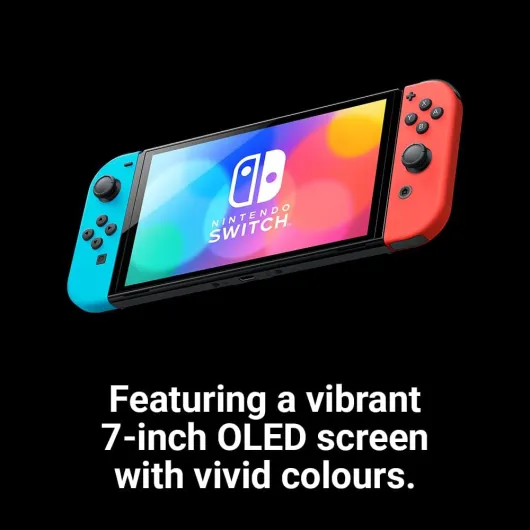
What does change the feel a bit is the screen quality. Because the OLED has much better contrast and colours, games look sharper and more vivid, even though the resolution is identical. In handheld mode, this actually helps hide some of the limitations of the hardware. Breath of the Wild, for example, just looks nicer on this screen, and the slightly deeper blacks make the world feel less washed out. It’s a visual upgrade, not a technical one, but it still improves the experience, especially if you mostly play portable.
Docked performance is exactly what you already know from the regular Switch. On a 4K TV, you’re still looking at 1080p max (and often less, depending on the game), and frame rates are the same. Compared to a PS5, Xbox Series X, or a decent gaming PC, the Switch OLED feels old, no surprise there. But Nintendo’s first-party games are still well optimised for what the hardware can do. Mario Kart stays smooth, and most platformers and indie games run just fine.
Where performance does feel dated is with some third-party ports and heavier games. You can see resolution drops, and sometimes you get stutter in busy scenes. This isn’t new to the OLED model; it’s just the reality of the Switch hardware in 2024. So overall: performance is good enough for Nintendo-style games and indies, but if you want high frame rates and crisp graphics, this console will feel behind. The OLED model doesn’t change that, it just makes the same performance look better in handheld.
What you actually get with the Switch OLED
Out of the box, you get the console, the dock, two Joy-Con (one neon blue, one neon red), the Joy-Con grip, two wrist straps, the power adapter and an HDMI cable. So it’s the full standard Switch setup, nothing fancy added, nothing removed. I didn’t have to buy any extra cable or adapter to get started. Plugged the dock into the TV and router, slotted the console in, and it just worked. Setup took maybe 15–20 minutes including system updates and logging into my Nintendo account.
The main new things compared to the original Switch are: the 7-inch OLED screen (up from 6.2"), the better kickstand, the dock with a wired LAN port, and 64 GB of internal storage instead of 32 GB. The Joy-Con are basically the same as before, same shape, same feel, same potential drift issue. Performance-wise, it’s the same hardware generation, so don’t expect faster loading or higher frame rates. All your old accessories and games work fine; I moved my microSD card over and everything showed up right away.
In everyday use, the wired LAN port is the thing I ended up appreciating more than I expected. Downloading big games like Zelda or Smash updates is just less of a pain when it isn’t fighting with Wi‑Fi. It’s not blazing fast compared to a PS5 or Xbox, but it’s more stable than Wi‑Fi on the old dock. If you only play offline or mostly in handheld, that part will matter less to you, though.
Overall, the presentation is pretty straightforward: it’s a slightly more premium Switch, not a new generation. Nintendo didn’t try to oversell it with weird extra features, which I actually like. You buy this for a better screen and a nicer physical design, not for new gameplay options. If you go in with that mindset, you’re less likely to be disappointed by what’s basically an iteration, not a revolution.
Pros
- OLED screen looks much better than the old LCD, especially in handheld
- Improved full-width kickstand makes tabletop mode actually usable
- Dock with wired LAN port gives more stable online and downloads
- Still fully compatible with existing Switch games and accessories
Cons
- No real performance improvement over older Switch models
- Joy-Con design and potential drift issues remain
- 64 GB internal storage is small if you buy a lot of digital games
- Price premium over the standard Switch can be hard to justify for mostly docked play
Conclusion
Editor's rating
The Nintendo Switch (OLED Model) Neon Blue/Neon Red is basically the best version of the Switch idea, without changing what the Switch actually is. The OLED screen, better kickstand, slightly sturdier feel, and wired LAN in the dock all make the day-to-day experience nicer, especially if you play a lot in handheld or tabletop mode. Games don’t run faster, but they do look better on the new display, and that alone makes older titles feel a bit fresher.
Who is it for? If you’re new to the Switch and plan to use it often on the go, this is the model I’d buy. If you own a worn-out launch Switch and mainly play portable, the upgrade is also pretty easy to justify. If you mostly play docked or you already have the newer standard Switch with better battery, the OLED feels more like a nice-to-have than a smart upgrade. Performance is unchanged, Joy-Con drift is still a potential issue, and 64 GB storage fills up fast if you buy a lot of digital games.
Overall, I’d rate it as a strong, but not mind-blowing, upgrade. It gets the job done very well for Nintendo fans and handheld players, but it doesn’t magically fix the aging hardware. Just be clear on why you’re buying it: for the screen and the convenience, not for raw power.