![Nintendo DS Lite Console with Charger - Powder Blue (Renewed) [video game]](https://www.gaming-console-guru.com/storage/661976/conversions/21TGDzedmfL-medium.webp)

![Nintendo DS Lite Polar White (Renewed) [video game]](https://www.gaming-console-guru.com/storage/661978/conversions/51B22y4LVUL._SL1500_-medium.webp)
![Nintendo DSi - Matte Black (Renewed) [video game]](https://www.gaming-console-guru.com/storage/661981/conversions/51nMwvVekAL._SL1000_-medium.webp)
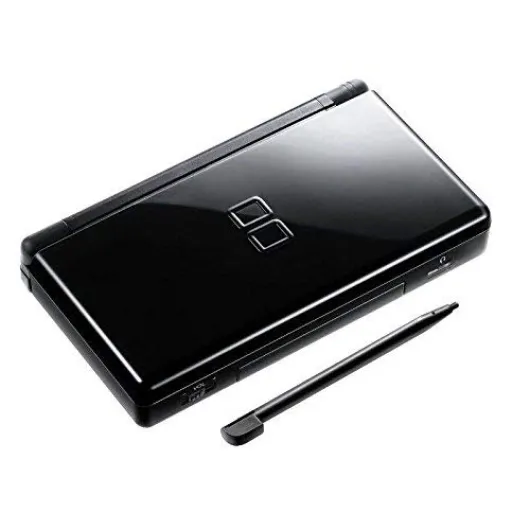
Understanding the basics of Nintendo DS modifications
What Makes Nintendo DS Modding Appealing?
The Nintendo DS, often called the NDS, stands out for its dual screen design, touch screen capabilities, and backward compatibility with Game Boy Advance (GBA) games. Many gamers find the DS and DS Lite models to be the ultimate portable gaming devices, thanks to their wide game library and strong community support. With so many options for personalization, it’s no surprise that mods for the NDS have become a popular way to enhance both the look and performance of the console.
Types of Modifications: Cosmetic, Hardware, and Software
Before diving into creative mods, it’s important to understand the three main categories:
- Cosmetic mods change the appearance of your NDS. These include custom shells, buttons, screen protectors, and carrying cases. Many users enjoy swapping out their DS Lite shells for unique colors or designs.
- Hardware mods focus on improving performance or adding features. Upgrades can include brighter screens, better battery power, or even a new cartridge connector for more reliable game card reading.
- Software mods involve changing the firmware or installing homebrew apps. This opens up possibilities like running homebrew games, using game save backups, or playing GBA ROMs through slot-2 expansion cards.
Why Mod Your Nintendo DS?
Personalizing your NDS isn’t just about looks. Many mods offer practical benefits, such as improved screen clarity, better game compatibility, and access to a wider range of games—including homebrew titles and classic Game Boy Advance releases. Reviews from the gaming community often highlight how mods can breathe new life into older consoles, making them great for both collectors and everyday gamers.
Staying Safe and Informed
It’s essential to use trusted tools and resources when modifying your Nintendo DS. The right guides can help you avoid damaging your device or voiding your warranty. Always check the price and reviews of mod kits, and be sure to back up your game saves before making changes. For those interested in exploring unique DS games, check out this deep dive into Mario & Luigi: Bowser’s Inside Story on DS for inspiration on what your modded console can offer.

Popular cosmetic modifications for Nintendo DS
Customizing the Look of Your Nintendo DS
Personalizing your Nintendo DS can make your handheld stand out and reflect your gaming style. Cosmetic modifications are among the most popular ways to give your nds, nds lite, or nintendo lite a fresh look. These mods don’t affect the core gaming performance, but they can make your device feel unique every time you pick it up for a game session.- Replacement Shells: Swapping out the original shell for a new color or themed design is a classic way to personalize. Many gamers find shells inspired by classic game boy, gba, or even modern game themes. Reviews often highlight the durability and fit of different brands, so check those before you buy.
- Button and Screen Mods: Upgrading to colored or glow-in-the-dark buttons, or adding a glass screen lens for better clarity, can enhance both the look and feel. Some mods nds enthusiasts also replace the touch screen for improved sensitivity.
- Decals and Skins: Applying vinyl decals or skins is a simple, non-permanent way to change the appearance. These are available for both the dual screen and the back, with designs ranging from retro gameboy advance graphics to modern art.
- LED Mods: Adding LED lights to the power button or around the cartridge connector is a great way to make your nds stand out, especially in low light. These mods require some soldering skills, so beginners should proceed with caution.
- Carrying Cases and Accessories: While not a direct modification, stylish carrying cases and custom styluses are a practical way to add personality and protect your device. Many cases are designed to hold extra gba rom cards, nds game cartridges, and even game save backups.
Considerations Before Modding
Before you start, it’s important to check the price and availability of parts. Some mods may void your warranty or affect the resale value. Always read reviews and guides to find the best quality products and avoid damaging your nintendo ds or nds lite. If you’re interested in how cosmetic mods fit into the broader world of handheld gaming, you might enjoy exploring the unique experience of the Vita Caligula Effect on gaming consoles for inspiration on how visual changes can impact your ultimate gaming experience.Popular Cosmetic Mods Table
| Mod Type | Purpose | Skill Level |
|---|---|---|
| Replacement Shell | Change color/design | Intermediate |
| Button/Screen Upgrade | Improve feel/clarity | Beginner to Intermediate |
| Decals/Skins | Non-permanent style | Beginner |
| LED Lighting | Visual effect | Advanced |
| Carrying Cases | Protection/style | Beginner |
Cosmetic mods are a fun entry point into the world of nds homebrew, games homebrew, and more advanced modifications. Whether you want your device to match your favorite game or just stand out in a crowd, there are plenty of options to explore. Always prioritize safety and check for compatibility with your model, whether it’s the original nintendo ds, nds lite, or gba slot variant.
Enhancing performance with hardware mods
Boosting Your Nintendo DS for Ultimate Gaming
Enhancing the performance of your Nintendo DS goes beyond just cosmetic tweaks. Many enthusiasts look for ways to get more power, better screen quality, and improved compatibility with their favorite games, including Game Boy Advance (GBA) and homebrew titles. Here’s what you need to know before diving into hardware mods for your DS, DS Lite, or even the classic Game Boy Advance slot models.
- Upgrading the Screen: Swapping out your original screen for a brighter or higher-quality touch screen can make a huge difference, especially for dual screen gaming and homebrew apps. Some mods nds fans recommend involve using parts from the Nintendo Lite or even third-party screens, but reviews suggest checking compatibility with your firmware and cartridge connector first.
- Battery and Power Mods: If you find your DS or DS Lite running out of juice too quickly, consider replacing the battery with a higher-capacity one. This is a great way to extend play sessions, whether you’re enjoying classic GBA rom games or the latest nds homebrew releases. Carrying cases with built-in power banks are also available for those who want extra convenience.
- Slot and Card Upgrades: Many users want to play a wider range of games, including game backups and homebrew games. Upgrading the slot or using a more advanced flash card can help, but always check the price and reviews to avoid damaging your nds game save data or violating privacy policy agreements. Some mods even allow for better game save management and faster loading times.
- Audio and Button Mods: For those who want the ultimate gaming experience, replacing the speakers or upgrading the buttons can make a big difference. This is especially true for fans of rhythm games or those who want their DS to feel more like a classic Game Boy or Game Boy Advance.
Before you start any hardware modification, make sure you have the right tools and understand the risks. Some mods can void your warranty or cause permanent damage if not done correctly. For a deep dive into safe modding practices and to find the best resources, check out the next section. And if you’re interested in expanding your gaming library, you might also want to learn how to play rare games on other consoles as well.
Exploring software modifications and homebrew
Unlocking New Possibilities with Homebrew and Software Mods
For many Nintendo DS enthusiasts, exploring software modifications opens up a world of creative opportunities. Homebrew apps and games allow you to go beyond the standard library, offering unique experiences and utilities that can enhance your gaming sessions. Whether you own a classic DS, DS Lite, or even a DSi, the process of installing homebrew can be both rewarding and challenging.
- Homebrew Games and Apps: Homebrew refers to unofficial software created by independent developers. You can find a wide range of homebrew games, emulators for classic systems like Game Boy Advance, and useful apps such as media players or drawing tools. These can be loaded onto your device using a compatible flash card or cartridge connector.
- Firmware and Compatibility: To run homebrew, your DS may need custom firmware or a specific loader. It’s important to check reviews and guides to ensure compatibility with your model, especially if you have a DS Lite or are interested in using GBA slot features.
- Game Backups and Game Saves: Some mods allow you to back up your own games and manage game saves more flexibly. This is particularly useful for those who want to protect their progress or transfer saves between devices. Always respect copyright laws and use backups only for games you own.
- Expanding Your Library: With homebrew, you can play fan-made games, try out mods for existing titles, or even run GBA ROMs if your DS supports it. This can breathe new life into your handheld, especially if you’re looking for the ultimate gaming experience beyond the official Nintendo catalog.
What You Need to Get Started
To safely explore software mods, you’ll need a few essentials:
- A reliable flash card (like an R4 or similar) that fits your DS or DS Lite’s cartridge slot
- Access to trusted homebrew repositories and forums for downloads and reviews
- Knowledge of your DS firmware version to ensure compatibility
- Optional: carrying cases to keep your device and cards organized
Remember, not all homebrew is created equal. Always read reviews and community feedback before installing anything. Some mods can affect your DS’s performance or even brick your device if not used properly. If you encounter issues, troubleshooting tips and resources are widely available in the community to help you restore your system or skip content that causes problems.
By taking the right precautions and staying informed, you can enjoy a great variety of homebrew games, apps, and mods on your Nintendo DS, making your handheld truly unique and powerful for gaming on the go.
Tools and resources for safe modifications
Essential Tools for Safe Nintendo DS Modding
Before diving into any mods nds project, gathering the right tools and resources is crucial for both safety and success. Whether you want to upgrade your Nintendo DS Lite screen, install a new cartridge connector, or explore homebrew games, having the proper equipment will make the process smoother and help avoid damage to your device.
- Precision Screwdrivers: A set of small Phillips and tri-wing screwdrivers is needed to open the DS, DS Lite, or even Game Boy Advance models without stripping screws.
- Plastic Pry Tools: These help you safely separate the dual screen housing without scratching the plastic or damaging the touch screen.
- Anti-Static Wrist Strap: Prevents static electricity from harming sensitive components, especially when upgrading the power system or replacing the screen.
- Soldering Kit: For advanced hardware mods, like adding a backlit screen to a Game Boy Advance or fixing a faulty card slot, a fine-tip soldering iron and quality solder are essential.
- Flash Cartridges: Devices like R4 or similar allow you to run nds homebrew apps, games homebrew, and even manage game save files or game backups. Always check reviews and price before purchasing, as quality varies.
- Firmware Updaters: Some mods require updating the DS firmware. Use trusted sources to avoid bricking your device.
- Carrying Cases: After modding, a sturdy case protects your ultimate gaming setup and any new cosmetic mods from scratches or drops.
Reliable Resources for Modding Guidance
Finding trustworthy information is just as important as having the right tools. The Nintendo modding community is vast, and there are many guides, forums, and video reviews to help you through each step. Look for resources that focus on your specific model, whether it’s the original DS, DS Lite, or Game Boy Advance. Community forums often provide detailed walkthroughs for installing new screens, slot upgrades, or running gba rom files on your nds game system.
- Official Documentation: Always start with the official Nintendo manuals for your model to understand the hardware layout and avoid damaging key components.
- Community Forums: Sites dedicated to nds homebrew and mods nds are great for troubleshooting and finding up-to-date guides on the latest homebrew apps and games.
- Video Tutorials: Watching step-by-step videos can clarify tricky parts, like connecting a new cartridge connector or adjusting the touch screen sensitivity.
- Product Reviews: Before buying any modding tool or flash card, check user reviews for compatibility and reliability, especially for DS Lite and Gameboy Advance accessories.
Safety and Legal Considerations
When modifying your Nintendo DS or DS Lite, always respect privacy policy guidelines and avoid sharing personal data. Be cautious with firmware updates and only use homebrew apps and gba rom files from reputable sources. Modding can void your warranty, so weigh the benefits against potential risks. For those interested in game backups or running homebrew games, ensure your actions comply with local laws and Nintendo’s terms of service.
Common challenges and troubleshooting tips
Frequent Issues When Modding Your Nintendo DS
- Screen and Touch Screen Problems: After installing new shells or replacing the dual screen, you might notice unresponsive touch controls or display glitches. This can be caused by misaligned connectors or dust trapped during reassembly. Always double-check the screen and cartridge connector alignment before closing the case.
- Cartridge and Slot Errors: If your NDS or NDS Lite stops reading game cards or GBA cartridges, the slot or connector may be loose or dirty. Carefully clean the connectors with isopropyl alcohol and ensure all parts click into place. Avoid forcing the card into the slot to prevent permanent damage.
- Firmware and Software Glitches: Installing custom firmware or homebrew apps can sometimes brick your device or cause it to freeze. To reduce risks, only use trusted sources for firmware and homebrew games. Always back up your game save files and review user reviews before updating or flashing new software.
- Power and Battery Issues: After hardware mods, some users report the Nintendo DS won’t power on or the battery drains quickly. Double-check all internal connections and make sure the battery is properly seated. If you’re using mods that require more power, consider upgrading to a higher-capacity battery compatible with your model.
- Game Backups and GBA ROM Compatibility: Not all backup solutions or flash cards support every game or gba rom. Check compatibility lists and community forums before purchasing. Some homebrew games and apps may require specific firmware versions or patches to run smoothly.
Tips for Safe and Effective Modding
- Work in a clean, static-free environment to avoid damaging sensitive components.
- Use the right tools, such as precision screwdrivers and plastic prying tools, to prevent scratches or cracks.
- Keep track of all screws and small parts in a carrying case or organizer.
- Read multiple reviews and guides before attempting new mods nds or homebrew installations.
- Test your Nintendo DS after each step, especially when working with the screen, slot, or power components.
Where to Find Help and Resources
- Online forums and communities focused on Nintendo, nds homebrew, and gameboy advance mods are great places to find troubleshooting advice.
- Official documentation and privacy policy pages from trusted sites can clarify legal questions about game backups and homebrew apps.
- Video tutorials and written guides often cover common challenges and offer step-by-step solutions for both cosmetic and hardware mods.
Remember, patience and careful research will help you achieve the ultimate gaming experience with your Nintendo DS, whether you’re enhancing performance, customizing the look, or exploring new games homebrew. If you run into persistent problems, don’t hesitate to seek help from experienced modders or professional repair services to protect your investment and enjoy great games on your nds lite or Nintendo Lite.
![Nintendo DSi - Matte Black (Renewed) [video game]](https://www.gaming-console-guru.com/storage/661981/51nMwvVekAL._SL1000_.jpg)