
Understanding og xbox modding
What is Modding and Why Do It?
Modding the original Xbox console means making changes to its hardware or software to unlock new features, improve performance, or expand its capabilities. Many enthusiasts start with the goal of playing more xbox games, using games emulators, or upgrading the hard drive for more storage. The process can involve both physical modifications, like installing a modchip or connecting a usb adapter, and software tweaks, such as softmodding the system to run custom dashboards like XBMC Xbox.
What Can You Achieve with Xbox Modding?
- Play backup copies of your original Xbox games or import titles.
- Upgrade the hard drive (HDD) to a larger or faster SATA hard drive using an IDE SATA adapter.
- Install games emulators to play classic titles from other consoles.
- Connect modern devices with HDMI mods or use USB peripherals with the right adapter.
- Replace or repair the DVD drive if it fails, ensuring your console will work for years to come.
- Customize the look and feel of your dashboard and access advanced features not available on stock systems.
How Does Modding Work?
At its core, modding involves bypassing or enhancing the Xbox's original security and hardware limitations. This can be done through softmodding, which uses software exploits, or by installing a mod chip directly onto the board with a wire or cable. Some mods require opening the console and connecting to the dvd rom or cpu gpu components, while others can be done using a memory card or xbox controller to transfer files.
Before diving in, it's important to understand the risks and benefits. Modding can void warranties and may have legal implications depending on how you use your mod original Xbox. For more on the current state of Xbox gaming and compatibility, check out this guide on is Dark and Darker available on Xbox.

Essential tools and hardware needed
Gathering the Right Gear for Your Xbox Modding Journey
Before you start modding your original Xbox, it's important to have the right tools and hardware. The process involves working with the console's internal components, so being prepared will make things smoother and safer. Here’s what you’ll need to get started:
- Original Xbox Console: Make sure you have the classic Xbox, not the Xbox 360 or newer models. The original hardware is essential for most modding methods.
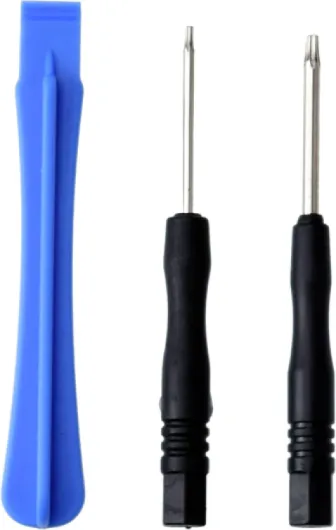
- Phillips Screwdriver: You'll need this to open the Xbox case and access the internal parts like the hard drive and DVD drive.
- Torx Screwdrivers (T10 and T20): These are required for the special screws used inside the Xbox. Without them, you can't safely remove the motherboard or drives.
- USB Adapter: A USB-to-Xbox controller adapter or a memory card with a USB mod will help transfer files from your PC to the console. This is crucial for softmodding and loading custom software.
- Compatible Flash Drive: Not all USB drives will work with the Xbox original. Look for older, smaller capacity drives (usually under 4GB) for best compatibility.
- Blank DVD or CD: For some modding methods, you may need to burn software to a disc that the Xbox DVD drive can read.
- IDE to SATA Adapter (Optional): If you plan to upgrade the hard drive to a modern SATA HDD, you’ll need an IDE to SATA adapter and a compatible SATA hard drive. This allows for more storage and better performance.
- Xbox Controller: Essential for navigating menus and inputting commands during the modding process.
- Network Cable: A standard Ethernet cable can connect your Xbox to your PC for file transfers, especially useful if you’re installing games emulators or XBMC Xbox software.
- Modchip or Softmod Kit (Optional): If you’re considering a hardware mod, a mod chip and soldering tools may be required. However, many beginners start with softmodding, which doesn’t need a modchip or wire work.
Some users also upgrade their Xbox with an HDMI adapter for better video quality, but this is optional and not required for basic modding. If your DVD ROM or hard drive is failing, consider sourcing replacements, as a working DVD drive and HDD are essential for most mods and for playing Xbox games.
Be sure to read up on which games and upgrades are compatible with the original Xbox before you begin. This will help you avoid compatibility issues with your chosen mods, especially when dealing with custom hard drives or games emulators.
With these tools and hardware, you’ll be ready to dive into the world of Xbox modding, unlocking new features and capabilities for your console.
Popular modding methods explained
Comparing Softmodding and Hardmodding Approaches
When it comes to xbox modding, there are two main methods: softmodding and hardmodding. Both approaches unlock new features on your original xbox, but they differ in complexity, risk, and the tools required. Understanding these differences will help you choose the right path for your console upgrade journey.
- Softmodding uses software exploits to bypass the xbox's security. This method does not require opening the console or soldering any wires to the board. Instead, you use a memory card, a compatible xbox game, and sometimes a usb adapter to load custom software. Softmodding is generally safer and easier for beginners, and it allows you to install apps like XBMC Xbox, run games emulators, and play backup xbox games from your hard drive.
- Hardmodding involves physically modifying the xbox hardware. This usually means installing a modchip onto the motherboard or using a special adapter to connect a new sata hard drive. Hardmodding can be more powerful, letting you bypass the dvd drive entirely, upgrade the cpu gpu, or even add hdmi output. However, it requires soldering skills, the right cable, and a steady hand. Mistakes can damage your console.
Other Modding Techniques and Upgrades
Beyond the main methods, there are additional ways to enhance your xbox original experience:
- TSOP Flashing: This is a hybrid approach where you reprogram the onboard bios chip. It offers some benefits of a mod chip without extra hardware, but it still involves opening the console and soldering a wire or two.
- DVD Drive Replacement: If your dvd rom fails, you can swap it for another compatible drive. Some modders use adapters to connect modern drives, but compatibility is key for the drive xbox will work with.
- Hard Drive Upgrades: Using an ide sata adapter, you can replace the original hdd with a larger sata hard drive, giving you more space for xbox games, emulators, and media. This is popular for those who want to run a custom dashboard or store their game collection on the console.
Choosing the Right Method for Your Needs
Deciding between softmodding and hardmodding depends on your comfort level, the features you want, and the tools you have. Softmodding is ideal for most beginners and covers the basics of xbox modding, while hardmodding and board upgrades offer advanced capabilities for those willing to take on more risk. For a deeper dive into how modding methods compare across different consoles and games, check out this guide to ROM hacks and modding methods.
Step-by-step guide to softmodding
Preparing Your Console for Softmodding
Before you start, make sure your original Xbox console is in working condition. Check that the DVD drive opens and reads discs, and that your Xbox controller is responsive. You’ll need a compatible memory card or USB adapter to transfer files, and a supported game (like 007: Agent Under Fire, MechAssault, or Splinter Cell) for the exploit. A USB flash drive and a USB-to-Xbox adapter cable are also essential for moving files between your PC and the console.
Transferring the Exploit Files
- Format your USB drive to FATX using a tool like FATXplorer or similar software.
- Download the softmod installer package and the game save exploit for your chosen game.
- Copy these files onto your USB drive, then connect the drive to your Xbox using the USB adapter.
- Use the Xbox dashboard to copy the exploit save files from the USB drive to the Xbox hard drive via the memory card menu.
Launching the Softmod Installer
Insert the original game disc into the DVD drive. Load the game and access the exploit by selecting the modified save file from the in-game menu. This will launch the softmod installer dashboard, which guides you through the process. Follow the on-screen instructions carefully. The installer will back up your EEPROM and original dashboard, which is crucial for recovery if anything goes wrong.
Completing the Softmod and Unlocking Features
- Choose your preferred dashboard (like UnleashX or EvolutionX) during installation.
- The installer will patch your Xbox’s hard drive, enabling new features such as running homebrew apps, emulators for classic games, and media centers like XBMC Xbox.
- After installation, remove the game disc and reboot your console. You should see the new custom dashboard.
Troubleshooting and Tips
- If the installer fails to load, double-check your USB adapter and cable connections.
- Always keep a backup of your EEPROM and original dashboard files on your PC or another safe location.
- For larger storage, consider upgrading to a SATA hard drive using an IDE to SATA adapter, but ensure compatibility with your Xbox board and power supply.
Softmodding does not require a mod chip or soldering wires to the motherboard, making it accessible for beginners. However, always read guides carefully and understand the risks before proceeding. With the right preparation, your Xbox original will work with new features, custom dashboards, and support for a wider range of games and emulators.
Unlocking new features and capabilities
Discovering What Your Modded Xbox Can Do
Once you have successfully modded your original Xbox, a whole new world of features and capabilities becomes available. The console, once limited by its factory settings, can now be customized to suit your gaming and entertainment needs. Here’s what you can unlock:
- Play Games from the Hard Drive: With a larger hard drive (HDD) or a SATA hard drive upgrade using an IDE SATA adapter, you can store and play your favorite Xbox games directly from the drive. This reduces load times and wear on the DVD drive.
- Run Homebrew Applications: Install custom dashboards and apps like XBMC Xbox (Xbox Media Center) to turn your console into a media hub. Stream music, watch videos, and manage files with ease.
- Use Emulators: Play classic games from other systems by installing games emulators. The original Xbox’s CPU and GPU are powerful enough to emulate many retro consoles, expanding your game library far beyond Xbox original titles.
- Access Custom Skins and Themes: Personalize your dashboard and menus with custom skins, giving your console a unique look and feel.
- Connect Modern Accessories: With the right USB adapter or cable, you can use USB storage devices, keyboards, and even some modern controllers. This makes transferring files or managing your game collection much easier.
- Backup and Restore Games: Safeguard your game collection by backing up your discs to the hard drive. This is especially useful if your DVD ROM or DVD drive is aging or unreliable.
- Network and FTP Access: Connect your modded Xbox to your home network. Transfer files, install new apps, or update your setup using FTP clients on your PC.
Hardware Upgrades and Compatibility
Modding also allows you to upgrade hardware components. For example, swapping the original hard drive for a larger one, or using a SATA hard drive with an IDE SATA adapter, can dramatically increase storage. Some enthusiasts even install modchips or custom boards to unlock advanced features or improve compatibility with different DVD drives and memory cards.
Expanding Your Gaming Experience
With these new capabilities, your modded Xbox becomes much more than a simple game console. It can serve as a retro gaming station, a media center, or a platform for experimenting with custom software. Whether you want to play rare games, stream content, or just enjoy the convenience of a modernized setup, modding the Xbox original opens up a range of possibilities that will work for many types of users.
Legal and ethical considerations
Understanding the Legal Landscape of Xbox Modding
When considering xbox modding, it's crucial to understand the legal and ethical boundaries. Modifying your original xbox console can unlock new features, allow for custom dashboards like XBMC Xbox, and enable the use of games emulators. However, not all modding activities are treated equally under the law.
- Copyright and Intellectual Property: Installing a mod chip or using software to bypass the original xbox security can violate copyright laws, especially if it enables the playing of pirated xbox games or unauthorized copies.
- Game Backups: While backing up games you legally own for personal use is a gray area in some regions, distributing or downloading xbox games without proper licensing is illegal in most countries.
- Online Play Risks: Modded consoles, whether using a custom hard drive, sata hard drive, or upgraded dvd drive, may be banned from online services. Microsoft has strict policies against modified hardware and software.
Ethical Considerations and Community Standards
Beyond legal risks, ethical considerations play a role in xbox modding. The community often values sharing knowledge about how to upgrade your xbox original with a new hdd, ide sata adapter, or usb adapter, but discourages piracy and cheating in games. Using a modchip or custom board to enhance your console's capabilities, such as adding hdmi output or supporting a usb cable for modern accessories, is generally accepted if it respects the rights of game developers and publishers.
- Respect for Developers: Supporting original game creators by purchasing legitimate copies helps sustain the industry.
- Responsible Sharing: Sharing guides on how to mod original xbox consoles, upgrade the cpu gpu, or replace the dvd rom drive is encouraged, but distributing copyrighted material is not.
What to Know Before You Mod
Before you start with xbox modding, read up on your local laws regarding console modification. Some regions allow hardware upgrades like a new hard drive or memory card, while others restrict any tampering with the xbox controller board or dvd drive xbox. Always use reputable sources and avoid any mod that could damage your console or violate terms of service.
Remember, while modding can breathe new life into your xbox original, it comes with responsibilities. Make sure your upgrades, whether it's a sata hard drive, usb adapter, or custom mod chip, will work within the boundaries of the law and community standards.